
.svg)



.webp)


%201.avif)
A Shopify website redesign represents one of the most significant investments an ecommerce brand can make in its digital future. Whether your store is struggling with poor conversion rates, outdated design, or technical limitations, a strategic redesign addresses fundamental issues that incremental changes cannot fix. The difference between a successful redesign and a costly mistake often lies in understanding when to rebuild, what to preserve, and how to execute the transition without damaging your existing performance. For UK brands operating in an increasingly competitive ecommerce landscape, getting this decision right in 2026 means balancing modern design trends with proven conversion principles whilst protecting the organic traffic and customer trust you've already built.
When Your Shopify Store Actually Needs a Redesign
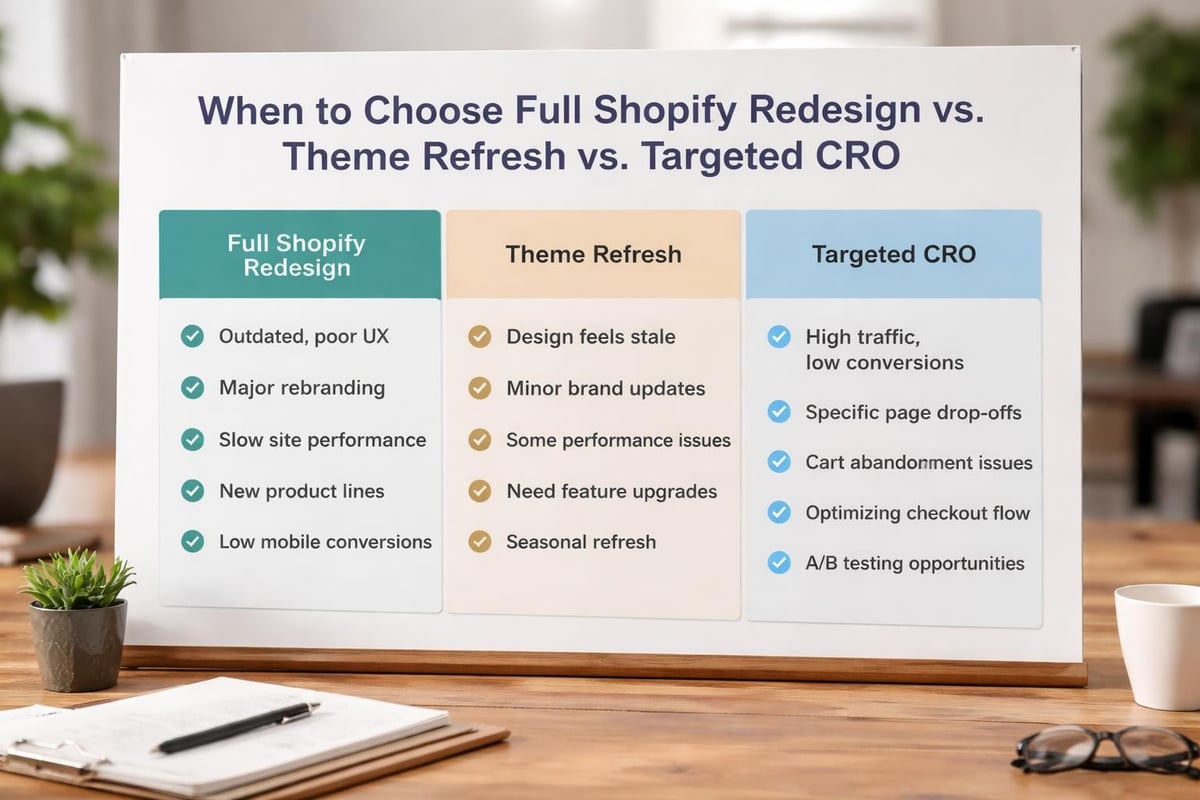
Not every performance problem requires a complete shopify website redesign. Many store owners rush into expensive rebuilds when targeted optimisation would deliver better returns. Understanding the difference matters for both your budget and your timeline.
Signs that indicate a full redesign is necessary:
- Your site architecture doesn't support your current product catalogue
- Mobile experience is fundamentally broken, not just poorly optimised
- Core conversion rate sits below 1.5% despite traffic quality improvements
- Theme is built on outdated Shopify code (Liquid 1.0 or older)
- Brand positioning has changed significantly since launch
- Navigation structure confuses customers across multiple user tests
A theme refresh or conversion rate optimisation sprint might suffice if your problems are cosmetic or confined to specific pages. True redesigns become necessary when structural issues affect the entire customer journey.
The Real Cost of Delaying a Necessary Redesign
Postponing a shopify website redesign when your store genuinely needs one creates compounding problems. Poor user experience doesn't just frustrate visitors today - it trains them to shop elsewhere tomorrow. Search engines increasingly factor user engagement metrics into rankings, meaning a clunky site gradually loses organic visibility even if your technical SEO remains sound.
Consider the opportunity cost. If your conversion rate is 1.2% when industry benchmarks suggest 2.5% is achievable with proper UX, you're leaving substantial revenue unclaimed every month. A store generating 10,000 monthly visitors at £75 average order value loses approximately £9,750 monthly by underperforming on conversion alone.
Pre-Redesign Planning: Setting Your Project Up for Success
The preparation phase determines whether your shopify website redesign delivers meaningful results or becomes an expensive disappointment. Rushing into design without understanding your data represents the most common critical mistake.
Start with comprehensive analytics review covering at minimum the past 12 months. Identify your highest-performing traffic sources, best-converting landing pages, and most valuable customer segments. Document which product categories drive revenue versus which generate traffic, as this distinction shapes your information architecture.
Pre-Redesign Audit AreaKey Metrics to CaptureWhy It MattersTraffic SourcesOrganic, paid, direct, referral breakdownProtects valuable channels during transitionConversion PathsTop entry pages, typical journey lengthInforms new site structure and navigationProduct PerformanceRevenue per product, view-to-purchase ratePrioritises which products get premium placementTechnical HealthPage speed, Core Web Vitals, mobile usabilityEstablishes baseline for improvement measurement
Competitive Research That Actually Informs Design
Studying competitor stores provides valuable insights when approached strategically. Rather than copying visual elements, analyse how successful brands in your sector structure their collection pages, present product information, and guide customers toward purchase decisions.
Document specific patterns:
- How many clicks to reach a product from homepage?
- What trust signals appear above the fold on product pages?
- How is filtering and sorting presented on collection pages?
- What customer service options are immediately visible?
- How does the mobile menu structure differ from desktop?
These functional observations translate into concrete design requirements far more effectively than aesthetic inspiration boards.
Design Phase: Building for Conversion, Not Just Beauty
Modern shopify website redesign projects must balance visual appeal with commercial performance. Beautiful designs that don't convert represent wasted investment, whilst highly functional stores that lack brand personality struggle to build customer loyalty.
The most successful Shopify stores in 2026 prioritise clarity over cleverness. Navigation should feel intuitive, not innovative. Customers visit ecommerce stores to buy products efficiently, not to figure out creative interface patterns.
Essential design principles for conversion-focused Shopify stores:
- Visual hierarchy guides attention - Most important elements (product images, add to cart, key benefits) dominate the layout
- White space prevents overwhelm - Generous spacing between elements reduces cognitive load
- Typography ensures readability - Body text at minimum 16px, clear colour contrast, limited font families
- Mobile-first approach - Over 70% of Shopify traffic comes from mobile devices in 2026
Homepage Strategy Beyond Generic Templates
Your homepage serves as brand ambassador and traffic director simultaneously. Generic Shopify themes often fail because they treat homepages as simple product showcases rather than strategic conversion tools.
Structure your homepage to accommodate different visitor types. New customers need brand context and trust signals before they'll browse products. Returning visitors want quick access to new arrivals or their preferred categories. These groups have conflicting needs that thoughtful design must balance.

Consider implementing a modular homepage approach where sections can be tested and optimised independently. A promotional banner, hero section, featured collections, social proof, and value proposition block can be rearranged based on performance data without requiring design overhauls.
Development Phase: Technical Execution That Supports Growth
Once design is approved, development quality separates sustainable stores from future headaches. A shopify website redesign built on proper Shopify development practices scales as your business grows, whilst rushed implementations require expensive refactoring within months.
Custom Shopify development should follow current best practices including theme architecture using sections and blocks, proper use of Shopify's JSON templates, and performance-optimised code that minimises external dependencies. Avoid heavy page builders that generate bloated code or limit future flexibility.
Performance optimisation starts during development, not after launch. Image optimisation, lazy loading implementation, critical CSS extraction, and JavaScript minification should be built into your development workflow. Core Web Vitals have become ranking factors, making speed non-negotiable for organic visibility.
Custom Functionality Without Technical Debt
Most successful stores need some custom functionality beyond standard Shopify features. The temptation to bolt on multiple apps to achieve required functionality often creates performance problems and maintenance nightmares.
Evaluate whether custom development or app integration better serves each requirement:
Requirement TypeCustom DevelopmentApp SolutionUnique product builderRecommendedAvoidStandard size guidesOptionalRecommendedCustom checkout fields (Plus)RecommendedOptionalEmail marketing automationAvoidRecommendedAdvanced product filteringRecommended for complex needsRecommended for standard needs
When apps are necessary, prioritise those built on Shopify's latest APIs and actively maintained by reputable developers. Abandoned apps represent future security risks and compatibility problems.
Protecting SEO During Your Shopify Redesign
Search traffic represents the most valuable channel for most ecommerce stores - it costs nothing per click and typically converts better than paid traffic. Losing organic rankings during a redesign can take months or years to recover, making SEO protection absolutely critical.
Begin with comprehensive URL documentation. Export every URL currently indexed by Google using Search Console data combined with your sitemap. These URLs must either be preserved exactly in the new site or redirected properly using 301 redirects to their new equivalents.
SEO preservation checklist for redesigns:
- Document all current URLs and their target keywords
- Map old URLs to new URLs in a redirect spreadsheet
- Preserve or improve title tags and meta descriptions
- Maintain or enhance content depth on key landing pages
- Keep successful URL structures where possible
- Implement 301 redirects for any changed URLs
- Submit new sitemap to Search Console post-launch
- Monitor Search Console for crawl errors and fix immediately
Content Migration Strategy
Your existing content likely includes product descriptions, blog posts, collection descriptions, and page copy that currently ranks. Simply copying this content into new templates often breaks formatting, loses internal linking, or diminishes keyword optimisation.
Treat content migration as an opportunity for enhancement. Update outdated information, expand thin content, improve keyword targeting, and strengthen internal linking whilst preserving the core elements that currently drive rankings.
For product descriptions specifically, this presents an ideal moment to implement structured data markup if you haven't already. Rich snippets improve click-through rates from search results, indirectly supporting your rankings through improved engagement metrics.
Launch Strategy: Minimising Risk and Downtime
Even perfectly planned Shopify website redesigns carry inherent launch risks. The transition from old store to new represents a critical moment where technical issues, broken functionality, or poor execution can damage both revenue and reputation.
Staging environment testing must be thorough and systematic. Test every customer journey, every form submission, every checkout path, and every third-party integration. Have team members unfamiliar with the project attempt to complete purchases - they'll spot usability issues that the project team has become blind to through familiarity.
Pre-Launch Testing Protocol
Create a structured testing checklist covering functional, visual, and performance aspects across devices and browsers. Shopify stores must perform flawlessly on iOS and Android devices using Safari, Chrome, and Samsung Internet browsers at minimum.
Critical pre-launch tests:
- Complete purchase flows for every payment method
- Account creation and login functionality
- Password reset and customer account pages
- Product filtering and search functionality
- Cart persistence and discount code application
- Mobile navigation and touch target sizing
- Page load speed across connection types
- Email notifications triggered correctly
- Integration with marketing and analytics platforms
Consider a soft launch approach where the new site goes live to a percentage of traffic first. This allows you to identify issues with real customer behaviour before full deployment. Most problems that slip through staging tests emerge through actual customer interactions.
Post-Launch Optimisation: The Redesign Never Really Ends
A successful shopify website redesign continues evolving after launch day. Initial design decisions should be validated with real customer data, then refined based on actual performance rather than assumptions.
Implement comprehensive tracking before launch so you can measure impact accurately. Beyond Google Analytics, consider tools like Hotjar or Microsoft Clarity for qualitative insights into how customers actually interact with your new design. Session recordings often reveal friction points that analytics data alone misses.
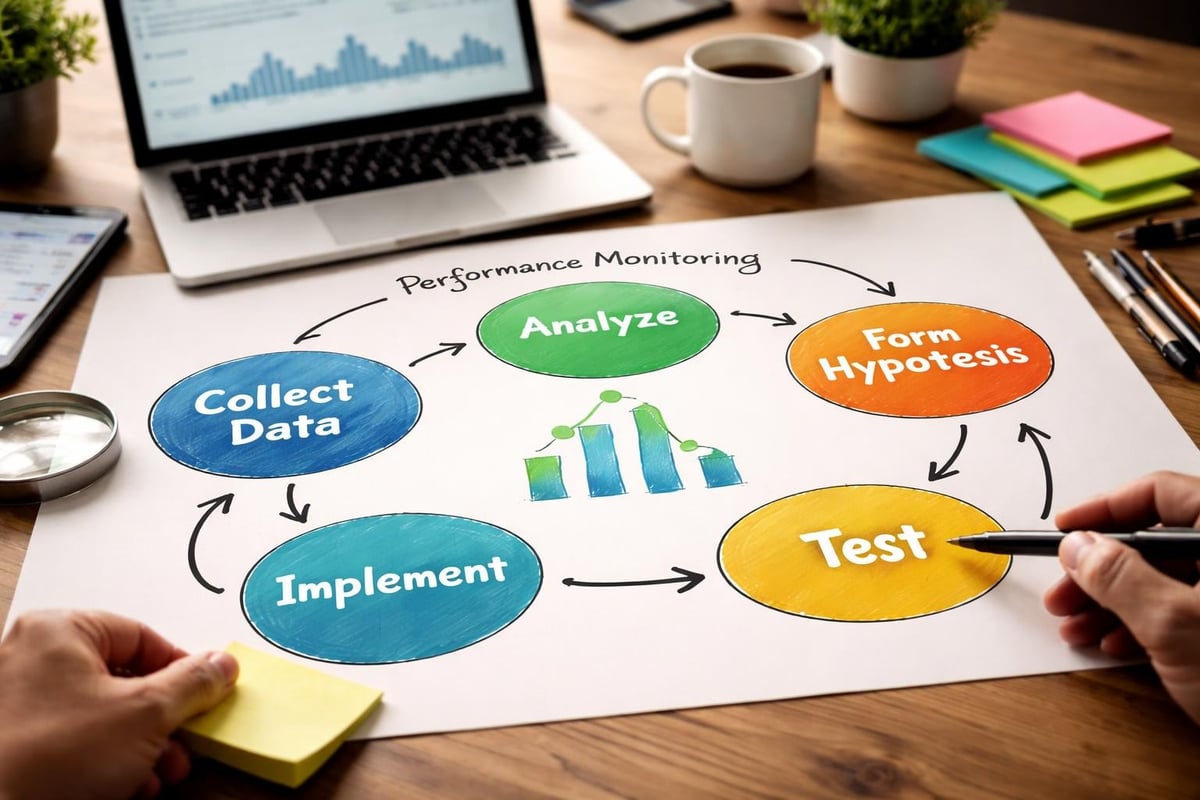
Establish a clear prioritisation framework for post-launch improvements. Not every observation requires immediate action. Focus first on changes affecting the highest-traffic pages or those with the greatest revenue impact potential. A 0.5% conversion improvement on your homepage matters more than a 5% improvement on a page receiving 20 visitors monthly.
A/B Testing Your New Design Elements
Once your shopify website redesign has generated sufficient traffic data (typically 2-4 weeks post-launch), begin systematic testing of key elements. Headlines, call-to-action buttons, product image arrangements, and trust signal placement all represent opportunities for data-driven improvement.
Start with high-impact, low-effort tests. Button colour changes require minimal development effort but can occasionally produce surprising results. Product page layout variations often reveal strong customer preferences that inform broader design decisions.
For stores working with experienced partners, ongoing Shopify support ensures that optimisation continues long after the initial redesign investment. Continuous improvement compounds over time, with small monthly gains accumulating into significant performance differences across a year.
Budgeting for Your Shopify Redesign Project
Understanding Shopify website redesign costs helps set realistic expectations and ensures adequate budget allocation. Prices vary enormously based on store complexity, custom functionality requirements, and agency expertise level.
For UK brands, expect investment ranging from £8,000 for straightforward redesigns using customised themes to £50,000+ for complex custom builds with extensive functionality. Shopify Plus stores requiring advanced features, custom checkout experiences, or complex integrations typically sit at the higher end.
Project ScopeTypical InvestmentTimelineBest ForTheme Customisation£8,000 - £15,0004-6 weeksEstablished stores needing visual refreshCustom Theme Build£15,000 - £30,0008-12 weeksBrands requiring unique design and functionalityComplex Custom Build£30,000 - £50,000+12-16 weeksLarge catalogues or advanced featuresEnterprise Plus Build£50,000+16+ weeksMulti-market stores with complex requirements
Budget should extend beyond the initial build. Allocate resources for ongoing optimisation, content creation, and technical maintenance. A £25,000 redesign that sits unchanged for two years delivers less value than a £15,000 build with £500 monthly invested in continuous improvement.
Hidden Costs to Include in Planning
Project budgets often overlook essential expenses beyond design and development. Professional product photography, copywriting, app subscriptions, and migration testing all require investment that contributes to total project cost.
Content creation represents a particularly common underestimation. If your existing product descriptions are thin or poorly optimised, rewriting them properly for the new site adds considerable scope. Similarly, if your redesign includes blog migration, editing and reformatting that content requires budget allocation.
Factor in post-launch support and training. Your team needs to understand how to manage the new platform, update content, and use any custom functionality built specifically for your store. Quality agencies include training, but ongoing questions and minor adjustments should be anticipated.
Choosing the Right Partner for Your Redesign
The agency or developer you select dramatically influences project outcomes. Finding the best Shopify agency for your specific needs requires looking beyond portfolio aesthetics to evaluate process maturity, technical capabilities, and strategic thinking.
Experience with stores similar to yours in size and complexity matters significantly. An agency that excels at building stores with 50 products may struggle with a 5,000-product catalogue requiring sophisticated filtering and search. Similarly, agencies focused on direct-to-consumer brands might not understand B2B ecommerce requirements.
Questions to ask potential redesign partners:
- How do you approach mobile-first design specifically for ecommerce?
- What's your process for protecting SEO during redesigns?
- How do you handle project scope changes and additional requirements?
- What does post-launch support include and for how long?
- Can you provide references from similar-sized stores in our industry?
- What's your typical timeline from kickoff to launch for projects like ours?
- How do you measure and report on project success post-launch?
Request detailed case studies showing measurable outcomes, not just visual before-and-after comparisons. Conversion rate improvements, organic traffic growth, and revenue impact demonstrate commercial understanding that pure design agencies may lack.
Migration Considerations for Platform Switchers
Brands moving to Shopify from other platforms face additional complexity during their redesign. Shopify migration from WooCommerce, Magento, or custom-built platforms requires careful data mapping, testing, and SEO protection beyond typical redesign requirements.
Product data structure differences between platforms create migration challenges. Custom fields, product variants, inventory tracking, and customer data all need accurate translation into Shopify's data model. Poor migration execution results in broken product links, lost customer accounts, or incomplete order histories that damage customer experience.
Plan for extended testing phases when platform migration combines with redesign. You're not just testing new design and functionality - you're validating that years of business data transferred correctly and remains accessible through the new platform.
A strategic shopify website redesign transforms underperforming stores into conversion-focused selling machines that support business growth for years. Success requires balancing aesthetic appeal with commercial pragmatism, protecting existing SEO equity whilst embracing modern best practices, and committing to post-launch optimisation rather than treating launch as the finish line. At Futur Media, we help ambitious UK ecommerce brands navigate every stage of the redesign process, from initial strategy through to ongoing conversion optimisation, delivering high-performing Shopify stores that drive measurable results. If your store needs a redesign that protects what's working whilst fixing what isn't, we'd welcome a conversation about your specific requirements and goals.



.svg)

