
.svg)





%201.avif)
Moving your online store from WooCommerce to Shopify represents a significant decision for any ecommerce business. Whether you're seeking better performance, improved scalability, or simpler ongoing maintenance, understanding the migration process thoroughly will determine whether your transition strengthens or disrupts your business. A well-executed woocommerce to shopify migration preserves your hard-earned SEO rankings, maintains customer data integrity, and positions your store for sustainable growth. This comprehensive guide walks through every critical aspect of platform migration, from initial planning to post-launch optimisation, ensuring you approach this transition with clarity and confidence.
Why Businesses Choose Shopify Over WooCommerce
The decision to migrate platforms rarely happens on impulse. Most businesses reach a tipping point where WooCommerce's limitations begin constraining growth rather than enabling it.
Performance and Hosting Complexity
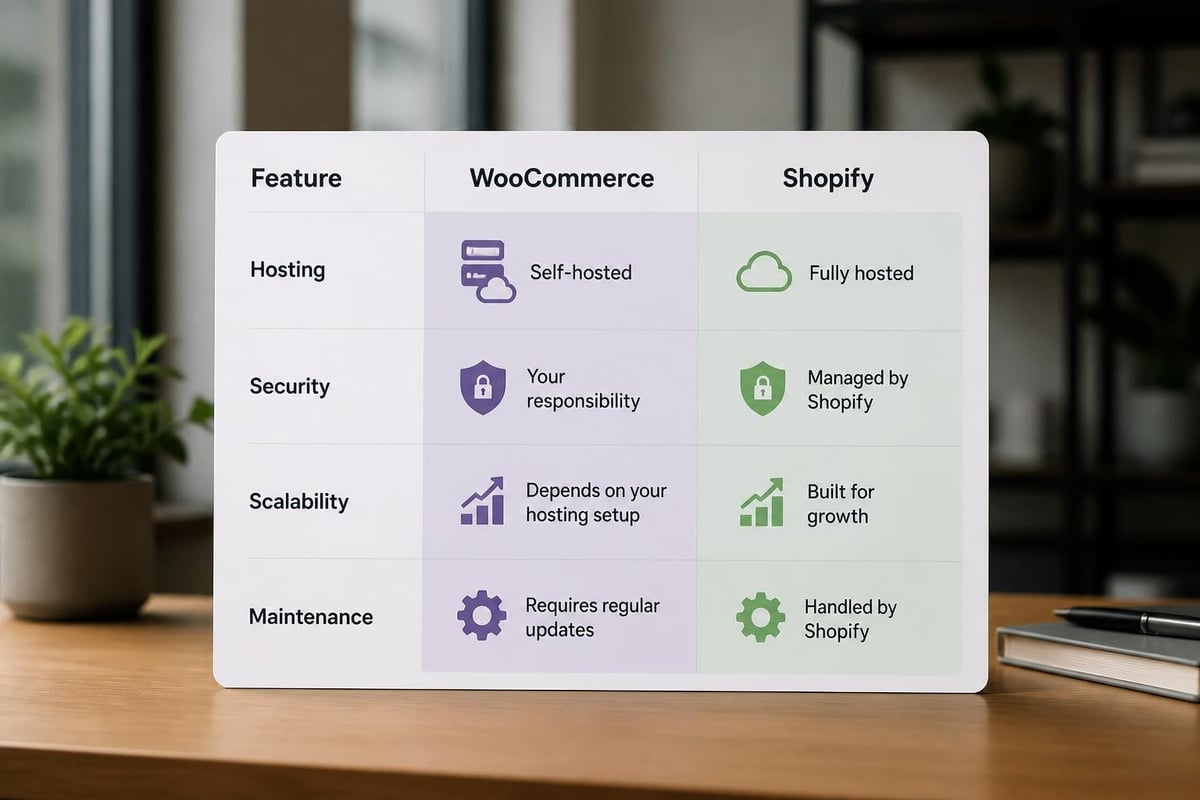
WooCommerce runs on WordPress, requiring you to manage hosting, security patches, plugin conflicts, and performance optimisation independently. As your product catalogue expands and traffic increases, maintaining fast page load speeds becomes increasingly challenging. You'll find yourself investing significant time troubleshooting compatibility issues between WordPress core updates, theme modifications, and the dozens of plugins powering your store's functionality.
Shopify eliminates this overhead entirely. The platform handles hosting, security, updates, and infrastructure automatically, allowing you to focus on selling rather than server management. This managed approach becomes particularly valuable as you scale, with Shopify's infrastructure designed to handle traffic spikes without requiring emergency developer intervention.
Total Cost of Ownership
Whilst WooCommerce itself is free, the true cost emerges through premium themes, essential plugins, reliable hosting, security certificates, and ongoing developer support. Many store owners discover their "free" platform costs significantly more than anticipated once they factor in these recurring expenses.
| Cost Element | WooCommerce | Shopify |
|---|---|---|
| Platform licence | Free | £25-£2,000/month |
| Hosting | £15-£200/month | Included |
| Security & SSL | £50-£150/year | Included |
| Payment gateway | Variable | 1.4%-2% + 20p |
| Essential plugins | £200-£1,000/year | Mostly included |
| Developer support | £50-£150/hour | Built-in support |
Shopify consolidates these costs into a predictable monthly subscription, often resulting in lower total expenditure alongside significantly reduced management burden.
Scalability and Growth Limitations
WooCommerce stores frequently encounter performance bottlenecks as they grow. Database queries slow down with larger product catalogues, checkout processes become sluggish under traffic pressure, and maintaining site speed requires increasingly sophisticated caching solutions. Scaling demands technical expertise that many business owners either lack or prefer not to manage.
Shopify's architecture handles growth seamlessly. Whether you're processing 100 or 100,000 transactions monthly, the platform scales automatically without requiring infrastructure changes, database optimisation, or architectural redesigns.
Understanding the WooCommerce to Shopify Migration Process
A successful woocommerce to shopify migration follows a structured methodology that protects your business whilst transitioning platforms. Rushing through this process or skipping critical steps typically results in lost data, broken redirects, or damaged search rankings.
Pre-Migration Planning and Audit
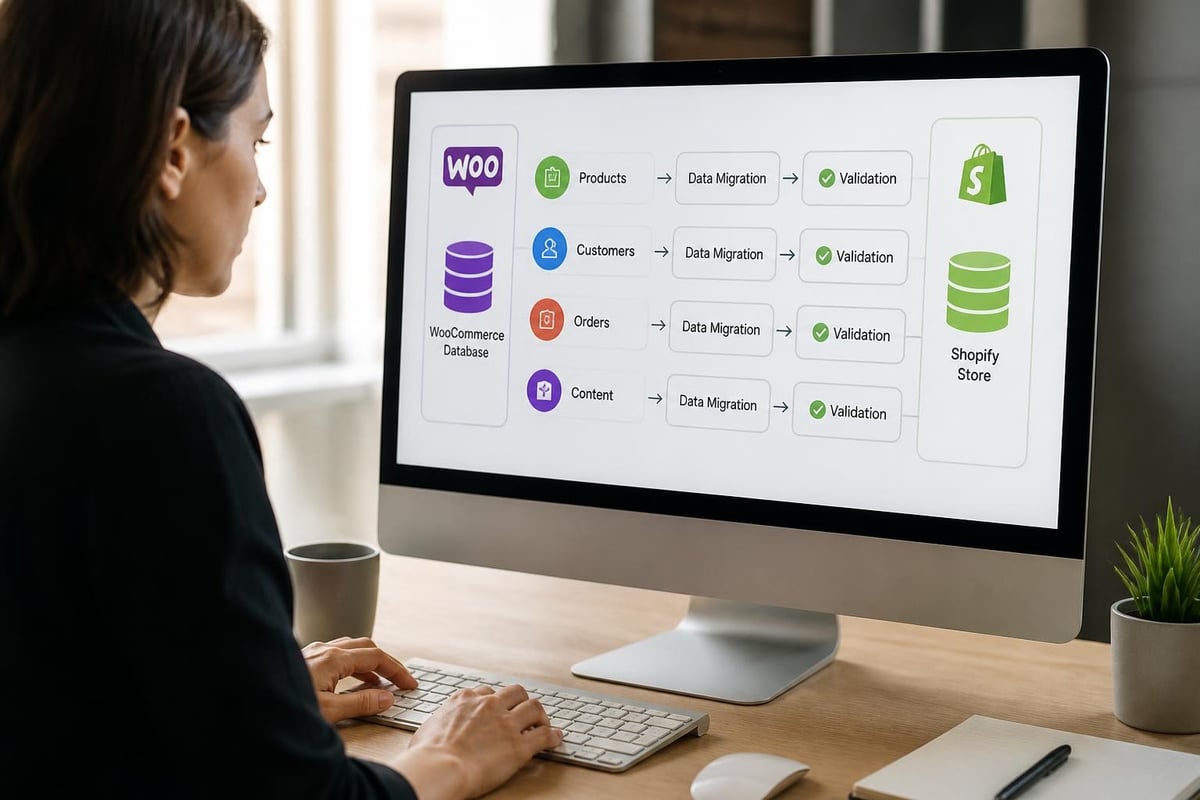
Before touching any data, conduct a comprehensive audit of your existing WooCommerce store. Document everything that needs transferring:
- Product catalogue: Total products, variations, custom fields, product images
- Customer database: Account details, order history, saved addresses
- Order history: Transaction records, fulfilment status, customer notes
- Content pages: About, contact, policies, blog posts
- SEO assets: URL structures, metadata, redirects, sitemap configuration
- Third-party integrations: Email marketing, inventory management, accounting software
- Custom functionality: Unique features, bespoke code, specialised workflows
This audit reveals the true scope of your migration and highlights potential complications before they cause problems. Comprehensive migration planning ensures nothing critical gets overlooked during the transition.
Choosing Your Migration Method
Three primary approaches exist for woocommerce to shopify migration, each suited to different scenarios and technical capabilities.
Automated Migration Apps
Shopify's Store Importer and third-party migration apps offer the quickest path for straightforward stores. These tools automatically transfer products, customers, and orders with minimal manual intervention. However, they often struggle with complex product structures, custom fields, or highly customised WooCommerce installations. Understanding the capabilities and limitations of automated tools prevents unrealistic expectations.
Manual CSV Import
Exporting data from WooCommerce as CSV files and importing into Shopify provides greater control over data mapping and transformation. This approach works well for stores with unique data structures or those requiring significant data cleaning during migration. The process is time-intensive but offers precision that automated tools cannot match.
Professional Migration Service
For stores with substantial product catalogues, complex customer data, or critical SEO requirements, professional Shopify migration services deliver the most reliable outcomes. Expert migration partners handle data integrity, SEO preservation, and technical complications whilst minimising business disruption throughout the transition.
Critical Data Migration Components
Each data type requires specific handling to ensure accurate transfer and proper functionality within Shopify's ecosystem.
Product Data Migration
Your product catalogue forms the foundation of your ecommerce business, making accurate migration essential. WooCommerce's flexible product structure doesn't always map directly to Shopify's more standardised approach.
Product variants require particular attention. WooCommerce handles variations differently than Shopify, with option names, SKUs, and pricing structures needing careful transformation. Products with multiple variation combinations must be restructured to fit within Shopify's three-option limit per product.
Product images transfer via URL references or file uploads, depending on your migration method. Maintain image alt text for SEO purposes and ensure high-resolution images upload successfully to preserve visual quality.
Custom product fields created through WooCommerce plugins often require metafields in Shopify. This transformation isn't automatic and typically needs manual mapping or custom migration scripting to preserve specialised product data.
Customer and Order History
Transferring customer data maintains continuity and preserves valuable customer relationships during platform transition.
Customer accounts migrate with email addresses, names, and basic contact information. However, password hashes use different encryption between platforms, requiring customers to reset passwords after migration. Communicate this clearly to minimise confusion and support enquiries.
Order history provides crucial context for customer service and helps maintain accurate lifetime value calculations. Historical orders import as archived records in Shopify, allowing your team to reference past transactions whilst distinguishing them from new Shopify-native orders.
| Data Type | Migration Complexity | Common Issues |
|---|---|---|
| Simple products | Low | Minimal |
| Variable products | Medium | Option mapping |
| Grouped products | High | Structure conversion |
| Customer accounts | Low | Password resets required |
| Order history | Medium | Status mapping |
| Digital products | Medium | Delivery URL recreation |
Content and Blog Migration
Your content pages and blog posts contribute significantly to SEO performance and customer trust. WooCommerce's WordPress foundation provides robust content management, whilst Shopify offers simpler but more focused blogging capabilities.
Blog posts export from WordPress and import into Shopify's blogging system. However, complex WordPress formatting, custom shortcodes, or advanced page builders won't transfer directly. Plan to manually recreate sophisticated layouts within Shopify's content editor or through custom theme code.
Static pages like About Us, Contact, and policy pages require recreation in Shopify. This presents an opportunity to refresh outdated content and improve conversion-focused copywriting during the migration process.
Protecting SEO During Platform Migration
Search rankings represent years of effort and significant business value. A careless migration can devastate organic traffic overnight, whilst a strategic approach maintains or even improves search performance.
URL Structure and 301 Redirects
WooCommerce and Shopify use different default URL structures. WooCommerce typically includes /product/ or /shop/ in product URLs, whilst Shopify uses /products/ and /collections/ paths. These structural differences require comprehensive redirect mapping.
Create a complete URL inventory before migration, documenting every product, category, and content page URL currently indexed by search engines. Export this from your WooCommerce site using SEO tools or sitemap data.
Map old URLs to new Shopify equivalents in a spreadsheet, ensuring every historical URL has a corresponding redirect target. Don't assume similar names will match automatically. Manual verification prevents broken links and lost rankings.
Implement 301 redirects within Shopify's redirect system or through apps for larger redirect volumes. Shopify's native redirect functionality handles several thousand redirects effectively, but stores with extensive URL histories may require dedicated redirect apps for optimal performance. Proper SEO preservation strategies protect your search visibility throughout the transition.
Metadata Preservation
Title tags, meta descriptions, and heading structures directly influence search rankings and click-through rates. These elements won't transfer automatically during most migrations.
Product metadata must be manually recreated or imported via CSV with dedicated metadata columns. Review and optimise this content during migration rather than blindly copying outdated descriptions that may not follow current SEO best practices.
Image alt text contributes to image search rankings and accessibility compliance. Ensure this transfers with product images or add it systematically post-migration before launch.
Technical SEO Configuration
Shopify's technical SEO capabilities differ from WordPress's plugin ecosystem. Configure these elements before making your new store publicly accessible:
- XML sitemap: Automatically generated by Shopify but verify submission to Google Search Console
- Robots.txt: Configure to allow proper crawling whilst blocking sensitive pages
- Canonical tags: Applied automatically by Shopify but review for custom requirements
- Structured data: Add schema markup for products, reviews, breadcrumbs through theme code
- Page speed: Optimise theme, compress images, minimise apps affecting load times
Understanding Shopify's approach to site structure helps you leverage the platform's built-in SEO advantages whilst addressing any gaps specific to your industry or competitive landscape.
Theme Selection and Design Considerations
Your store's visual presentation and user experience require careful planning during woocommerce to shopify migration. Simply replicating your WooCommerce design rarely represents the best approach.
Evaluating Pre-Built Themes vs Custom Development
Shopify's theme ecosystem offers hundreds of professionally designed templates suitable for most business types. Premium themes typically cost £140-£280 and provide solid foundations with customisation flexibility through Shopify's theme editor.
Pre-built themes accelerate launch timelines and reduce upfront costs. Modern Shopify themes include conversion-optimised layouts, mobile responsiveness, and performance best practices built-in. For businesses prioritising speed to market or operating with limited budgets, quality themes deliver professional results without custom development investment.
Custom theme development suits brands with unique design requirements, specific user experience needs, or competitive differentiation through distinctive visual identity. Shopify web design services create bespoke themes aligned precisely with brand guidelines and conversion objectives, though requiring larger budgets and extended timelines.
Mobile-First Design Priorities
Over 70% of ecommerce traffic originates from mobile devices in 2026. Your Shopify theme must deliver exceptional mobile experiences, not just acceptable responsive layouts.
Evaluate potential themes by testing on actual mobile devices, not just browser resize tools. Examine checkout flows, navigation menus, product filtering, and image galleries specifically on smartphones. Poor mobile experiences directly impact conversion rates regardless of how impressive desktop designs appear.
Conversion Rate Optimisation Features
Migrating platforms provides an ideal opportunity to implement proven conversion rate optimisation elements that may have been difficult in WooCommerce:
- Trust signals: Security badges, payment icons, return guarantees prominently displayed
- Social proof: Customer reviews, ratings, testimonials, user-generated content
- Urgency mechanisms: Stock counters, time-limited offers, recently viewed products
- Simplified checkout: Guest checkout, multiple payment options, progress indicators
- Product recommendations: Related products, frequently bought together, recently viewed
These features integrate more seamlessly in Shopify than through WordPress plugins, often with better performance and fewer compatibility concerns.
Migration Timeline and Cost Expectations
Understanding realistic timeframes and budgets prevents frustration and ensures adequate resource allocation throughout your woocommerce to shopify migration project.
Typical Migration Duration
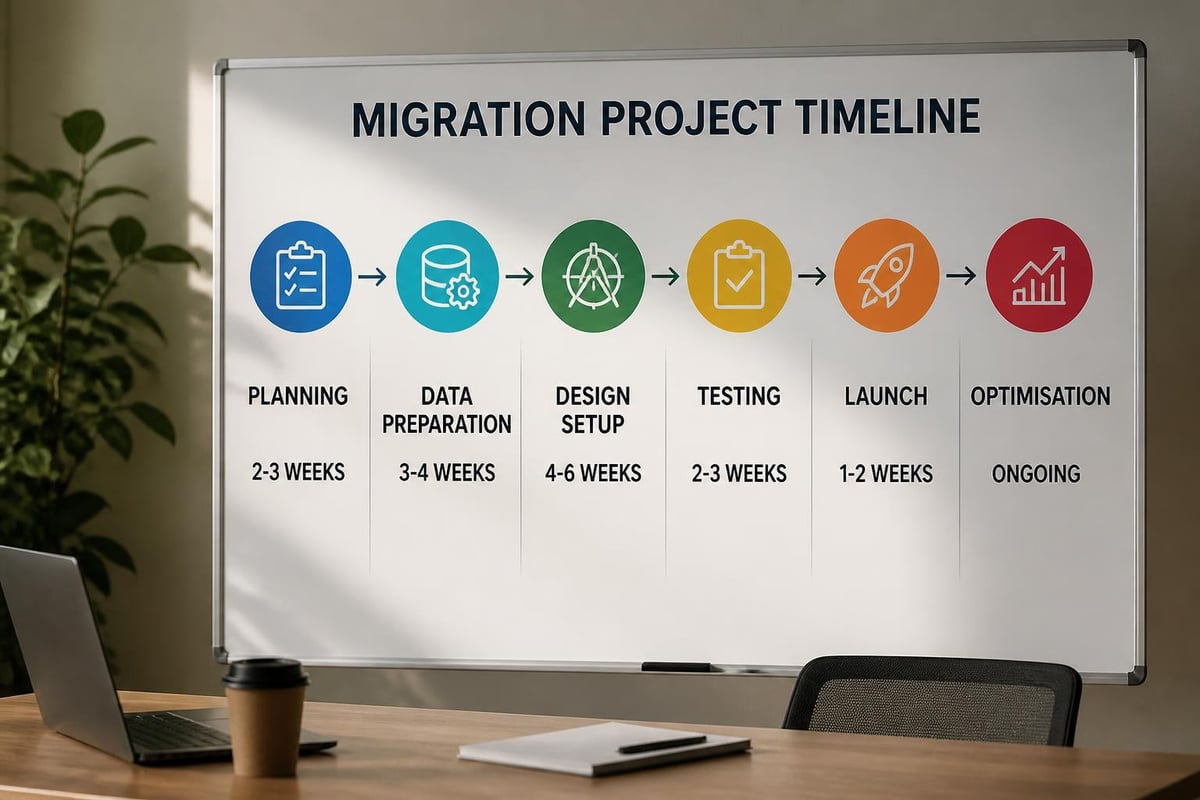
Migration complexity determines timeline more than store size alone. A 100-product store with extensive customisation may require longer migration than a 1,000-product store with straightforward structures.
Basic migrations (small product catalogues, minimal customisation, automated tools) typically complete within 2-4 weeks, including planning, data transfer, testing, and launch.
Medium complexity migrations (moderate product counts, some custom functionality, professional theme setup) generally require 4-8 weeks to properly execute all phases without rushing critical steps.
Complex migrations (large catalogues, extensive customisation, multiple integrations, bespoke development) often span 8-16 weeks, allowing adequate time for custom work, thorough testing, and staged rollouts. Realistic timeline expectations help businesses plan appropriately without underestimating project scope.
Budget Considerations
Migration costs vary dramatically based on approach, store complexity, and desired customisation level.
| Migration Approach | Typical Cost Range | Best For |
|---|---|---|
| DIY with free tools | £0-£500 | Very small stores, tight budgets |
| DIY with premium apps | £500-£2,000 | Moderate technical skills, simple stores |
| Professional basic migration | £2,000-£8,000 | Standard stores, SEO protection needed |
| Professional custom migration | £8,000-£25,000+ | Complex stores, custom functionality |
Beyond migration itself, budget for Shopify subscriptions, app costs, theme purchases, and potential custom development. Understanding the full cost picture prevents budget surprises mid-project.
Third-Party Integration Migration
Your WooCommerce store likely connects to various external services that require reconfiguration or replacement during platform migration.
Email Marketing Platforms
Most email marketing services support both WooCommerce and Shopify through native integrations or apps. Mailchimp, Klaviyo, Omnisend, and similar platforms maintain Shopify apps that recreate abandoned cart automations, customer segmentation, and purchase-triggered campaigns.
Re-establish customer syncing to ensure your email platform receives updated customer data from Shopify. Review automation workflows to verify they function correctly with Shopify's data structure, particularly for abandoned cart sequences and post-purchase follow-ups.
Payment Gateway Configuration
Payment processor migration requires careful attention to avoid transaction disruptions. If you're maintaining the same payment processor (Stripe, PayPal, etc.), you'll reconfigure credentials within Shopify whilst potentially benefiting from Shopify Payments' integrated solution.
Shopify Payments offers competitive rates and eliminates transaction fees charged on third-party gateways. However, it isn't available in all countries or for all business types. Evaluate whether switching to Shopify's native payment solution makes financial sense for your operation.
Inventory and Fulfilment Systems
Warehouse management systems, dropshipping platforms, and inventory tracking tools typically offer Shopify integrations alongside their WooCommerce support. Research your current providers' Shopify compatibility before migration to identify any functionality gaps or necessary provider changes.
Multichannel selling platforms like Amazon, eBay, and social commerce integrations generally connect more reliably with Shopify than WooCommerce, often with better synchronisation and fewer conflicts. This represents a hidden benefit of migration that may improve operational efficiency.
Accounting and ERP Platforms
QuickBooks, Xero, and similar accounting systems integrate with Shopify through dedicated apps. These connections typically require reconfiguration but rarely necessitate changing accounting platforms entirely.
Verify that your financial reporting needs are met by available Shopify integrations before committing to migration. Some specialised B2B or wholesale functionality available through WooCommerce plugins may require custom development or different app combinations in Shopify.
Testing and Quality Assurance
Thorough testing before launch prevents embarrassing errors, protects customer experience, and ensures business continuity throughout your woocommerce to shopify migration.
Data Verification Checklist
Systematically verify every migrated data type against source WooCommerce data:
- Product count accuracy: Total products match between platforms
- Variant completeness: All product options and combinations present
- Pricing accuracy: Sale prices, regular prices, variant pricing correct
- Inventory quantities: Stock levels transferred accurately
- Image associations: Correct images assigned to appropriate products
- Customer record count: All customer accounts migrated successfully
- Order history completeness: Historical orders present and accurate
Create sample orders in your development environment to test the complete customer journey from browsing through checkout completion.
Functional Testing Requirements
Beyond data accuracy, verify all store functionality operates correctly:
- Navigation and filtering: Category pages, search, product filtering
- Shopping cart behaviour: Add to cart, quantity updates, cart saving
- Checkout process: All payment methods, shipping calculations, tax computation
- Account functionality: Login, registration, order history, address saving
- Email notifications: Order confirmations, shipping updates, password resets
- Mobile responsiveness: Complete site functionality on smartphones and tablets
- Page load performance: Acceptable speed across all page types
Cross-Browser and Device Testing
Test your new Shopify store across multiple browsers (Chrome, Safari, Firefox, Edge) and devices (iOS, Android, desktop) to identify platform-specific issues before public launch. Don't assume consistency across environments. Real-world testing on actual devices reveals problems that emulators miss.
Post-Migration Optimisation
Launch day marks a beginning, not an ending. Strategic post-migration activities maximise the benefits of your new Shopify platform.
Performance Monitoring
Track key metrics immediately following migration to identify issues quickly and measure migration success:
Traffic patterns: Monitor organic, direct, and referral traffic for unusual drops that might indicate redirect problems or SEO issues. Significant traffic decreases within the first week typically signal technical problems requiring immediate attention.
Conversion rates: Compare pre-migration and post-migration conversion metrics across devices and traffic sources. Initial conversion rate dips are common as customers adjust to new navigation and design, but sustained decreases warrant investigation.
Page load speeds: Use Google PageSpeed Insights, GTmetrix, or similar tools to benchmark performance. Shopify generally delivers faster load times than most WooCommerce hosting, but poorly optimised themes or excessive apps can negate this advantage.
SEO Performance Tracking
Monitor search performance closely during the first three months post-migration:
- Search Console data: Check for crawl errors, redirect chains, indexation issues
- Rankings monitoring: Track primary keyword positions weekly
- Organic traffic trends: Compare year-over-year and pre/post-migration metrics
- Click-through rates: Verify metadata displays correctly in search results
Minor ranking fluctuations are normal during the first 4-6 weeks as search engines recrawl and reassess your site. Significant sustained declines require investigation and potential corrective action.
Customer Communication
Proactive communication prevents confusion and maintains trust throughout platform transition:
Announce the migration through email, social media, and on-site messaging before launch. Explain any changes customers will notice, particularly if they need to reset passwords or update saved preferences.
Provide clear guidance for common questions about account access, order history, and any functionality changes. FAQ pages or help centre articles reduce support burden whilst improving customer experience.
Collect feedback actively during the first month post-launch. Customer insights reveal usability issues or missing features that internal testing overlooked.
Common Migration Challenges and Solutions
Understanding frequent complications helps you anticipate and address problems before they escalate.
Complex Product Structures
Products using WooCommerce's product add-ons, composite products, or product bundles rarely migrate cleanly through automated tools. These require manual recreation using Shopify apps or custom development to replicate functionality.
Solution: Audit complex product types during planning and allocate specific time for manual setup or custom development. Several Shopify apps provide product customisation, bundling, and kit-building capabilities that may actually improve on your WooCommerce implementation.
Custom WooCommerce Functionality
Bespoke features developed through custom WooCommerce plugins won't transfer automatically. Identify critical custom functionality early and plan Shopify equivalents through apps, theme customisation, or custom Shopify development.
Solution: Document all custom functionality completely, then research Shopify app alternatives or obtain development quotes for recreation. Some custom features may be unnecessary in Shopify's ecosystem where native functionality or quality apps provide better solutions.
Large Product Catalogues
Stores with tens of thousands of products face extended migration timelines and increased complexity. Automated tools often timeout or fail with massive datasets, whilst manual processes become impractically time-consuming.
Solution: Consider staged migrations, moving high-priority products first whilst gradually migrating remaining catalogue. Alternatively, engage migration specialists with experience handling large-scale data transfers who can leverage API-based migration tools designed for enterprise-level projects.
Multilingual and Multi-Currency Stores
WooCommerce's WPML and multi-currency plugins provide robust internationalisation that doesn't directly map to Shopify's approach. Shopify Markets and translation apps offer strong alternatives but require thoughtful configuration.
Solution: Research Shopify's native multi-market capabilities and third-party translation apps before migration. Plan URL structures, domain configurations, and translation workflows to maintain international customer experiences through the transition.
Leveraging Shopify's Advanced Capabilities
Once successfully migrated, explore Shopify features that extend beyond WooCommerce's standard capabilities.
Native Analytics and Reporting
Shopify's analytics dashboard provides comprehensive insights into sales, customer behaviour, and product performance without requiring Google Analytics expertise or third-party plugins. The platform tracks customer lifetime value, returning customer rates, and attribution data that helps refine marketing strategies.
Shopify Plus merchants access even more sophisticated reporting, including customisable reports, staff activity tracking, and advanced customer segmentation that supports data-driven decision-making at scale.
Automation Through Shopify Flow
Shopify Flow enables sophisticated automation workflows without coding knowledge. Create automated processes for inventory management, customer tagging, fraud detection, and fulfilment routing that would require custom development or premium plugins in WooCommerce.
Point of Sale Integration
Shopify POS provides seamless omnichannel retail capabilities for businesses operating both online and physical locations. Unified inventory, customer data, and reporting across channels create cohesive experiences that strengthen customer relationships and operational efficiency.
App Ecosystem Quality
Shopify's curated app marketplace maintains higher quality standards than WordPress's plugin ecosystem. Apps undergo review processes and must meet performance benchmarks, reducing the compatibility conflicts and security vulnerabilities common with WordPress plugins.
Building Long-Term Success on Shopify
Platform migration creates momentum for broader ecommerce improvements beyond simply replicating your previous WooCommerce setup.
Continuous Optimisation Mindset
Treat migration as the foundation for ongoing enhancement rather than a one-time project. Regular performance reviews, A/B testing, and user experience improvements compound over time, gradually increasing conversion rates and average order values.
Conversion rate optimisation services help identify specific improvement opportunities through data analysis, user testing, and systematic experimentation that turns migration into sustained competitive advantage.
Staying Current With Platform Updates
Shopify releases regular feature updates, new capabilities, and performance improvements automatically. Unlike WooCommerce where you're responsible for applying updates and managing compatibility, Shopify handles platform maintenance whilst you benefit from continuous innovation.
Subscribe to Shopify's changelog, participate in merchant communities, and maintain relationships with Shopify partners who can advise on leveraging new features relevant to your business model.
Strategic Growth Planning
With platform stability established, focus strategic attention on customer acquisition, retention optimisation, and market expansion. Shopify's infrastructure scales effortlessly, allowing you to pursue growth opportunities without technical constraints holding you back.
Successfully executing a woocommerce to shopify migration requires careful planning, systematic execution, and strategic post-launch optimisation to protect your business whilst unlocking Shopify's full potential. Whether you're seeking better performance, simplified management, or enhanced scalability, the migration process demands attention to data integrity, SEO preservation, and customer experience throughout every phase. Futur Media specialises in seamless Shopify migrations for ambitious UK brands, protecting your search rankings and customer data whilst building high-performing stores designed for sustainable growth. If you're considering a platform move, we'd be happy to discuss how we can make your transition smooth, strategic, and successful.



.svg)

