
.svg)






%201.avif)
Organising your product catalogue effectively is one of the most critical decisions you'll make when building a Shopify store. Collections on Shopify serve as the backbone of your site's navigation, helping customers find exactly what they need whilst simultaneously improving your search engine visibility and conversion rates. Whether you're launching a new store, migrating from another platform, or refining an existing setup, understanding how to create and optimise collections will directly impact your bottom line. For UK brands selling everything from fashion to home goods, mastering collections transforms a confusing product list into a streamlined shopping experience that drives measurable results.
What Are Collections on Shopify
Collections on Shopify are groups of products that you can organise in ways that make sense for your customers and your business. Think of them as curated categories that help shoppers navigate your store without getting overwhelmed by hundreds or thousands of individual products.
There are two primary types of collections:
- Manual collections where you handpick specific products
- Automated collections that update dynamically based on conditions you set
Manual collections give you complete control over which products appear and in what order. They're ideal for featured items, seasonal promotions, or curated bundles where you want precise presentation. You might create a "Staff Picks" collection or a "Valentine's Day Gift Guide" where every product is deliberately chosen.
Automated collections use conditions like product tags, price, vendor, or inventory levels to automatically include or exclude products. If you tag new arrivals with "new-2026", an automated collection can display them without manual intervention. This saves countless hours for stores with large catalogues or frequent product updates.
Why Collections Matter for eCommerce Success
Collections directly influence how customers interact with your store. Poor organisation leads to frustration, abandoned browsing sessions, and lost sales. Well-structured collections create clear pathways to purchase.
From an SEO perspective, collection pages rank independently in search results. When optimised properly, they can capture high-intent search traffic for category terms like "men's running trainers" or "organic skincare sets". According to best practices for Shopify collection SEO, collection pages often outperform individual product pages for broader search terms.
Key benefits include:
- Improved site navigation and user experience
- Better product discovery for new visitors
- Enhanced SEO targeting for category-level keywords
- Increased average order value through cross-selling
- Reduced bounce rates from clearer categorisation
Creating Collections on Shopify: Step-by-Step Process
Building collections on Shopify requires strategic thinking before you start clicking buttons in the admin panel. Start by mapping out your store's information architecture based on how customers actually search and shop.
Planning Your Collection Structure
Before creating anything, audit your product catalogue and identify natural groupings. Consider multiple organisational methods: by product type, by use case, by season, by price point, or by brand. Most successful stores use a combination.
Common collection hierarchies include:
- Product type (e.g., Dresses, Shoes, Accessories)
- Gender or demographic (e.g., Women's, Men's, Kids')
- Occasion (e.g., Workwear, Casual, Formal)
- Season (e.g., Spring/Summer 2026, Autumn/Winter 2026)
- Price tier (e.g., Under £50, Luxury)
Map these on paper or in a spreadsheet first. Consider how they'll appear in your navigation menu and whether the structure makes intuitive sense to someone unfamiliar with your products. The goal is to ensure customers can find any product within three clicks.
Technical Setup in Shopify Admin
Navigate to Products > Collections in your Shopify admin panel. Click "Create collection" and you'll see options for both manual and automated types. Choose based on your specific needs for that collection.
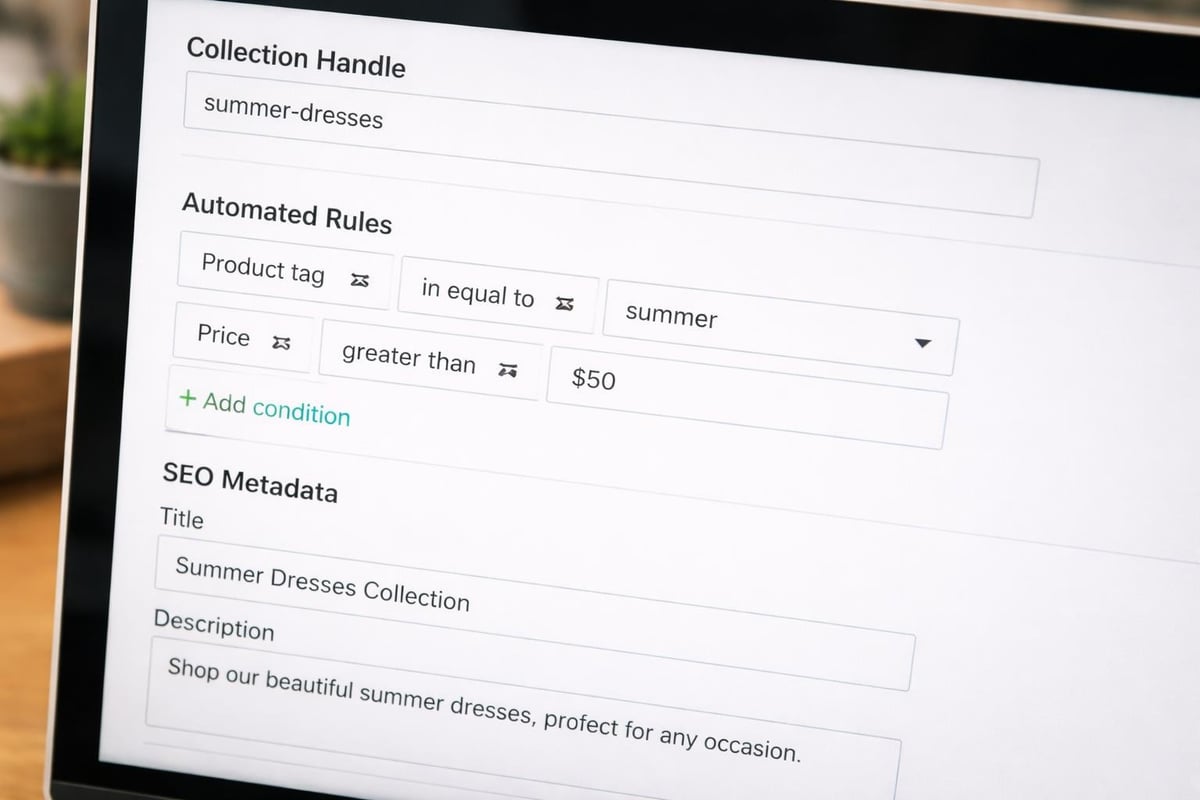
For automated collections, you'll set conditions using Shopify's rule builder. You can combine multiple conditions using "AND" or "OR" logic. For example, create a "Summer Dresses Under £100" collection with conditions: product type equals "Dress" AND price is less than £100 AND tags contain "summer-2026".
Collection TypeBest ForUpdate MethodControl LevelManualCurated selections, featured products, small cataloguesManual addition/removalComplete controlAutomatedLarge catalogues, new arrivals, price-based groupsAutomatic via rulesRule-based automation
Manual collections require you to add products individually through the admin interface. While more time-consuming initially, they give you pixel-perfect control over product order and selection. You can drag and drop products to reorder them based on what you want to feature prominently.
Automated Collection Rules and Logic
Automated collections shine when managing stores with hundreds of products or frequent inventory changes. The conditions you can use include product title, type, vendor, price, compare at price, weight, inventory stock, variant title, and tags.
Practical automation examples:
- New arrivals: Created date is within the last 30 days
- Sale items: Compare at price is greater than price
- In stock only: Inventory stock is greater than 0
- Brand collections: Vendor is "Nike" or "Adidas"
- Size-specific: Variant title contains "Large"
Combine conditions strategically. A "Premium Running Shoes" collection might use: product type equals "Shoes" AND tags contain "running" AND price is greater than £150. This automatically captures all qualifying products without manual updates.
Optimising Collection Pages for Conversion
Creating collections is just the beginning. The real work lies in optimising these pages to convert browsers into buyers. Collection page optimisation combines user experience design, copywriting, and technical performance.
Collection Descriptions and SEO Content
Every collection should have a unique, keyword-rich description. Shopify allows up to 5,000 characters, though the ideal length depends on the collection's importance and search volume. For major category pages, write 300-500 words of helpful content that includes your target keywords naturally.
Don't just stuff keywords. Write genuinely useful content that answers customer questions. For a "Women's Winter Coats" collection, explain fabric types, styling tips, care instructions, and sizing guidance. This content serves dual purposes: helping customers make informed decisions whilst signalling relevance to search engines.
When building effective Shopify collections, remember that collection titles become page titles by default. Keep them clear and keyword-focused. "Men's Running Trainers" is better than "Sprint Series" for SEO, even if the latter sounds more branded.
Visual Presentation and Imagery
Collection featured images appear in navigation menus, collection lists, and sometimes in search results. Choose high-quality images that represent the collection's theme whilst maintaining visual consistency across your store.
Image best practices:
- Use consistent dimensions across all collection images
- Choose images that clearly represent the collection's purpose
- Optimise file sizes for fast loading (aim for under 200KB)
- Use descriptive alt text for accessibility and SEO
- Consider lifestyle imagery over plain product shots
The collection page layout itself should be clean and scannable. Most successful stores display 12-48 products per page with infinite scroll or pagination. Too few products looks sparse; too many overwhelms customers and slows page speed.
Filtering and Sorting Options
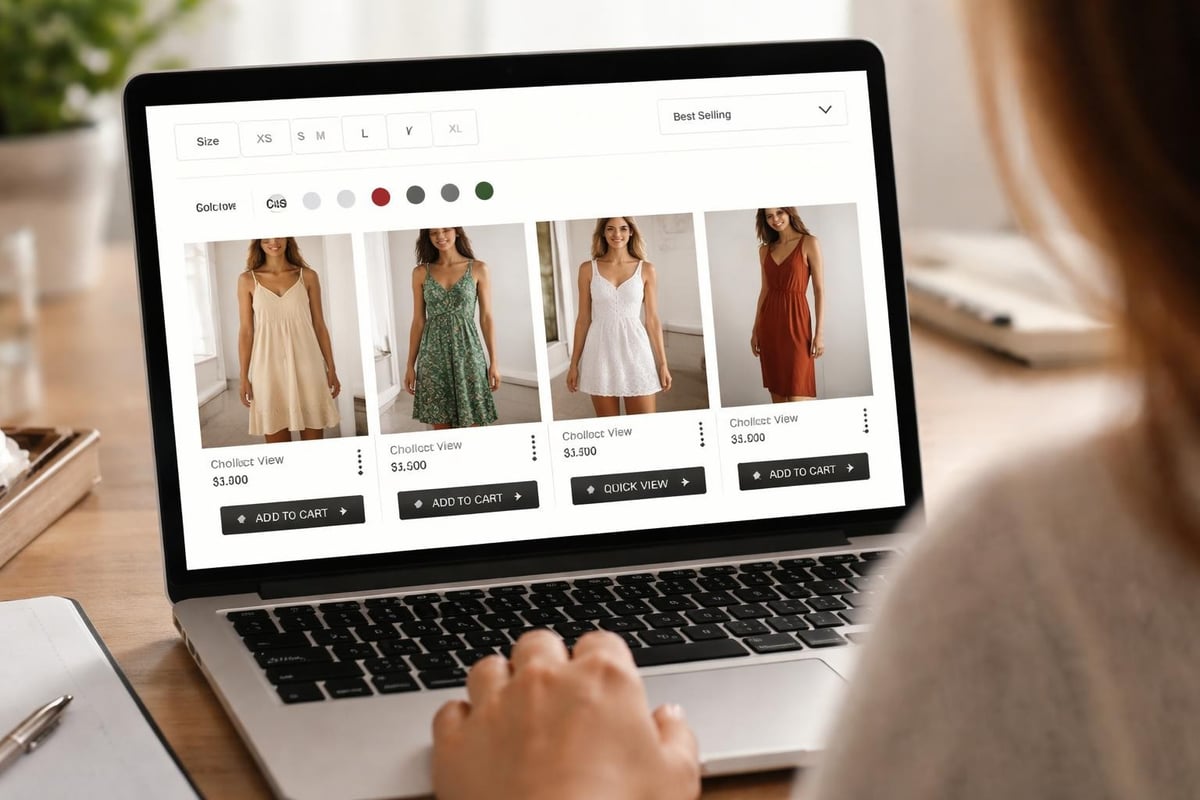
Modern customers expect robust filtering capabilities. Shopify's default filtering includes availability, price, product type, and vendor. Enhanced filtering through apps or custom development can include size, colour, material, rating, and custom product attributes.
Consider how customers naturally narrow down choices in your category. Fashion stores need colour and size filters prominently displayed. Electronics stores require specification-based filtering like screen size or processor type. Organising products with strategic filtering dramatically improves the shopping experience.
Sorting options matter equally. Provide multiple sorting methods: best selling, newest, price (low to high), price (high to low), and alphabetical. Different customers shop differently-some hunt for bargains, others want premium options first, and many trust social proof from best sellers.
Advanced Collection Strategies for Growth
Once you've mastered basic collections on Shopify, advanced strategies can unlock significant growth opportunities. These techniques require more planning but deliver measurable improvements in traffic, engagement, and revenue.
Nested Collections and Hierarchies
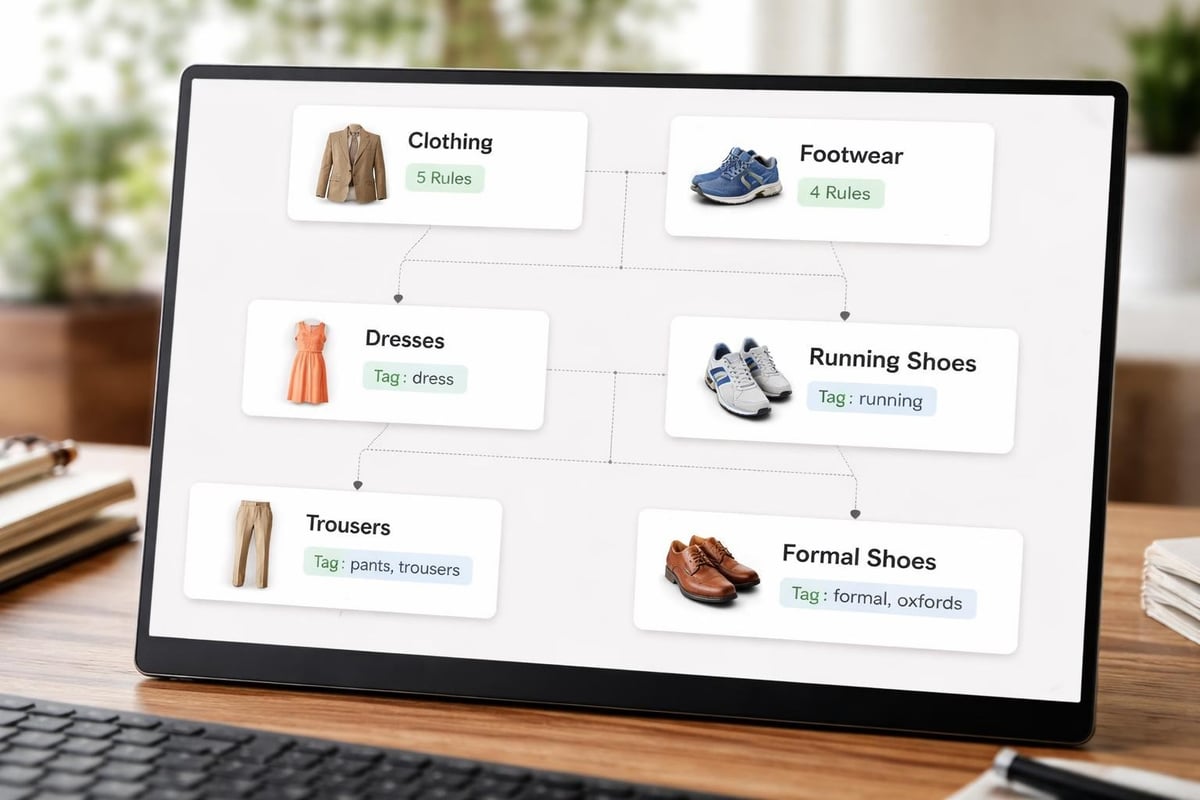
Large catalogues benefit from nested collection structures where broad parent collections contain more specific child collections. A "Women's Clothing" parent might include "Dresses", "Tops", "Trousers", and "Outerwear" as children, with each child potentially containing further subcollections.
This hierarchy improves navigation and SEO by creating logical pathways through your catalogue. It also allows you to target keywords at different specificity levels. "Women's Clothing" captures broad searches whilst "Women's Midi Dresses" targets specific intent.
Implementation approaches:
- Create parent collections as manual or automated
- Build child collections with more specific conditions
- Link them through navigation menus and breadcrumbs
- Ensure each level provides clear value to customers
- Maintain consistent naming conventions throughout
Shopify doesn't enforce parent-child relationships at the database level, so you'll manage this through naming conventions and menu structure. Keep it simple initially-you can always add complexity as your catalogue grows.
Seasonal and Time-Based Collections
Seasonal collections capture timely demand and keep your store feeling fresh and relevant. Create collections for holidays, seasons, events, and shopping periods well in advance. Populate them with products tagged appropriately, then schedule their promotion through your marketing calendar.
Effective seasonal collections include:
- Christmas Gifts (active November-December)
- Valentine's Day (active January-February)
- Summer Sale (active July-August)
- Back to School (active August-September)
- Black Friday Deals (active November)
Use automated collections with date-based tags or manual collections you update quarterly. The key is preparing content and imagery in advance so you're not scrambling when the season arrives. Many successful brands prepare seasonal collections 8-12 weeks ahead of the relevant period.
Smart Cross-Selling Through Collections
Collections aren't just category pages-they're powerful cross-selling tools. Create collections that group complementary products together based on customer behaviour and purchase patterns.
A "Complete Your Look" collection on a dress product page might show matching accessories. A "Frequently Bought Together" collection displays items that customers purchase in combination. These strategic collections increase average order value by making relevant suggestions at the right moment.
Consider these cross-selling collection types:
Collection PurposeExampleTriggerComplementary ProductsLaptop accessories for specific laptop modelsProduct pageHigher Price PointsPremium alternatives to viewed productsCollection browsingBundle SuggestionsComplete outfit setsProduct page or cartRestocking RemindersConsumables purchased togetherEmail campaigns
Technical Considerations and Performance
The technical implementation of collections on Shopify affects everything from site speed to search rankings. Understanding these elements helps you build collections that perform well both for users and search engines.
URL Structure and Permalinks
Shopify automatically generates collection URLs based on collection handles (the URL-friendly version of your collection name). The format is yourdomain.com/collections/handle. Once set, changing handles breaks existing URLs unless you implement proper redirects.
Choose handles carefully from the start. Use keywords where natural, keep them concise, and avoid unnecessary words. "womens-winter-coats" is better than "womens-winter-coats-collection-2026". The collection handle becomes part of every product URL when accessed through that collection, creating product URL variations like yourdomain.com/collections/winter-coats/products/wool-coat.
Metadata and Schema Markup
Every collection page should have unique title tags and meta descriptions. Shopify auto-generates these from collection names and descriptions, but you can customise them for better SEO performance. Write compelling meta descriptions that encourage clicks from search results.
Optimisation checklist:
- Unique title tag (50-60 characters)
- Compelling meta description (140-155 characters)
- Target keyword in both title and description
- Collection description with natural keyword usage
- Proper heading structure (H1 for collection title)
For stores with custom development, implement Collection schema markup. This structured data helps search engines understand your collection pages better and can enable rich results in search. Many Shopify themes include basic schema, but comprehensive markup often requires customisation through professional Shopify development.
Collection Page Speed Optimisation
Collection pages often load slowly because they display multiple product images simultaneously. Optimise these pages aggressively to maintain fast load times that improve both conversion rates and SEO rankings.
Performance improvements include:
- Lazy loading for product images below the fold
- Optimised image formats (WebP with PNG/JPG fallbacks)
- Reduced image file sizes through compression
- Minimised app scripts that slow collection pages
- Efficient theme code without unnecessary features
Monitor collection page speed using Google PageSpeed Insights or Shopify's built-in speed report. Aim for load times under 3 seconds on mobile devices. Slow collection pages directly hurt conversion rates-Amazon found that every 100ms delay cost them 1% in sales.
Common Mistakes to Avoid
Even experienced store owners make collection mistakes that hurt performance. Learning from these common pitfalls saves time and prevents lost revenue from poor organisation.
Over-Complication and Confusion
Creating too many collections confuses customers and dilutes your SEO efforts. Every collection should serve a clear purpose and contain enough products to justify its existence. A collection with three products looks sparse and unprofessional.
Start with 5-10 core collections covering your main product categories. Expand gradually based on customer behaviour and search data. Resist the temptation to create collections for every possible product combination. Focus on what customers actually want to browse, not every theoretical categorisation.
Warning signs of over-complication:
- Collections with fewer than 5 products
- Overlapping collections causing product duplication
- Menu navigation more than three levels deep
- Collection names that confuse rather than clarify
- Similar collections targeting identical keywords
Neglecting Collection Maintenance
Collections require ongoing maintenance, especially automated ones with complex rules. Products might appear in unintended collections due to incorrect tagging or rule logic. Review collections quarterly to ensure they're performing as expected.
Check for empty collections that now contain zero products. Update seasonal collection content when seasons change. Remove or archive collections that no longer serve a purpose. Add new collections when expanding into product categories or when search data reveals opportunities.
Ignoring Analytics and Customer Behaviour
Your customers tell you which collections matter through their behaviour. Use Shopify analytics to identify high-traffic collections, conversion rates by collection, and exit rates. This data reveals which collections drive sales and which need optimisation.
Pay attention to internal site search queries. If customers frequently search for "vegan skincare" but you don't have a corresponding collection, create one. When analysing ecommerce homepage design and navigation, customer search behaviour provides invaluable insights into missing categories.
Monitor external search performance through Google Search Console. Identify which collection pages rank well and which have opportunities for improvement. Double down on successful collections whilst reconsidering underperforming ones.
Integrating Collections with Marketing Strategy
Collections on Shopify extend beyond your website-they integrate with your entire marketing ecosystem. Use them strategically across email campaigns, social media, and paid advertising to drive targeted traffic and increase conversions.
Email Campaign Segmentation
Segment email campaigns based on collection browsing and purchase behaviour. Customers who viewed your "Running Shoes" collection but didn't purchase receive different emails than those interested in "Formal Footwear". This personalisation dramatically improves email performance.
Email collection strategies:
- New collection announcements to engaged subscribers
- Abandoned browse emails featuring viewed collections
- Personalised recommendations from previously browsed collections
- VIP early access to seasonal collection launches
- Restocking alerts for sold-out collection items
Link directly to relevant collections in emails rather than your homepage. This reduces friction and gets customers closer to conversion immediately. Track which collections drive the highest email engagement to inform future campaigns.
Social Media and Paid Advertising
Create dedicated landing pages for social media campaigns by using collection pages. When running Instagram ads for summer dresses, link directly to your "Summer Dresses" collection, not your homepage. This relevance improves conversion rates and reduces advertising costs.
Use collection images and products in social content. Feature new collections in Instagram posts and Stories, linking to the collection page through your bio or shopping features. Facebook and Instagram shopping integrations work beautifully with Shopify collections, allowing customers to browse and purchase without leaving the platform.
For Google Shopping and Performance Max campaigns, well-organised collections help with product feed categorisation. Google uses your collection structure to understand product relationships and show more relevant ads to potential customers. Comprehensive guidance on creating effective Shopify collections emphasises this advertising integration.
Content Marketing Opportunities
Each collection represents a content marketing opportunity. Create blog posts, buying guides, and educational content around your major collections. A "Winter Coat Buying Guide" naturally links to your winter coat collection whilst providing genuine value to customers.
Video content works particularly well for collection marketing. Create styling videos, product roundups, or tutorial content featuring products from specific collections. Host these on YouTube and embed them on collection pages to increase engagement and time on site.
Consider seasonal lookbooks, trend reports, or expert guides that showcase collection products in context. This content ranks in search engines, drives traffic to collections, and positions your brand as an authority in your niche. For ambitious UK brands, understanding how to design an effective Shopify site means integrating collections with broader content strategy.
Collections and Store Migration
When migrating to Shopify from platforms like WooCommerce, Magento, or BigCommerce, preserving collection structure whilst improving organisation is critical. Poor migration planning can destroy years of SEO equity and confuse existing customers.
Preserving SEO Value During Migration
Map old category URLs to new collection URLs before migration begins. Create a comprehensive redirect plan ensuring every old category page redirects to its equivalent Shopify collection. This maintains search rankings and prevents customers hitting 404 errors.
Migration collection checklist:
- Audit existing category structure and URLs
- Plan improved collection structure for Shopify
- Map old URLs to new collection handles
- Implement 301 redirects for all categories
- Verify redirects work correctly post-migration
- Monitor search rankings for collection pages
- Update external links pointing to old categories
Some categories might not translate directly to Shopify collections. Decide whether to consolidate, split, or restructure based on SEO data and customer behaviour. Prioritise maintaining rankings for high-traffic category pages whilst improving overall organisation.
Improving Organisation Post-Migration
Migration offers an opportunity to fix categorisation mistakes from your previous platform. Analyse which categories performed well and which confused customers. Implement best practices from the start rather than replicating old problems.
Consider customer feedback and analytics from your old store. Which categories had high bounce rates? Where did customers struggle to find products? Use these insights to create more intuitive collections on Shopify. The process of setting up a Shopify store includes strategic collection planning from day one.
Test navigation with real users before launching your migrated store. Ensure collection names make sense, products live in logical places, and filtering works as expected. Small usability improvements during migration compound into significant conversion rate increases over time.
Mastering collections on Shopify transforms how customers navigate your store, discover products, and ultimately convert into buyers. From basic automated rules to advanced cross-selling strategies, thoughtful collection organisation pays dividends through improved SEO, higher conversion rates, and better customer experiences.
Whether you're launching a new store or optimising an existing one, getting collections right requires strategic thinking, technical knowledge, and ongoing refinement. Futur Media specialises in designing and building high-performing Shopify stores for ambitious UK brands, including strategic collection architecture that drives measurable results. If you're ready to create a store that converts browsers into customers through smart organisation and proven ecommerce best practices, we're here to help.



.svg)

