
.svg)






%201.avif)
Understanding the performance of your online store is no longer optional in 2026. Every successful eCommerce business relies on data to make informed decisions, identify opportunities, and eliminate bottlenecks that hinder growth. Shopify store analytics provides the foundation for this data-driven approach, offering merchants insights into customer behaviour, sales patterns, product performance, and marketing effectiveness. Whether you're launching a new venture or scaling an established brand, mastering your analytics transforms raw numbers into actionable strategies that directly impact your bottom line.
Why Shopify Store Analytics Matter for Your Business
The difference between guessing and knowing is the foundation of sustainable eCommerce growth. Without proper analytics, you're essentially flying blind, making decisions based on intuition rather than evidence. Shopify store analytics delivers clarity on what's working and what isn't, allowing you to allocate resources effectively and prioritise improvements that generate measurable results.
Key benefits of analytics-driven decision making include:
- Identifying your most profitable products and customer segments
- Understanding which marketing channels deliver the best return on investment
- Spotting seasonal trends before they impact inventory levels
- Detecting technical issues that hurt conversion rates
- Optimising pricing strategies based on purchasing patterns
Many UK brands struggle to move beyond vanity metrics like total visitors, missing the deeper insights that drive profitability. Platform evaluations like TechRadar's Shopify review highlight how the platform's built-in analytics capabilities continue to evolve, but maximising their value requires strategic thinking about which metrics truly matter for your specific business model.
The Cost of Ignoring Your Data
Businesses that neglect their analytics often waste marketing budgets on underperforming channels, stock products that don't sell, and miss opportunities to retain profitable customers. In 2026's competitive eCommerce landscape, these oversights compound quickly. A 1% improvement in conversion rate can translate to tens of thousands in additional annual revenue for a medium-sized store.
Essential Metrics Every Shopify Merchant Should Track
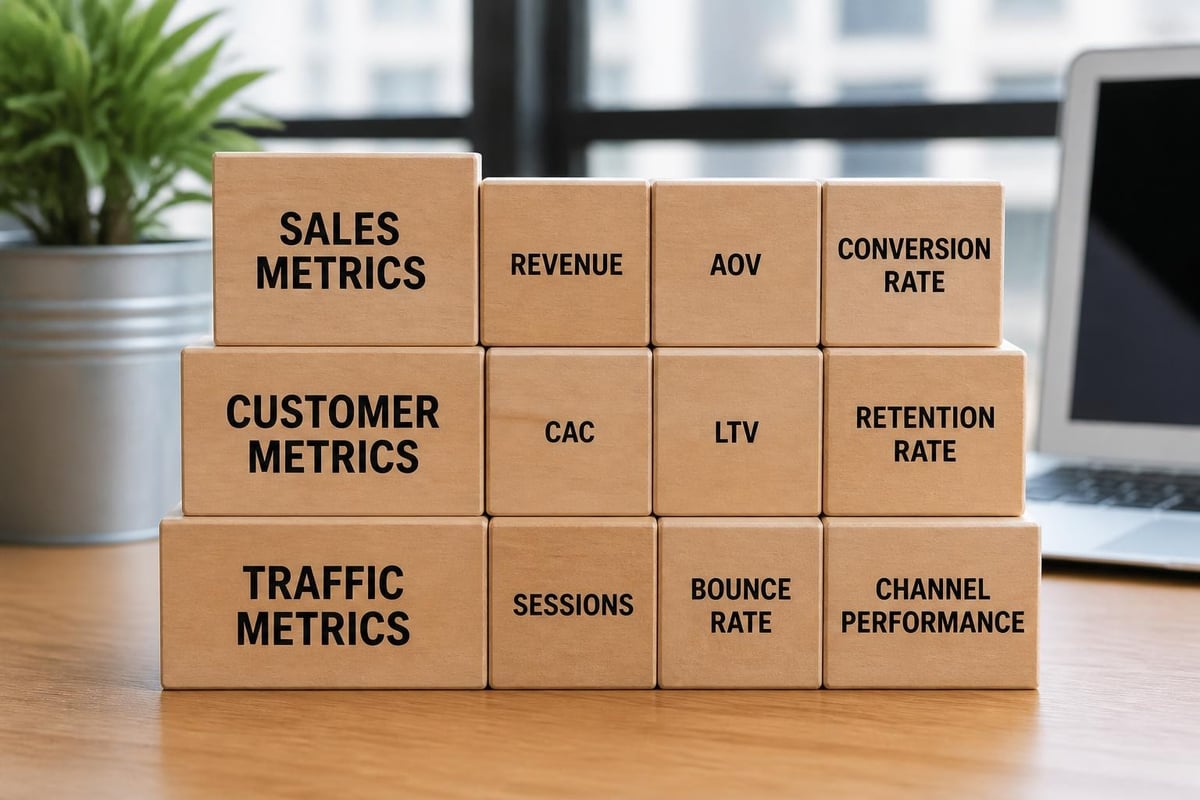
Understanding which numbers matter is the first step toward meaningful analysis. Shopify provides dozens of data points, but focusing on core performance indicators ensures you're monitoring the health of your business without drowning in irrelevant statistics.
Revenue and Sales Performance
Total sales revenue represents the most straightforward measure of business health, but breaking it down reveals opportunities for optimisation. Average order value (AOV) indicates how much customers spend per transaction, whilst conversion rate shows how effectively you turn visitors into buyers. Monitoring these metrics together highlights whether growth comes from more customers, higher spending, or improved efficiency.
| Metric | What It Measures | Why It Matters |
|---|---|---|
| Total Sales | Overall revenue generated | Business growth trajectory |
| Average Order Value | Revenue per transaction | Upselling and bundling effectiveness |
| Conversion Rate | Percentage of visitors who purchase | Site performance and UX quality |
| Sales by Channel | Revenue attributed to traffic sources | Marketing ROI and budget allocation |
| Sales by Product | Individual product performance | Inventory and merchandising decisions |
Customer Acquisition and Retention
Acquiring new customers costs significantly more than retaining existing ones, making customer lifetime value (CLV) and retention rate critical metrics. Customer acquisition cost (CAC) reveals how efficiently your marketing generates new buyers. When CLV exceeds CAC by a healthy margin, your business model is sustainable. When it doesn't, you're burning money.
Repeat customer rate demonstrates brand loyalty and product satisfaction. In 2026, with privacy changes affecting advertising effectiveness, organic retention through exceptional customer experience becomes increasingly valuable. Many merchants use advanced analytics platforms like Metorik to track customer cohorts and identify patterns in repeat purchasing behaviour that Shopify's native analytics might miss.
Traffic and Engagement Indicators
Understanding where visitors come from and how they behave on your site informs both marketing strategy and user experience optimisation. Sessions, unique visitors, and returning visitor rates paint a picture of audience engagement. Bounce rate indicates whether landing pages meet visitor expectations, whilst time on site suggests content relevance.
Traffic source analysis reveals:
- Which channels (organic search, paid ads, social, email, direct) drive the most qualified visitors
- Whether your SEO efforts are generating sustainable growth
- How paid advertising campaigns perform relative to their cost
- Whether social media engagement translates to actual sales
Shopify's Native Analytics Tools and Their Limitations
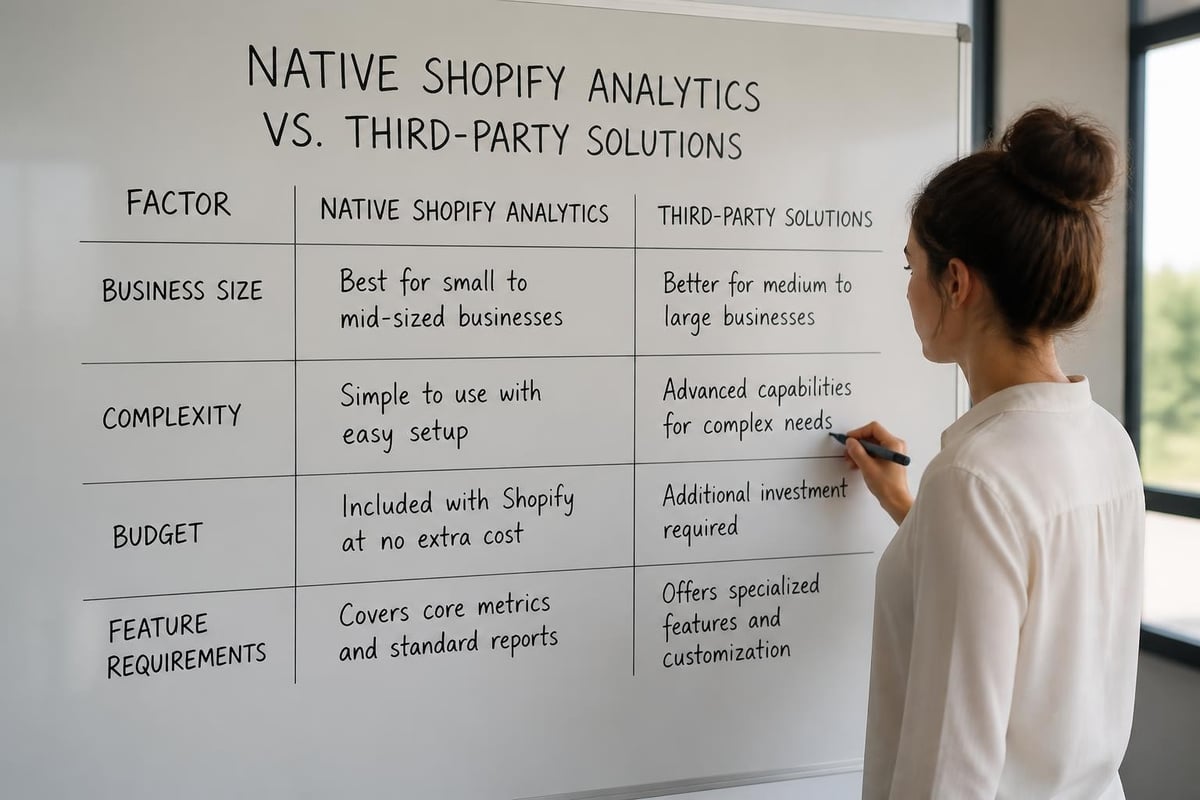
Shopify provides robust built-in analytics for all plan levels, with more advanced features available on higher tiers. The standard dashboard offers quick insights into sales trends, top products, and basic traffic sources. These tools serve most small to medium businesses adequately, particularly when starting out or operating with straightforward business models.
What Shopify Analytics Does Well
The platform excels at presenting sales data in digestible formats. You can quickly identify best-selling products, track revenue by day or month, and see which traffic sources generate sales. The reports are visual, relatively intuitive, and update in near real-time. For merchants focused primarily on top-line growth metrics, Shopify's native tools often suffice.
Financial reporting includes sales by payment method, taxes collected, and shipping charges, simplifying accounting processes. Inventory tracking integrates with sales data, helping prevent stockouts of popular items. Customer reports show purchasing frequency and total spend, enabling basic segmentation.
Where Native Analytics Fall Short
Despite these strengths, Shopify's built-in analytics have notable gaps. Profit tracking requires manual calculation or third-party tools, as the platform doesn't automatically account for product costs, shipping expenses, or marketing spend. Customer journey mapping is limited, making it difficult to understand the complete path from first visit to purchase.
Common limitations include:
- No native cohort analysis to track customer behaviour over time
- Limited attribution modelling for multi-touch customer journeys
- Basic product analytics that don't reveal correlation between purchases
- Minimal email marketing integration beyond Shopify Email
- Restricted historical data access on lower-tier plans
Brands seeking to optimise based on profitability rather than revenue often find they need supplementary tools. Working with a Shopify consultant can help identify which additional analytics capabilities your specific business requires and whether investment in premium tools delivers adequate return.
Third-Party Analytics Solutions Worth Considering
The Shopify app ecosystem offers numerous analytics enhancements, from simple dashboard improvements to comprehensive business intelligence platforms. Selecting the right tools depends on your business size, complexity, and specific analytical needs.
Advanced Reporting and Business Intelligence
Tools like Google Analytics 4 (GA4) provide deeper insights into user behaviour, including page-level engagement, funnel visualisation, and sophisticated audience segmentation. Implementing GA4 alongside Shopify analytics creates a more complete picture of customer interactions. The platform's machine learning capabilities can predict customer churn and identify high-value segments automatically.
Dedicated eCommerce analytics platforms often specialise in areas Shopify doesn't prioritise. They track profit margins by product, calculate true marketing ROI including all costs, and provide automated reports that highlight anomalies requiring attention. Many integrate with advertising platforms to show exactly which campaigns drive profitable customers, not just sales.
Competitive Intelligence Tools
Understanding competitor performance provides valuable market context for your own metrics. Tools like ZIK Analytics reveal competitor product performance and advertising strategies, whilst platforms such as Koala Apps offer insights into competitors' installed applications and themes. These competitive insights help benchmark your performance and identify opportunities in your market segment.
Several platforms including SpyStore.app and ShopXray allow merchants to analyse any Shopify store's technology stack, best-sellers, and estimated traffic. Whilst these tools raise privacy considerations, they've become standard competitive research resources in 2026. MyShopStats focuses specifically on tracking competitor prices and product changes, enabling dynamic pricing strategies.
Setting Up Analytics for Actionable Insights
Having tools available means nothing without proper implementation. Many merchants install analytics applications but fail to configure them correctly, leading to incomplete data or misattributed conversions. Proper setup requires attention to detail and understanding of how different tracking methods interact.
Implementation Best Practices
Start by ensuring Shopify's own analytics are working correctly. Verify that checkout tracking fires properly, payment confirmations are recorded, and customer data syncs accurately. Small configuration errors early in your store's life can corrupt months of data, making historical analysis unreliable.
When adding Google Analytics or third-party platforms, implement enhanced eCommerce tracking to capture detailed transaction data. This includes product impressions, add-to-cart events, checkout steps, and purchase completion. Tag manager platforms simplify this process, allowing non-technical merchants to maintain tracking without editing theme code directly.
Configuration checklist:
- Enable enhanced eCommerce in Google Analytics 4
- Set up conversion tracking for all marketing platforms
- Configure UTM parameters for campaign tracking
- Implement customer privacy controls compliant with UK regulations
- Test checkout flow to confirm all events fire correctly
- Create custom dashboards for your specific KPIs
Creating Meaningful Dashboards
Raw data becomes useful only when organised around specific questions you need answered. Rather than displaying every available metric, effective dashboards focus on indicators that inform actual business decisions. A typical eCommerce dashboard might track daily revenue, conversion rate trends, top products, and marketing performance in a single view.
Segment dashboards by audience or time period to spot patterns. For example, comparing mobile versus desktop conversion rates might reveal technical issues affecting specific devices. Year-over-year comparisons account for seasonal variations that make month-to-month data misleading for many product categories.
Interpreting Data to Drive Store Performance
Collecting metrics is merely the starting point. The real value emerges when you analyse trends, identify correlations, and test hypotheses based on what the data suggests. This analytical process separates successful merchants from those who simply accumulate information without acting on it.
Identifying Growth Opportunities
When average order value trends downward, investigate whether it's due to promotional discounting, changes in product mix, or declining basket sizes. Each cause requires a different solution. Similarly, rising traffic with stable conversion rates suggests your marketing is working, whilst rising traffic with declining conversions points to quality issues in new visitors.
Product performance analysis reveals which items drive profitability versus which consume inventory capital without adequate return. Many merchants discover their perceived best-sellers actually generate lower margins than slower-moving products. This insight informs merchandising strategy and homepage design, ensuring prominent placement goes to profitable products rather than simply popular ones.
| Scenario | Likely Cause | Recommended Action |
|---|---|---|
| Traffic up, sales flat | Poor quality traffic or technical issues | Review traffic sources and test checkout flow |
| Sales up, profit down | Margin compression or increased costs | Audit product costs and promotional strategy |
| High cart abandonment | Unexpected costs or complicated checkout | Simplify process and clarify pricing earlier |
| Low repeat rate | Product quality or poor post-purchase experience | Improve fulfilment and implement retention campaigns |
Connecting Analytics to Store Improvements
Data analysis should directly inform development priorities. If mobile conversion rates lag desktop significantly, investing in responsive design optimisation becomes a clear priority. When particular product pages show high bounce rates, content improvements or better product photography may be required.
Page speed metrics correlate strongly with conversion performance, making them critical analytics to monitor. Stores that migrated to Shopify from heavier platforms often see immediate performance gains, as demonstrated in migrations like the Campervan Coffee Co project, where technical improvements directly impacted sales metrics.

Avoiding Common Analytics Mistakes
Even experienced merchants fall into predictable traps when working with shopify store analytics. Recognising these pitfalls helps you maintain data integrity and draw accurate conclusions from your analysis.
Misattribution and Tracking Errors
Attribution models determine which marketing touchpoint receives credit for a sale. Last-click attribution, Shopify's default, credits the final interaction before purchase. This approach systematically undervalues awareness-building activities like content marketing or social media engagement that introduce customers to your brand initially.
In 2026, privacy restrictions have made accurate attribution more challenging. iOS privacy features limit Facebook pixel effectiveness, whilst cookie restrictions affect Google Analytics tracking. Merchants must accept some uncertainty whilst implementing first-party data collection strategies to maintain visibility into customer journeys.
Common tracking problems include:
- Ad blockers preventing analytics scripts from firing
- Incorrect UTM parameters creating duplicate channel entries
- Checkout on different domains breaking funnel tracking
- Apps interfering with theme-based tracking code
- Failed implementation after theme updates
Vanity Metrics and Misleading Indicators
Total visitors sounds impressive but means little without context about conversion quality. Similarly, social media followers don't directly correlate with revenue unless those audiences actually purchase. Focusing on metrics that connect to commercial outcomes prevents wasted effort optimising numbers that don't impact profitability.
Email open rates have become increasingly unreliable due to privacy features that auto-load images, artificially inflating this metric. Click-through rates and conversion from email provide more accurate performance indicators. When evaluating marketing effectiveness, always trace metrics back to revenue and profit, not intermediate engagement statistics.
Integrating Analytics Across Your Business Operations
Shopify store analytics shouldn't exist in isolation. The most valuable insights emerge when eCommerce data connects with inventory management, customer service, and financial systems. This integrated approach provides a complete view of business health and reveals opportunities that siloed data would miss.
Inventory and Fulfilment Optimisation
Sales velocity data informs purchasing decisions, helping maintain optimal stock levels without tying up excessive capital in slow-moving inventory. Analytics reveal seasonal patterns, allowing you to increase stock ahead of predictable demand spikes and reduce it during slower periods.
Stockout analytics identify how often you miss sales due to inventory gaps. Combined with product performance data, this helps prioritise reordering. When certain products consistently sell out quickly, consider increasing minimum stock levels or negotiating better supplier terms to improve margins on these proven performers.
Customer Service and Retention
Integrating analytics with customer support platforms reveals patterns in product issues, common questions, and service quality. If particular products generate disproportionate support tickets, investigate whether descriptions are misleading, quality is inconsistent, or complexity requires better documentation.
Customer lifetime value analysis combined with support interaction data might reveal that customers who contact support before their first purchase actually have higher retention rates. This insight could justify investing in proactive customer service or live chat functionality to increase conversion and long-term value.
Privacy, Security, and Analytics in 2026
Data collection faces increasing regulatory scrutiny. UK GDPR requirements, combined with browser privacy features, affect what data you can collect and how you must handle it. Responsible analytics practices protect your business whilst maintaining customer trust.
Compliance and Best Practices
Cookie consent mechanisms are mandatory for UK-based businesses. Your analytics implementation must respect user choices about tracking, even though this creates gaps in your data. First-party data collection through accounts, surveys, and direct interactions becomes more valuable as third-party tracking diminishes.
Shopify store analytics should never compromise customer privacy. Avoid collecting unnecessary personal information, secure any data you do gather, and maintain transparent policies about data usage. Security vulnerabilities in analytics applications can expose stores to significant risks, as highlighted by incidents like the Shopify plugin security flaw that affected hundreds of merchants.
Security considerations include:
- Regularly auditing installed analytics applications for updates
- Limiting staff access to sensitive customer data
- Implementing two-factor authentication on admin accounts
- Reviewing app permissions to ensure appropriate data access
- Maintaining backups of historical analytics data
Following security best practices helps protect both your business and customer information whilst maintaining the analytical capabilities required for growth.
Building an Analytics-Driven Culture
The most sophisticated analytics tools deliver no value if insights don't inform decisions. Successful eCommerce brands embed data literacy throughout their organisation, ensuring everyone from marketing to customer service understands how their work impacts key metrics.
Regular Review Processes
Establish weekly or monthly analytics reviews where team members examine performance against goals, identify trends, and propose experiments based on what the data suggests. This structured approach prevents reactive decision-making whilst encouraging continuous improvement based on evidence.
Dashboard sharing ensures relevant team members access the metrics they need without overwhelming them with unnecessary data. Marketing staff require channel performance and customer acquisition metrics, whilst fulfilment teams benefit from inventory and shipping analytics. Tailored views keep everyone focused on their area of responsibility.
Testing and Experimentation
Analytics reveal what's happening, but controlled experiments prove why. A/B testing different product page layouts, pricing strategies, or promotional approaches transforms hypotheses into validated insights. Shopify's native tools support basic testing, whilst specialised platforms enable more sophisticated multivariate experiments.
Document test results and integrate learnings into standard operating procedures. Over time, this builds institutional knowledge about what works for your specific audience and product category. Even failed experiments provide value by eliminating ineffective approaches and refining your understanding of customer preferences.
Mastering shopify store analytics transforms how you understand and grow your eCommerce business, replacing guesswork with data-driven strategy that delivers measurable results. Whether you're analysing sales trends, optimising conversion funnels, or identifying your most profitable customer segments, the insights gained from proper analytics implementation directly impact your bottom line. If you're ready to build a high-performing store that turns data into growth, Futur Media specialises in creating conversion-focused Shopify experiences backed by strategic analytics implementation. Get in touch to discuss how we can help optimise your store for sustainable, profitable growth.



.svg)

