
.svg)





%201.avif)
Understanding how your Shopify store performs is fundamental to growing your eCommerce business. Without proper analytics, you're making decisions based on guesswork rather than data. Shopify analytics tools provide the insights you need to understand customer behaviour, identify sales trends, optimise marketing spend, and ultimately increase revenue. Whether you're running a new store or scaling an established brand, choosing the right analytics stack can be the difference between steady growth and stagnation. This guide explores the essential shopify analytics tools available in 2026, from native Shopify features to powerful third-party integrations that deliver deeper insights.
Native Shopify Analytics Capabilities
Shopify's built-in analytics provide a solid foundation for most store owners. The platform includes comprehensive reporting across sales, customers, marketing, and behaviour without requiring any additional tools or monthly subscriptions.
Understanding Shopify's Analytics Dashboard
Shopify's analytics and reporting dashboards offer real-time visibility into your store's performance. The native system tracks total sales, average order value, conversion rates, and returning customer rates across customisable date ranges.
For merchants on Shopify's higher-tier plans, the analytics become significantly more sophisticated. Standard reports include:
- Sales by channel: Track which sales channels drive the most revenue
- Customer cohort analysis: Understand purchasing patterns over time
- Product performance: Identify bestsellers and underperforming inventory
- Marketing attribution: Connect sales to specific campaigns
- Traffic sources: See where visitors originate before purchase
The platform automatically segments data by device type, location, and referral source, giving you immediate insights without manual configuration.

Limitations of Native Analytics
Whilst Shopify's built-in tools are comprehensive, they have boundaries. Historical data access varies by plan tier, with basic plans offering limited lookback periods. Custom reporting requires manual exports and manipulation in spreadsheet software.
The native analytics also struggle with multi-channel attribution. If customers interact with your brand across email, social media, and paid ads before converting, Shopify typically credits only the final touchpoint. This oversimplification can lead to misallocated marketing budgets.
Essential Third-Party Shopify Analytics Tools
Beyond Shopify's native capabilities, specialised shopify analytics tools fill specific gaps and provide advanced functionality for growing brands.
Google Analytics 4 Integration
Google Analytics remains the gold standard for comprehensive website analytics. The GA4 integration with Shopify tracks user journeys across sessions, devices, and platforms with superior granularity compared to native reporting.
Key advantages include:
- Cross-platform tracking: Follow customers from social media to your store
- Advanced segmentation: Create custom audiences based on behaviour
- Funnel visualisation: Identify exactly where customers abandon purchases
- Predictive metrics: Use machine learning to forecast churn and lifetime value
Setting up GA4 properly requires technical knowledge of eCommerce events and enhanced conversions. Incorrectly configured tracking leads to data discrepancies and poor decision-making.
Specialist Conversion Analytics Platforms
Tools like Lucky Orange, Hotjar, and Microsoft Clarity add qualitative insights to your quantitative data. These platforms record user sessions, generate heatmaps, and identify friction points in your customer journey.
| Tool | Best For | Starting Price | Key Feature |
|---|---|---|---|
| Lucky Orange | Session recordings | £10/month | Live visitor tracking |
| Hotjar | Heatmaps | Free tier available | User feedback polls |
| Microsoft Clarity | Budget-conscious stores | Free | Rage click detection |
Session recordings reveal why customers behave in specific ways. You'll see exactly where users struggle with navigation, which product images they scrutinise, and what causes cart abandonment. This qualitative data complements your quantitative metrics perfectly.
Customer Lifetime Value Tools
Repeat Customer Insights and similar platforms calculate true customer lifetime value, cohort retention rates, and predictive purchase patterns. These shopify analytics tools answer critical questions about customer quality rather than just quantity.
Understanding which customer segments generate the most long-term value helps you:
- Allocate marketing budget more effectively
- Design targeted retention campaigns
- Identify high-value customer characteristics
- Calculate true customer acquisition cost payback periods
For stores focused on building sustainable growth rather than vanity metrics, CLV analytics are essential. Many ambitious brands working with specialists like those offering Shopify CRO use these insights to inform conversion optimisation strategies.
Marketing Attribution and Performance Tools
Accurate attribution remains one of eCommerce's greatest challenges. Multiple shopify analytics tools address this problem from different angles.
Multi-Touch Attribution Platforms
Tools like TripleWhale, Northbeam, and Elevar connect the dots between multiple customer touchpoints before conversion. Rather than crediting only the last click, these platforms assign proportional value across the entire customer journey.
First-touch attribution identifies which channels introduce new customers to your brand. Last-touch attribution shows what drives final conversions. Linear attribution distributes credit equally across all touchpoints. Time-decay attribution gives more weight to interactions closer to purchase.
Understanding these models helps you invest marketing budget where it actually generates results rather than where conversions happen to be recorded.
Email Marketing Analytics Integration
Klaviyo, Omnisend, and similar platforms provide deep analytics specifically for email and SMS marketing. These tools track beyond basic open and click rates to measure:
- Revenue per email sent
- Customer lifecycle segmentation performance
- Automated flow conversion rates
- List growth and engagement trends
The best email platforms integrate bidirectionally with Shopify, pulling product data in and pushing conversion data back. This creates a unified view of how email marketing contributes to overall revenue.

Inventory and Product Performance Analytics
Managing inventory effectively requires granular product-level analytics beyond basic sales reports.
Advanced Inventory Forecasting
Inventory Planner, Stocky, and similar tools analyse sales velocity, seasonal trends, and reorder points to prevent stockouts and overstock situations. These shopify analytics tools integrate with your supplier lead times and safety stock requirements.
Predictive inventory analytics help you:
- Reduce capital tied up in slow-moving stock
- Prevent lost sales from stockouts
- Negotiate better terms with suppliers through accurate forecasting
- Identify products approaching end-of-life
For stores with extensive catalogues or seasonal products, inventory analytics directly impact profitability by optimising working capital.
Product Bundle and Upsell Analysis
Understanding which products customers purchase together informs bundling strategies and upsell opportunities. Tools like Peel Insights identify product affinity and sequential purchase patterns.
If customers who buy Product A frequently return to purchase Product B within 30 days, you can create subscription options, bundles, or post-purchase upsell sequences. These insights increase average order value without requiring additional traffic.
Data Warehouse and Business Intelligence Solutions
For larger stores or those with complex data needs, centralised data warehouses provide unified analytics across all business systems.
Centralised Data Platforms
Panoply, Supermetrics, and similar solutions pull data from Shopify, Google Analytics, advertising platforms, email marketing tools, and other sources into a single database. Top Shopify analytics tools like these enable cross-platform reporting impossible within individual systems.
Benefits include:
- Single source of truth: Eliminate conflicting reports from different platforms
- Custom dashboards: Build visualisations specific to your KPIs
- Automated reporting: Schedule reports for stakeholders without manual work
- Advanced analysis: Query data using SQL or business intelligence tools
The technical complexity and cost make these solutions appropriate for established stores generating significant revenue. Smaller stores often don't need this level of sophistication.
Security Considerations for Analytics Tools
When connecting third-party analytics tools to your Shopify store, security becomes paramount. Security vulnerabilities in Shopify plugins can expose customer data and compromise your store. Always vet tools thoroughly, maintain updated versions, and review access permissions regularly.
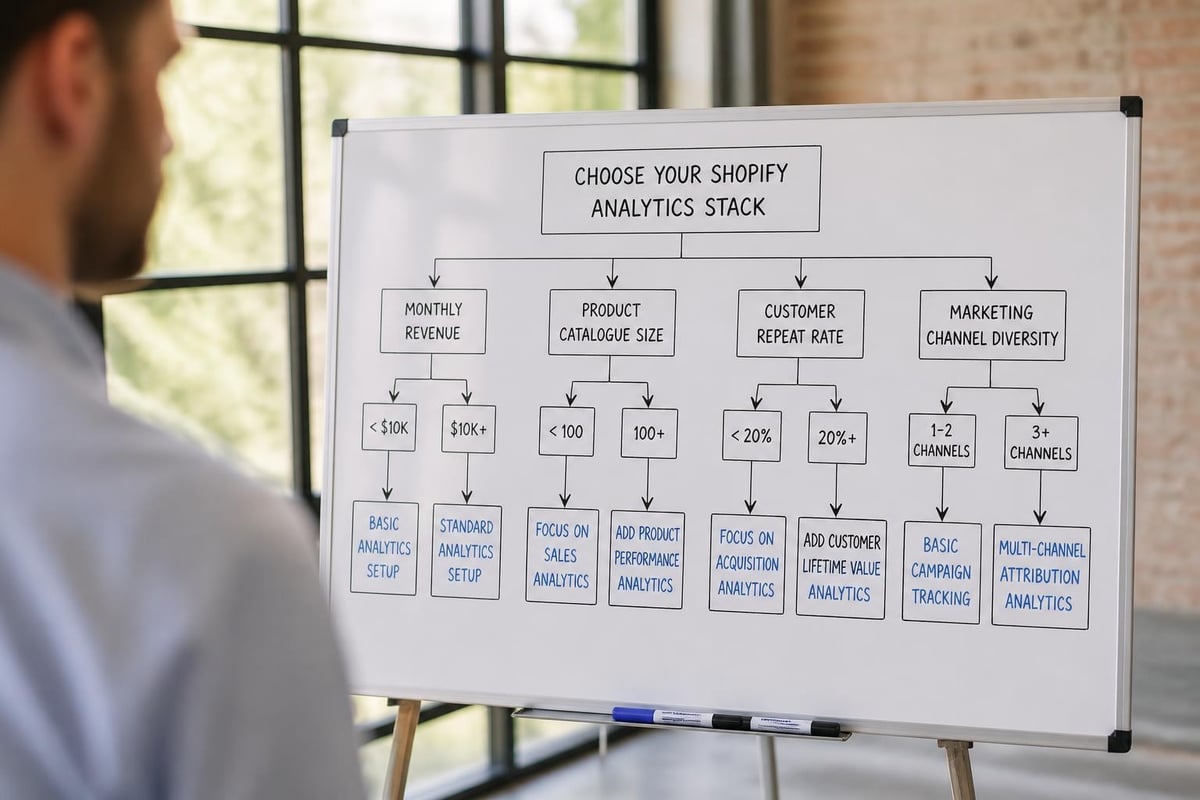
Choosing the Right Analytics Stack for Your Store
Selecting shopify analytics tools requires matching capabilities to your actual needs rather than adopting every available option.
Analytics Requirements by Store Stage
New stores (0-100 orders/month) should focus on:
- Native Shopify analytics
- Google Analytics 4 for traffic insights
- One session recording tool for qualitative feedback
Growing stores (100-1000 orders/month) benefit from adding:
- Email marketing platform analytics
- Customer lifetime value tracking
- Basic attribution reporting
Established stores (1000+ orders/month) often need:
- Multi-touch attribution platforms
- Inventory forecasting tools
- Data warehouse solutions for unified reporting
Building your analytics stack gradually prevents data overload and ensures you actually use the insights generated. CommerceBolt's guide to analytics tools provides additional perspective on matching tools to business stage.
Cost-Benefit Analysis Framework
| Monthly Revenue | Recommended Analytics Budget | Priority Tools |
|---|---|---|
| £0-10k | £0-50 | Native + GA4 + free session recording |
| £10k-50k | £50-300 | Add email analytics + paid session recording |
| £50k-200k | £300-1000 | Add attribution platform + CLV tracking |
| £200k+ | £1000+ | Add data warehouse + advanced forecasting |
These ranges represent guidelines rather than rules. Stores with complex product catalogues might need inventory analytics earlier, whilst service-based businesses might prioritise customer analytics differently.
Implementing Analytics for Actionable Insights
Installing shopify analytics tools is only the beginning. Extracting actionable insights requires proper implementation and regular analysis.
Setting Up Proper Tracking
Accurate data begins with correct configuration. Enhanced eCommerce tracking in GA4 requires proper event tagging for product views, add-to-cart actions, checkout initiation, and purchases. Missing events create blind spots in your customer journey analysis.
Work with developers experienced in Shopify development to ensure tracking implementation follows best practices. Common mistakes include:
- Failing to track dynamic content updates
- Missing cross-domain tracking for external checkout flows
- Incorrectly configured conversion values
- Duplicate transaction recording from multiple tools
Test thoroughly using debug modes and validation tools before relying on data for decisions.
Creating Meaningful Dashboards
The best analytics dashboards answer specific business questions rather than displaying every available metric. Focus on actionable KPIs aligned with your current growth priorities.
For example, if you're focusing on customer retention, your dashboard should prominently display:
- Repeat purchase rate by cohort
- Customer lifetime value trends
- Time between first and second purchase
- Retention rate by acquisition channel
Avoid vanity metrics that feel good but don't drive decisions. Total page views matter less than conversion rate. Social media followers matter less than revenue per follower.
Privacy and Compliance Considerations
Analytics tools collect customer data, making privacy compliance essential in 2026.
GDPR and Data Protection
UK and European stores must comply with GDPR requirements for customer data collection and storage. Your analytics setup needs:
- Clear cookie consent: Obtain permission before tracking non-essential cookies
- Privacy policy transparency: Disclose which tools collect customer data
- Data retention limits: Configure tools to delete old data automatically
- Customer data access: Enable customers to request their tracked data
Tools handling sensitive financial information require additional security measures. Research papers on data quality measurement and monitoring provide frameworks for ensuring analytics accuracy whilst maintaining privacy standards.
Differential Privacy Approaches
Advanced stores concerned with maximum privacy protection can implement differential privacy frameworks. Research on differential privacy analytics demonstrates methods for gaining insights whilst mathematically guaranteeing individual customer privacy.
These approaches remain cutting-edge and complex to implement, but they represent the future direction of privacy-conscious analytics.
Maximising ROI from Analytics Investment
The real value from shopify analytics tools comes from acting on insights rather than simply collecting data.
Regular Analysis Cadences
Establish consistent review schedules for different metric categories:
Daily reviews should cover:
- Sales performance versus targets
- Advertising spend and ROAS
- Inventory alerts and stockouts
- Website errors or downtime
Weekly reviews should include:
- Marketing channel performance
- Product performance trends
- Customer service metrics
- Traffic source changes
Monthly reviews should examine:
- Customer cohort performance
- Lifetime value trends
- Inventory forecasting accuracy
- Strategic initiative progress
Assign responsibility for each review type to specific team members. Analytics without assigned ownership rarely drive action.
From Insights to Action
Converting analytics into business improvements requires a structured approach:
- Identify the insight: What does the data reveal?
- Determine significance: Is this insight statistically meaningful?
- Hypothesise the cause: Why is this happening?
- Design an intervention: What action could improve the metric?
- Implement and measure: Test the change and track results
For instance, if analytics reveal that mobile conversion rates lag desktop by 40%, investigate mobile user experience through session recordings. Hypothesis: checkout friction on mobile devices. Intervention: simplify mobile checkout flow. Measurement: track mobile conversion rate changes post-implementation.
Stores prioritising conversion rate optimisation use this cycle continuously to incrementally improve performance based on data rather than assumptions.
Integration with Broader Business Systems
Your eCommerce analytics shouldn't exist in isolation from other business data.
Connecting Financial Systems
Integrate Shopify analytics with accounting platforms like Xero or QuickBooks to understand true profitability. Revenue numbers from Shopify don't account for:
- Payment processing fees
- Shipping costs versus charges
- Returns and refunds
- Cost of goods sold
- Marketing spend
- Operational overhead
Unified financial analytics reveal which products, customer segments, and channels actually generate profit rather than just revenue.
Warehouse and Fulfilment Integration
For stores managing physical inventory and fulfilment, connecting warehouse management systems with analytics provides operational insights. Track metrics like:
- Time from order to dispatch
- Picking accuracy rates
- Returns by product or supplier
- Fulfilment cost per order
These operational metrics directly impact customer satisfaction and unit economics, making them as important as traditional eCommerce metrics.
Effective analytics transform how you run your Shopify store, replacing guesswork with data-driven decision-making across every aspect of your business. The right combination of native Shopify features and carefully selected third-party tools provides the visibility needed to grow sustainably whilst maintaining profitability. If you're ready to build or optimise a Shopify store designed around measurable performance, Futur Media combines technical expertise with commercial understanding to create eCommerce experiences that deliver results. Our Cardiff-based team specialises in building high-performing Shopify stores backed by proper tracking, analytics, and continuous optimisation.



.svg)

