
.svg)





%201.png)
Building a successful eCommerce store requires more than selecting a template and adding products. Shopify web development combines strategic planning, technical expertise, and user-focused design to create stores that convert visitors into customers. For UK brands seeking growth in 2026's competitive online marketplace, understanding the development process and best practices ensures your Shopify store performs efficiently whilst delivering exceptional customer experiences. Whether launching a new store, migrating from another platform, or enhancing existing functionality, proper development foundations determine long-term success.
Understanding Shopify Web Development
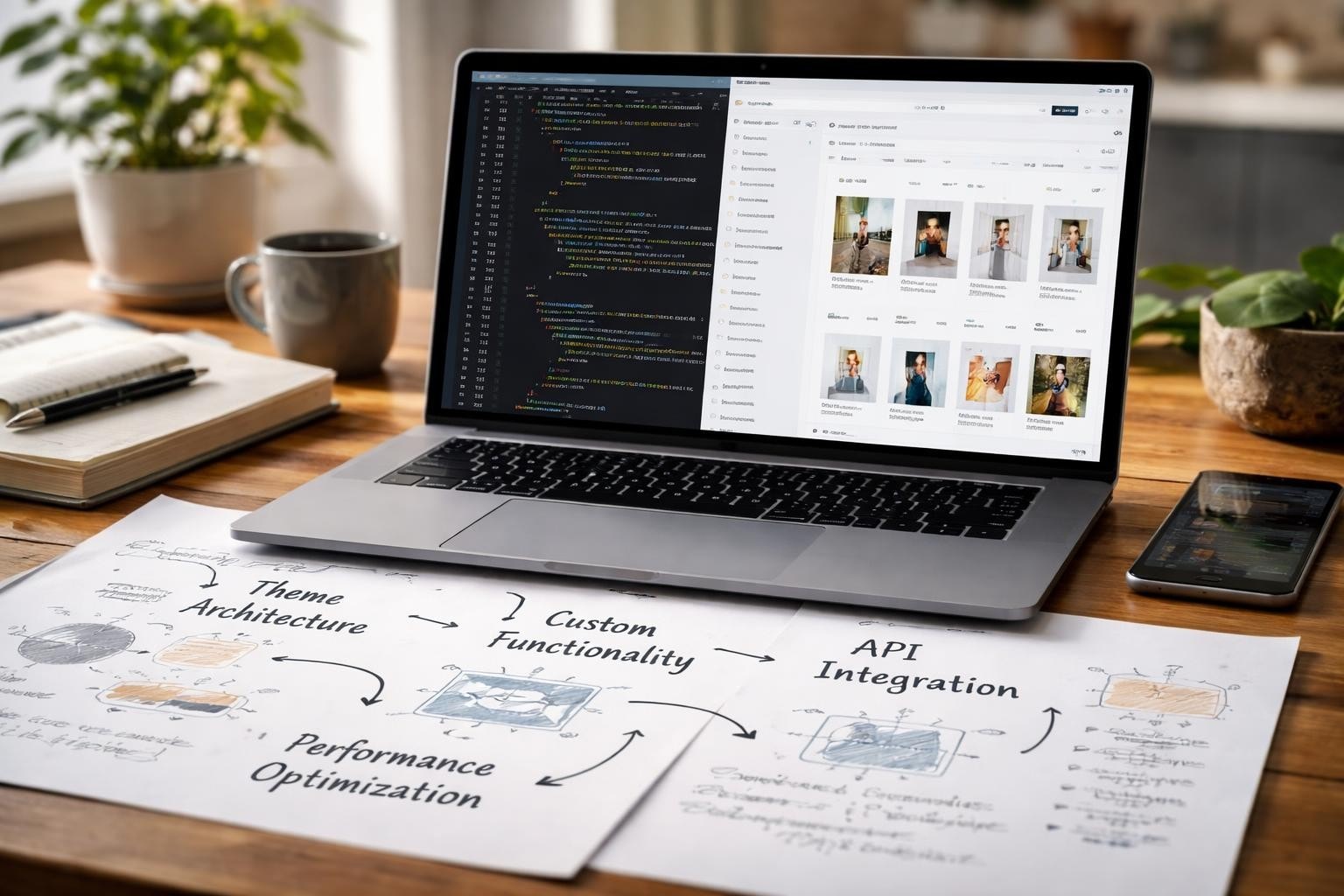
Shopify web development encompasses the technical processes involved in building, customising, and optimising eCommerce stores on the Shopify platform. This includes theme development, custom functionality implementation, API integrations, and performance optimisation.
The platform offers flexibility through its Liquid templating language, extensive API ecosystem, and growing suite of modern development tools. Developers can choose between customising existing themes or building bespoke solutions from the ground up.
Modern Shopify development approaches include:
- Theme customisation using Liquid, HTML, CSS, and JavaScript
- Headless commerce implementations with Hydrogen and Storefront API
- Custom app development for unique business requirements
- Third-party integrations with marketing, inventory, and fulfilment systems
- Performance optimisation for Core Web Vitals and page speed
The right development approach depends on your business requirements, budget, and timeline. Most UK brands benefit from customised theme development that balances visual appeal with technical performance, rather than completely custom builds that increase both cost and maintenance overhead.
Technical Architecture Decisions
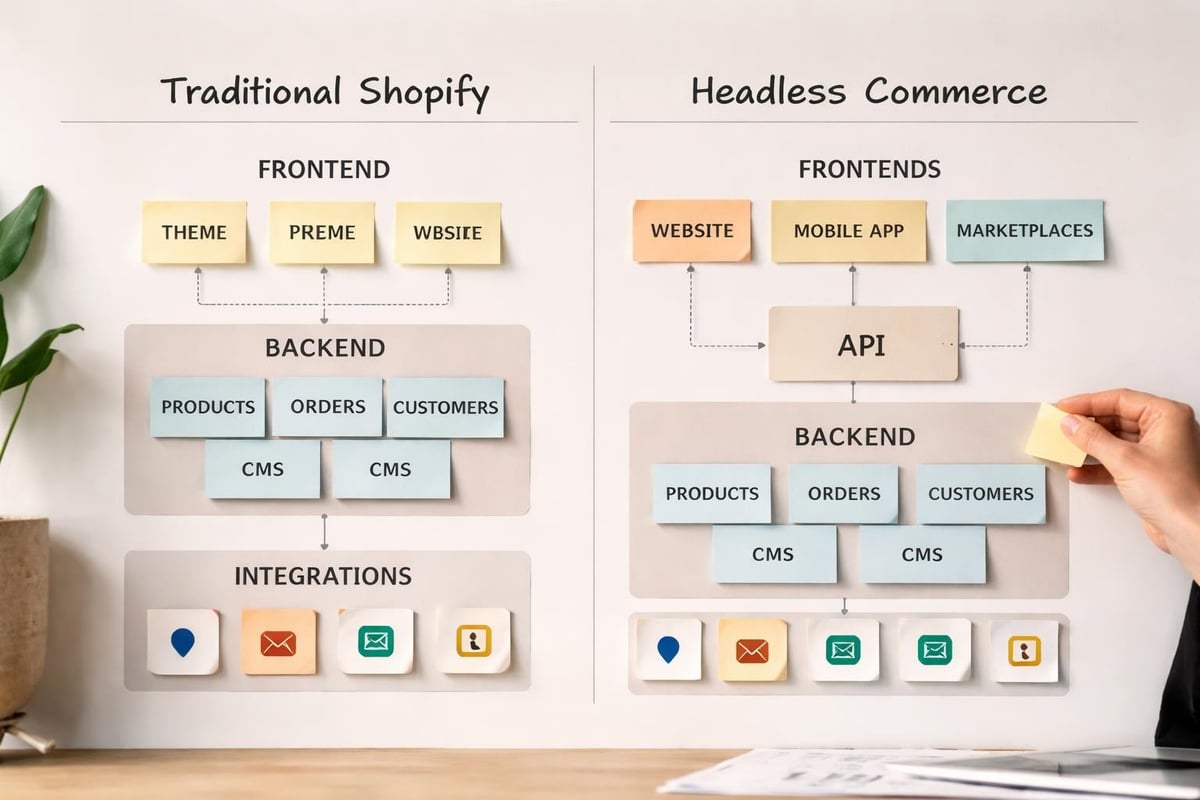
Choosing between traditional theme-based development and headless commerce represents a fundamental architectural decision. Traditional Shopify themes offer faster implementation, lower costs, and simpler maintenance. They suit most eCommerce businesses perfectly well.
Headless Shopify separates the frontend presentation layer from the backend commerce functionality. This approach provides greater design flexibility and potentially superior performance, but requires significantly more development resources and ongoing technical expertise.
For ambitious UK brands, Shopify Development services help navigate these architectural decisions by assessing your specific requirements, technical capabilities, and growth trajectory before committing to a development approach.
Development Best Practices for Performance
Performance directly impacts conversion rates, with even millisecond improvements influencing revenue. Shopify web development must prioritise speed, responsiveness, and efficient resource loading from the project's inception.
Following Shopify's performance best practices ensures your store loads quickly across devices and network conditions. This includes optimising images, minimising JavaScript execution, and leveraging browser caching effectively.
Performance FactorImpact on ConversionImplementation PriorityPage Load TimeHigh - 1s delay = 7% reductionCriticalMobile ResponsivenessHigh - 60%+ mobile trafficCriticalImage OptimisationMedium - affects load timeHighJavaScript EfficiencyMedium - impacts interactivityHighFont LoadingLow - affects perceived speedMedium
Image and Asset Optimisation
Images typically constitute the largest portion of page weight on eCommerce stores. Proper optimisation reduces load times without sacrificing visual quality.
Effective image optimisation strategies:
- Use WebP format with JPG fallbacks for broad compatibility
- Implement responsive images with srcset attributes
- Lazy load images below the fold
- Compress images before uploading to Shopify
- Specify width and height attributes to prevent layout shift
Beyond images, CSS and JavaScript files require optimisation. Minify these resources, remove unused code, and defer non-critical JavaScript to improve initial page rendering. The Shopify theme development guidelines provide detailed technical recommendations for asset management.
Modern Shopify themes should achieve Lighthouse scores above 90 for performance, accessibility, and best practices. These metrics correlate with both user experience and search engine rankings, making them essential benchmarks for quality development.
Custom Functionality and App Integration
Whilst Shopify provides robust out-of-the-box features, most businesses require additional functionality to match their unique processes and customer needs. This customisation happens through theme modifications, custom apps, or third-party integrations.
Evaluating whether to build custom functionality or use existing apps involves weighing development costs against ongoing subscription fees. Simple requirements often benefit from proven third-party apps, whilst unique business logic justifies custom development.
When to choose custom development:
- Unique business processes not served by existing apps
- Complex integrations with internal systems
- Performance-critical features where app overhead matters
- Long-term cost savings compared to monthly subscriptions
- Proprietary features that provide competitive advantage
When to use third-party apps:
- Standard eCommerce functionality (reviews, wishlists, email marketing)
- Rapid implementation requirements
- Features requiring ongoing updates and maintenance
- Proven solutions with established support
- Testing functionality before investing in custom builds
Integration architecture matters significantly for store performance. Each app potentially adds JavaScript, makes API calls, and increases page weight. Careful selection and implementation prevent performance degradation as functionality expands.
API Integration Patterns
Shopify's extensive API ecosystem enables connections with inventory management systems, marketing platforms, fulfilment services, and accounting software. Proper API integration ensures data synchronisation whilst maintaining performance.
REST and GraphQL APIs serve different purposes within Shopify web development. REST APIs provide straightforward access to Shopify resources, whilst GraphQL offers more efficient data retrieval for complex queries with specific field requirements.
Authentication, rate limiting, and error handling require careful implementation. Robust integrations include retry logic, proper error logging, and graceful degradation when external services experience issues. These considerations separate professional development from amateur implementations.

Theme Development and Customisation
Theme selection forms the foundation of your Shopify store's appearance and functionality. Whether starting with a commercial theme or building custom, understanding theme architecture ensures sustainable long-term development.
Shopify's Liquid templating language powers theme functionality, enabling dynamic content rendering based on product data, customer information, and business logic. Mastering Liquid's syntax, filters, and objects allows developers to create sophisticated customer experiences.
Theme Architecture and Organisation
Well-structured themes separate concerns logically, making maintenance and updates manageable. Following Shopify's theme best practices ensures code quality and reduces technical debt.
Essential theme structure elements:
- Templates - Define page-level structure for different content types
- Sections - Create reusable, customisable content blocks
- Snippets - Store reusable code fragments and components
- Assets - Manage CSS, JavaScript, and image files
- Config - Define theme settings and customisation options
Modern Shopify development increasingly uses sections everywhere approach, providing merchants with maximum flexibility to customise pages through the theme editor. This approach balances developer control with merchant autonomy.
Version control through Git remains essential for professional Shopify web development. Tracking changes, enabling collaboration, and providing rollback capabilities protect against errors and facilitate team development. Integration with Shopify's development tools streamlines deployment workflows.
Mobile-First Development Approach
With mobile commerce representing the majority of UK eCommerce traffic in 2026, mobile-first development has shifted from best practice to business necessity. Designing for mobile constraints first ensures experiences work universally.
Responsive design alone proves insufficient. Mobile-first development considers touch interactions, reduced screen real estate, and varied network conditions from the initial design phase. This approach prevents retrofitting desktop experiences onto mobile devices.
Mobile-first development priorities:
- Touch-friendly interface elements with adequate spacing
- Simplified navigation appropriate for smaller screens
- Optimised images and lazy loading for mobile networks
- Reduced form fields and streamlined checkout processes
- Fast initial page loads on 3G and 4G connections
Testing across actual devices remains critical, as browser emulation doesn't perfectly replicate real-world performance. UK brands should test on popular devices within their customer base, including mid-range Android phones that may have less powerful processors.
The common development mistakes guide highlights how neglecting mobile responsiveness damages both conversion rates and search rankings. Google's mobile-first indexing means your mobile experience directly determines search visibility.
Touch Optimisation and Interaction Design
Mobile users interact through touch, requiring larger tap targets, appropriate spacing, and gesture-friendly interfaces. Buttons should measure at least 44x44 pixels, with adequate spacing preventing accidental taps.
Swipe gestures for product image galleries, pull-to-refresh for collection pages, and smooth scrolling enhance mobile experiences. However, gesture-based navigation should supplement, not replace, visible navigation elements for discoverability.
Forms present particular mobile challenges. Implementing appropriate input types triggers optimal mobile keyboards, reducing friction during checkout. Autofill support, minimal required fields, and clear error messaging improve completion rates significantly.
Search Engine Optimisation Considerations
Technical SEO forms an integral component of Shopify web development, not an afterthought. Proper implementation during development prevents costly remediation whilst establishing strong search visibility foundations.
Shopify provides solid SEO fundamentals out of the box, but developers must configure and optimise numerous technical elements. These include URL structure, canonical tags, meta information, structured data, and XML sitemaps.
Development-phase SEO requirements:
- Clean, descriptive URL structures for products and collections
- Proper heading hierarchy (H1, H2, H3) throughout templates
- Fast page load speeds meeting Core Web Vitals thresholds
- Mobile-responsive design passing mobile-friendly tests
- Structured data markup for products, reviews, and breadcrumbs
- Optimised image alt attributes for accessibility and SEO
Developers should implement schema markup for products, reviews, FAQs, and other relevant content types. This structured data helps search engines understand your content whilst potentially earning rich snippets in search results.
For brands seeking comprehensive optimisation, understanding how SEO integrates with Shopify design ensures technical implementations support rather than hinder search visibility. Poor development choices create SEO barriers requiring significant effort to overcome.

Conversion Rate Optimisation Through Development
Shopify web development significantly influences conversion rates through performance, user experience, and trust signals. Developers should understand conversion principles to make informed technical decisions.
Page speed directly correlates with conversion rates, making performance optimisation a conversion strategy rather than purely technical concern. Similarly, removing friction from the purchase journey through streamlined checkout processes improves completion rates.
Development DecisionConversion ImpactImplementation ComplexityOne-page checkout+10-15% completionLow (Shopify default)Fast page loads (<3s)+5-7% conversionMediumTrust badges placement+2-4% conversionLowGuest checkout option+8-12% completionLow (Shopify setting)Mobile optimisation+15-20% mobile conversionMedium-High
User Experience and Interface Development
Intuitive navigation, clear calls-to-action, and logical information architecture guide visitors toward purchase decisions. Development choices either facilitate or hinder these elements.
Product page layouts should present information hierarchically, with essential details (price, availability, add-to-cart) immediately visible. Supporting information (specifications, shipping details, reviews) should be accessible without overwhelming primary content.
Collection pages benefit from filtering and sorting functionality that helps customers find relevant products quickly. Optimising collection pages combines design, development, and merchandising strategy for maximum effectiveness.
Cart and checkout experiences require particular attention to detail. Progress indicators, security reassurances, and clear shipping information reduce abandonment. Developers should minimise page loads during checkout, implement auto-save functionality, and provide clear error messaging.
Platform Migration and Data Integrity
Many UK brands arrive at Shopify through migration from platforms like WooCommerce, Magento, or BigCommerce. Shopify web development for migrations demands meticulous planning to preserve SEO value, customer data, and order history.
Migration projects require careful URL mapping to maintain search rankings, comprehensive data validation to prevent information loss, and thorough testing before cutover. The technical complexity varies significantly based on source platform and data volume.
Critical migration considerations:
- URL structure preservation or proper 301 redirects
- Customer account and order history transfer
- Product data including variants, images, and descriptions
- SEO metadata and content preservation
- Integration reconfiguration for apps and services
Successful migrations balance speed with thoroughness. Rushing the process risks data loss and SEO damage, whilst excessive delays postpone the benefits of improved platform capabilities. Experienced developers establish clear timelines with appropriate contingencies.
Brands considering platform changes should review comprehensive migration guides that outline the full process, common challenges, and success factors. Migration represents significant investment, making proper planning essential.
Ongoing Maintenance and Development
Launch represents the beginning of your Shopify store's lifecycle, not the conclusion. Ongoing development maintains performance, adds functionality, and adapts to changing business requirements.
Regular updates address security vulnerabilities, maintain compatibility with Shopify platform updates, and optimise based on performance data. Neglecting maintenance creates technical debt that becomes increasingly costly to resolve.
Recommended maintenance activities:
- Monthly performance monitoring and optimisation
- Quarterly conversion rate analysis and improvements
- Regular theme updates for security and compatibility
- Continuous testing across devices and browsers
- Integration health checks and API monitoring
Analytics data should inform development priorities. Identifying high-exit pages, slow-loading templates, or mobile-specific issues directs optimisation efforts toward maximum business impact. Data-driven development produces measurably better results than assumption-based changes.
Establishing relationships with experienced developers ensures access to expertise when needed. Whether through retained support services or project-based engagements, having reliable technical partners accelerates problem resolution and capability expansion.
Development Tools and Workflow
Professional Shopify web development requires appropriate tooling for efficiency, quality, and collaboration. The Shopify ecosystem provides numerous tools supporting modern development workflows.
Shopify CLI streamlines local development, enabling developers to work offline, preview changes instantly, and deploy confidently. Theme Kit provides alternative command-line functionality for theme management and deployment.
Essential development tools:
- Shopify CLI - Local development environment and theme management
- Git version control - Code tracking, collaboration, and rollback capabilities
- Lighthouse - Performance, accessibility, and SEO auditing
- Browser DevTools - Debugging, performance profiling, and testing
- Shopify Theme Inspector - Real-time Liquid debugging and performance insights
Development environments should mirror production as closely as possible. Using development stores prevents testing and experimentation from affecting live customer experiences. Proper staging workflows enable thorough testing before deploying changes to production.
Collaboration between designers, developers, and merchants requires clear communication and defined processes. Design handoffs should include specifications, assets, and interaction details. Development should follow agreed timelines with regular progress updates. Testing should involve merchant review before final deployment.
Selecting Development Partners
Choosing between in-house development, freelancers, or agencies significantly impacts project outcomes. Each approach offers distinct advantages depending on project scope, timeline, and ongoing requirements.
In-house developers provide deep business knowledge and immediate availability but require ongoing employment costs. Freelancers offer flexibility and specialised skills but may lack accountability for long-term outcomes. Agencies provide comprehensive expertise and reliable delivery but typically command higher rates.
For UK eCommerce brands, partnering with experienced Shopify specialists ensures platform expertise, proven processes, and reference implementations. When evaluating potential partners, examine portfolio quality, client testimonials, and technical approach rather than simply comparing hourly rates.
Key partner selection criteria:
- Demonstrated Shopify expertise with relevant portfolio examples
- Clear development processes and project management
- Transparent pricing and realistic timeline estimates
- Ongoing support and maintenance capabilities
- Strong communication and collaborative approach
Understanding what makes effective eCommerce development companies helps distinguish genuine expertise from superficial claims. Technical competence matters, but so does commercial understanding and strategic thinking.
The best development partners combine technical skill with business acumen, understanding how development decisions impact conversion rates, customer experience, and long-term growth. They challenge assumptions, propose alternatives, and explain trade-offs rather than simply implementing requests.
Future-Proofing Your Shopify Store
Technology evolves continuously, making future-proof development approaches essential for sustainable eCommerce success. Whilst predicting specific changes proves impossible, certain principles ensure your store remains adaptable.
Following Shopify's recommended practices, maintaining clean code, and documenting customisations enables easier updates and modifications. Avoiding deprecated features and staying current with platform capabilities prevents technical debt accumulation.
Future-proofing strategies:
- Build on Shopify's latest theme architecture (Online Store 2.0)
- Use section-based designs for maximum flexibility
- Implement Progressive Web App capabilities where appropriate
- Maintain modular code structure for easier updates
- Document all customisations and integration points
Emerging technologies like AI-powered personalisation, augmented reality product visualisation, and voice commerce may become competitive necessities. Flexible technical foundations enable adopting these capabilities without complete rebuilds.
Monitoring Shopify's engineering developments keeps you informed about platform evolution and new capabilities. Early adoption of beneficial features provides competitive advantages whilst platform support remains strong.
Successful Shopify web development combines technical expertise, conversion focus, and strategic thinking to build stores that drive measurable business results. From performance optimisation and mobile-first approaches through SEO implementation and ongoing maintenance, every development decision influences your eCommerce success. Whether launching a new store, enhancing existing functionality, or migrating from another platform, Futur Media delivers performance-led Shopify development that helps ambitious UK brands grow their online presence and achieve their commercial objectives.



