
.svg)






%201.avif)
Your product pages are the digital equivalent of your shop floor. They're where browsing becomes buying, where interest converts to revenue, and where first impressions determine whether a visitor clicks "Add to Cart" or navigates away. Learning to edit Shopify product page layouts, content, and elements effectively is essential for any eCommerce brand looking to maximise conversions and create exceptional customer experiences. Whether you're launching a new store, refreshing an existing catalogue, or optimising for better performance, understanding the full range of customisation options available to you will directly impact your bottom line. This comprehensive guide walks you through everything you need to know about editing Shopify product pages in 2026, from basic content updates to advanced customisation techniques that transform standard templates into conversion-focused sales machines.
Understanding Shopify Product Page Architecture
Before you edit Shopify product page elements, you need to understand how these pages are structured. Shopify uses a combination of templates, sections, and blocks that work together to create the final customer-facing page.
Theme Templates and Product Page Structure
Every Shopify theme includes a product template that controls the overall layout and available customisation options. When you edit Shopify product page designs, you're primarily working within the constraints and possibilities defined by your active theme.
Key architectural components include:
- Product templates (main, alternate, custom)
- Sections (reusable content containers)
- Blocks (individual elements within sections)
- Metafields (custom data fields for additional information)
- Liquid code (Shopify's templating language)
Modern Shopify themes built on the Online Store 2.0 architecture offer significantly more flexibility than legacy themes. With 2.0 themes, you can add, remove, and rearrange sections directly on product pages without touching code, making it considerably easier to edit Shopify product page layouts for different product types.
The Role of Sections and Blocks
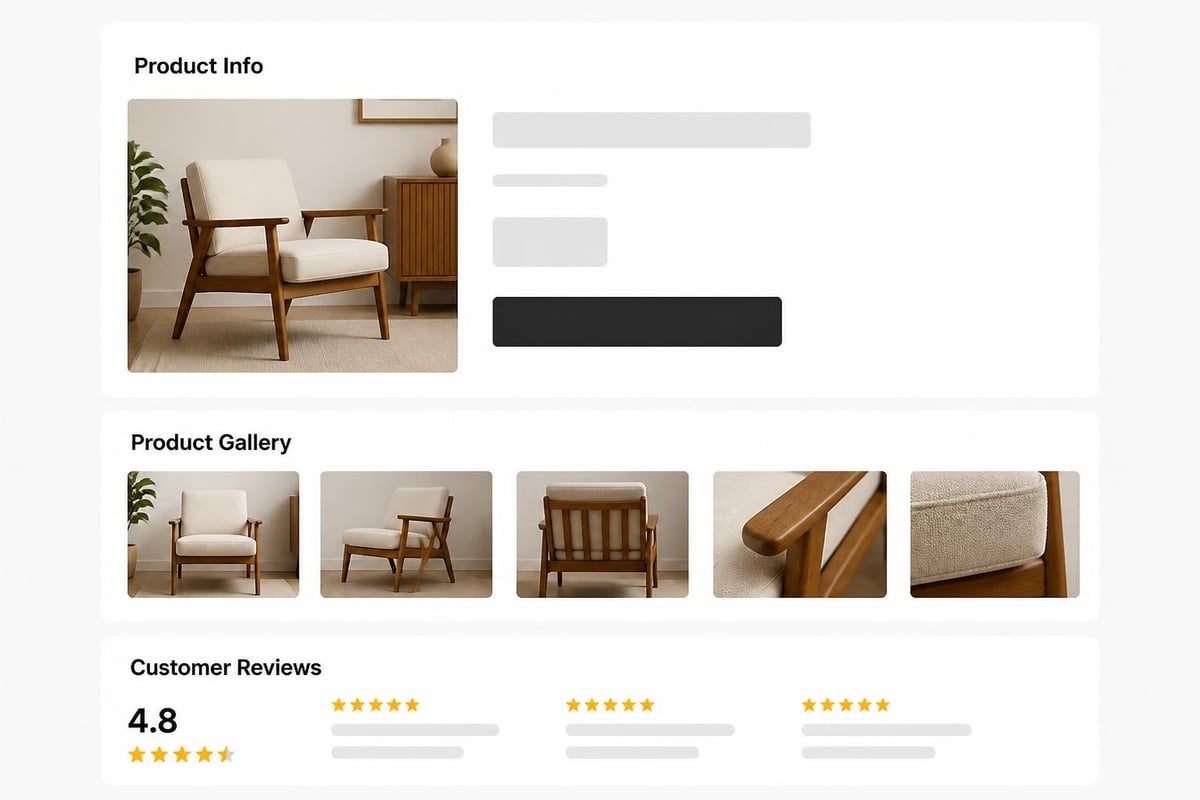
Sections are the building blocks of your product pages. Common sections include product information, image galleries, related products, reviews, and custom content areas. Within each section, blocks represent individual elements like buttons, text fields, icons, or images.
This modular approach means you can create unique product page configurations for different collections or individual products. For example, your premium product line might include video sections and detailed size guides, whilst basic products keep a simpler structure.
Methods to Edit Shopify Product Page Content
There are several approaches to editing product pages, each suited to different skill levels and customisation needs. Understanding when to use each method will help you work more efficiently.
Using the Shopify Admin Product Editor
The most straightforward way to edit Shopify product page content is through the admin panel. This method handles all essential product information without requiring any technical knowledge.
Steps to edit basic product information:
- Log into your Shopify admin dashboard
- Navigate to Products from the left sidebar
- Select the product you want to edit
- Modify product details including title, description, pricing, and inventory
- Upload or rearrange product images
- Configure variants (size, colour, material)
- Add product categories and tags
- Click Save to publish changes
This approach works perfectly for routine updates like price changes, stock levels, or description refinements. However, it doesn't allow you to change the visual layout or add custom sections.
Theme Customiser for Layout Changes
To edit Shopify product page layouts and visual elements, you'll use the theme customiser. This visual editor lets you see changes in real-time before publishing.
| Customisation Level | What You Can Change | Technical Skill Required |
|---|---|---|
| Basic | Colours, fonts, button styles | None |
| Intermediate | Section arrangement, block configuration | Low |
| Advanced | Custom sections, metafield integration | Medium |
| Expert | Liquid code, custom functionality | High |
Access the theme customiser by navigating to Online Store > Themes > Customize. From here, you can select any product to preview and modify its layout. The left sidebar displays all available sections and blocks, whilst the main panel shows your live preview.
Creating Custom Product Templates
Sometimes different products need entirely different layouts. Luxury items might need expansive image galleries and detailed craftsmanship descriptions, whilst digital products might prioritise instant download buttons and usage instructions.
Creating custom templates allows you to edit Shopify product page designs specifically for different product categories. In the theme customiser, you can create a new product template, configure its unique layout, and then assign specific products to use that template.
This approach is particularly valuable for stores with diverse product catalogues. Building a successful Shopify store often means recognising that one-size-fits-all rarely delivers optimal results.
Essential Elements Every Product Page Needs
Regardless of how you choose to edit Shopify product page designs, certain elements consistently drive conversions and should feature on every product page.
Compelling Product Titles and Descriptions
Your product title needs to be descriptive, keyword-rich, and compelling. It should tell customers exactly what they're looking at whilst incorporating search terms they're likely to use.
Product descriptions serve dual purposes: informing customers and improving search visibility. According to best practices for product page content, effective descriptions should include:
- Clear benefits and features
- Specifications and dimensions
- Materials and care instructions
- Use cases and applications
- Relevant keywords naturally integrated
Write for humans first, search engines second. Avoid keyword stuffing, which damages both readability and SEO performance.
High-Quality Visual Content
Images sell products online. When you edit Shopify product page galleries, prioritise quality, variety, and context.
Essential image types:
- Hero shot (main product image on white background)
- Lifestyle images (product in use or styled)
- Detail shots (textures, features, craftsmanship)
- Scale references (product with common objects or people)
- Variant-specific images (showing all colour or style options)
Modern consumers expect multiple angles and zoom functionality. Include at least 4-6 high-resolution images per product, and consider adding video content which can increase conversion rates by up to 80% according to various industry studies.
Clear Pricing and Stock Information
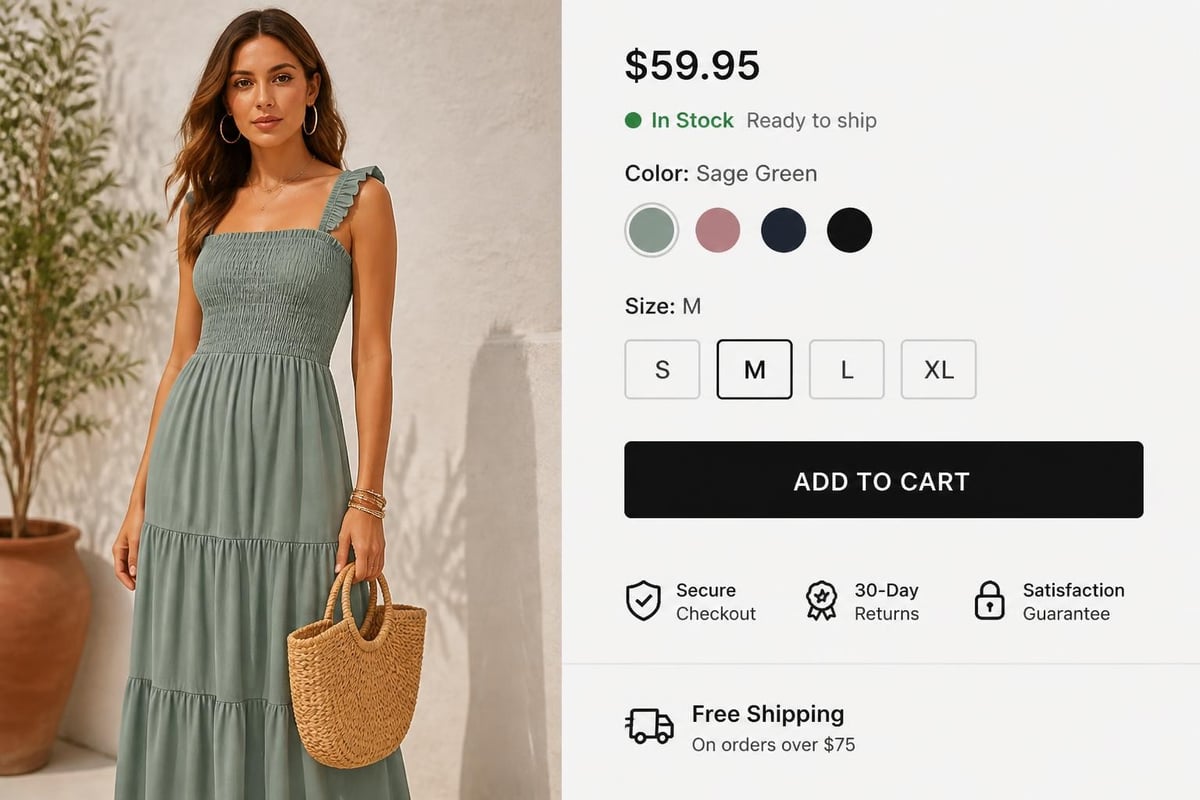
Transparency builds trust. Display pricing prominently, include any compare-at prices to show value, and clearly communicate stock availability.
If you offer variants, ensure pricing updates dynamically when customers select different options. Nothing frustrates shoppers more than discovering price changes at checkout that weren't visible on the product page.
Advanced Customisation Techniques
Once you've mastered basic editing, these advanced techniques will help you create truly distinctive product pages that outperform competitor stores.
Using Page Builder Apps
Whilst Shopify's native customisation tools are powerful, page builder apps offer even greater flexibility when you need to edit Shopify product page designs beyond standard theme capabilities.
Popular page builders include PageFly, Shogun, and GemPages. These tools provide drag-and-drop interfaces for creating completely custom layouts without writing code. They're particularly useful for:
- Creating highly visual, conversion-optimised layouts
- A/B testing different page designs
- Building product pages that look completely different from your theme
- Adding interactive elements like accordions, tabs, and sliders
The trade-off is additional app costs and potential performance impact. When working with professional Shopify development teams, they can often achieve similar results through custom theme development that performs better and costs less long-term.
Leveraging Metafields for Custom Content
Metafields allow you to add custom data to products beyond standard Shopify fields. This becomes particularly powerful when you edit Shopify product page templates to display this custom information.
Common metafield applications include:
- Size guides and dimension charts
- Material composition percentages
- Care and maintenance instructions
- Sustainability certifications
- Country of origin information
- Custom specifications for technical products
You can add metafields through the Shopify admin, apps, or bulk import via CSV. Once created, you'll need to edit your theme code to display them, or use apps that provide visual interfaces for metafield display.
Customising with Liquid Code
For complete control when you edit Shopify product page functionality, understanding Shopify's Liquid templating language opens unlimited possibilities.
Common Liquid customisations include:
- Conditional content display based on product tags or collections
- Custom product option selectors with unique styling
- Dynamic content that changes based on selected variants
- Integration with external data sources
- Custom product recommendation logic
Working with Liquid requires technical knowledge, and mistakes can break your store. Always work in a duplicate theme when testing code changes, and consider partnering with experienced Shopify development specialists for complex customisations.
Optimising Product Pages for Conversion
Creating beautiful product pages matters little if they don't convert visitors into customers. These optimisation strategies ensure your editing efforts translate to improved sales performance.
Strategic Layout and Information Hierarchy
The way you arrange elements when you edit Shopify product page layouts dramatically affects conversion rates. Eye-tracking studies consistently show that users scan pages in predictable patterns, typically F-shaped or Z-shaped.
Position your most important conversion elements accordingly:
- Product title and price in the top-left area
- Primary product image dominating the left side
- Add to cart button above the fold, prominent and contrasting
- Key trust indicators (reviews, guarantees, shipping) near purchase decision points
- Detailed specifications and descriptions below primary conversion area
Every element should serve a purpose. Remove clutter that doesn't actively support the purchase decision. If you're unsure whether certain content improves performance, conversion rate optimisation services can provide data-led insights.
Social Proof and Trust Signals
Modern consumers research extensively before purchasing. When you edit Shopify product page designs, integrate social proof throughout to build confidence.
| Trust Element | Purpose | Optimal Placement |
|---|---|---|
| Customer reviews | Demonstrate product quality through peer validation | Below product description |
| Star ratings | Provide quick quality assessment | Near product title |
| Number of purchases | Create popularity perception | Near add to cart button |
| Guarantees | Reduce purchase risk | Near pricing |
| Security badges | Reassure about transaction safety | Near checkout buttons |
| Press mentions | Build brand credibility | Product description area |
According to research on Shopify product page best practices, pages with visible review content convert up to 270% better than those without.
Mobile-First Considerations
Over 70% of eCommerce traffic now comes from mobile devices. When you edit Shopify product page elements, always preview and optimise for mobile experiences.
Mobile optimisation essentials:
- Ensure images load quickly without sacrificing quality
- Make buttons large enough for easy tapping (minimum 44x44 pixels)
- Simplify navigation to reduce cognitive load
- Keep forms minimal and use appropriate input types
- Test checkout flow thoroughly on actual devices
- Consider thumb zones when positioning key interactive elements
Shopify themes are responsive by default, but customisations can sometimes break mobile layouts. Always test changes across multiple device sizes before publishing.
Technical Optimisation for Performance and SEO
Beautiful, conversion-optimised product pages mean little if customers can't find them or if they load too slowly. These technical considerations are essential when you edit Shopify product page configurations.
Page Speed Optimisation
Site speed directly impacts both conversion rates and search rankings. Even one-second delays can decrease conversions by 7% according to industry research.
Speed optimisation strategies:
- Compress and optimise all product images (use WebP format where possible)
- Lazy load images below the fold
- Minimise app usage (each app adds code weight)
- Remove unused theme features and sections
- Enable Shopify's built-in CDN for faster global delivery
- Reduce custom font usage and ensure font files are optimised
When working with Shopify web design professionals, they can implement advanced performance optimisations that go beyond basic best practices.
SEO Best Practices for Product Pages
Search engine optimisation ensures customers can find your products through organic search. When you edit Shopify product page content, these SEO fundamentals should guide your decisions.
Critical SEO elements:
- URL structure: Use clean, keyword-rich URLs that describe the product
- Title tags: Include primary keywords and keep under 60 characters
- Meta descriptions: Write compelling summaries that encourage clicks (150-160 characters)
- Header tags: Structure content with H1 (product title) and H2/H3 subheadings
- Image alt text: Describe images accurately with relevant keywords
- Schema markup: Implement product schema for rich search results
Shopify automatically generates some SEO elements, but you should customise them for optimal performance. Dedicated Shopify SEO services can identify opportunities and implement comprehensive optimisation strategies across your entire catalogue.
Structured Data Implementation
Structured data helps search engines understand your product information and can result in rich snippets showing pricing, availability, and reviews directly in search results.
Shopify includes basic product schema by default, but you can enhance it when you edit Shopify product page templates. Additional structured data might include:
- Product reviews and ratings
- Availability status
- Price and currency
- Brand information
- Product variations
Rich snippets can significantly improve click-through rates from search results, making them a valuable investment for competitive markets.

Managing Product Variants and Options
Many products come in multiple variations like size, colour, or material. Proper variant management is crucial when you edit Shopify product page configurations for complex products.
Setting Up Product Variants
Shopify supports up to three variant options per product, with up to 100 unique combinations. Access variant settings in the product editor under the Variants section.
Variant management best practices:
- Use consistent option names across your catalogue (e.g., always "Size" not sometimes "Sizing")
- Arrange options in logical order (typically size before colour)
- Include variant-specific pricing where applicable
- Upload unique images for each significant variant
- Track inventory separately for each variant
- Use SKUs that clearly identify each variant
For products with more than three option types or needing more complex configurations, you'll need to explore apps or custom development solutions.
Displaying Variant Selectors
The way variants display affects user experience and conversion. When you edit Shopify product page variant selectors, consider these approaches based on your product type:
| Selector Type | Best For | Advantages | Disadvantages |
|---|---|---|---|
| Dropdown | Many options | Space-efficient | Requires extra click |
| Buttons | Visual options | Easy selection, clear display | Takes more space |
| Colour swatches | Colour variants | Visual representation | Requires image setup |
| Size chips | Clothing sizes | Familiar interface | Less flexible |
Advanced customisation guides demonstrate how to create custom variant selectors that match your brand whilst improving usability.
Variant-Specific Content
Different variants sometimes need unique information. A large size might have different measurements than small, or a leather version might need different care instructions than fabric.
Using metafields, you can add variant-specific content that displays when customers select particular options. This requires theme customisation but significantly improves the shopping experience for products with meaningful variant differences.
Common Mistakes to Avoid
Even experienced store owners make these errors when they edit Shopify product page elements. Avoiding them will save time and protect your conversion rates.
Overcomplicated Layouts
Adding every possible element and section creates cluttered, overwhelming pages that confuse rather than convert. Just because you can add something doesn't mean you should.
Focus on essential information and clear conversion paths. Every element should serve a specific purpose that supports the purchase decision. Remove anything that doesn't directly inform, persuade, or facilitate buying.
Inconsistent Branding and Design
Product pages should feel cohesive with your overall store design whilst maintaining their own conversion-focused structure. When you edit Shopify product page templates, maintain consistent:
- Typography and font usage
- Colour schemes aligned with your brand
- Button styles and interactive elements
- Image quality and styling
- Spacing and layout principles
Inconsistency damages trust and makes your store feel unprofessional. Professional Shopify web design services ensure consistency across all customer touchpoints.
Neglecting Mobile Experience
Desktop-first thinking still dominates despite mobile representing the majority of traffic for most stores. Every time you edit Shopify product page layouts, test the mobile experience thoroughly.
Common mobile mistakes include:
- Buttons too small to tap easily
- Images that don't scale properly
- Excessive scrolling to reach purchase buttons
- Forms that don't use mobile-optimised input types
- Pop-ups that can't be dismissed on smaller screens
Ignoring Loading Speed
Beautiful, feature-rich pages that take 5-6 seconds to load will haemorrhage customers before they see any of your carefully crafted content.
When you edit Shopify product page designs, constantly monitor performance. Remove or optimise any elements that significantly impact loading speed. According to comprehensive customisation guides, performance should never be sacrificed for aesthetics.
Testing and Iteration
The most successful eCommerce brands treat product pages as ongoing experiments rather than finished projects. When you edit Shopify product page elements, implement a testing framework to measure impact.
A/B Testing Product Page Elements
A/B testing compares two versions of a page to determine which performs better. Test one element at a time for clear results:
- Different product image styles or quantities
- Varied description lengths and formats
- Alternative button colours or copy
- Different layouts for key information
- Various trust badge placements
Apps like Google Optimize or dedicated Shopify A/B testing apps make this process straightforward. Run tests long enough to achieve statistical significance (typically 2-4 weeks depending on traffic).
Analytics and Behaviour Tracking
Understanding how visitors interact with product pages reveals optimisation opportunities. Key metrics to monitor include:
- Bounce rate (percentage leaving without interaction)
- Time on page (engagement indicator)
- Add to cart rate (conversion intent)
- Scroll depth (content visibility)
- Click patterns (what captures attention)
Tools like Hotjar or Microsoft Clarity provide heat maps and session recordings that visualise user behaviour, highlighting exactly where visitors get stuck or confused.
Continuous Improvement Approach
The best product pages emerge through iterative refinement based on data, customer feedback, and changing market conditions. Establish a regular review schedule:
- Monthly: Review conversion rates and identify underperforming products
- Quarterly: Conduct comprehensive analytics review and plan major updates
- Bi-annually: Audit entire catalogue for consistency and opportunities
- Annually: Consider significant redesigns aligned with brand evolution
When working with ongoing Shopify support services, this continuous improvement becomes systematic rather than reactive.
Industry-Specific Considerations
Different industries have unique requirements when you edit Shopify product page layouts and content. Understanding these nuances improves relevance and conversion.
Fashion and Apparel
Clothing and accessory brands need extensive visual content, size guides, and fit information. Priority elements include:
- Multiple model shots from different angles
- Detailed fabric and material descriptions
- Comprehensive size charts with measurements
- Styling suggestions and outfit combinations
- Care and washing instructions
- Model sizing information for reference
Consider adding virtual try-on technology or fit prediction tools to reduce returns and increase confidence.
Beauty and Cosmetics
Beauty products require ingredient transparency, usage instructions, and results demonstration. Essential content includes:
- Before and after imagery
- Detailed ingredient lists with explanations
- Application instructions with visual guides
- Skin type or concern matching
- Cruelty-free and sustainability certifications
- Shade matching tools for colour cosmetics
Video content showing application techniques significantly improves conversion for makeup and skincare products.
Electronics and Technology
Technical products need detailed specifications, compatibility information, and support resources. When you edit Shopify product page content for tech products, include:
- Complete technical specifications in scannable format
- Compatibility lists for systems, devices, or accessories
- What's included in the box
- Warranty and support information
- Comparison tables with similar products
- Tutorial videos or user guides
Technical buyers research extensively, so comprehensive, accurate information builds trust and reduces support queries.
Home and Furniture
Large home goods require dimension clarity, room visualisation, and detailed assembly information:
- Multiple room setting images
- Detailed dimensions and weight specifications
- Material composition and finish options
- Assembly requirements and complexity
- Delivery and shipping information
- Room planning tools or AR visualisation
Given the investment and permanence of furniture purchases, extensive product information directly correlates with conversion rates.
Maintaining Product Page Quality at Scale
As your catalogue grows, maintaining quality becomes increasingly challenging. These systems help you edit Shopify product page content efficiently across hundreds or thousands of products.
Creating Product Page Templates
Develop standardised templates for different product categories. This ensures consistency whilst reducing the time needed to launch new products.
Template components should include:
- Required fields and information sections
- Image quantity and type specifications
- Minimum and maximum description lengths
- Mandatory technical specifications
- Standard section arrangements
- Required trust elements and certifications
Templates don't mean identical pages. They provide frameworks that maintain quality standards whilst allowing product-specific customisation.
Bulk Editing Tools
Shopify's bulk editor allows you to update multiple products simultaneously from the admin. This is invaluable for:
- Updating pricing across collections
- Changing vendor or product type classifications
- Modifying tags for improved organisation
- Adjusting inventory policies
- Updating SEO elements systematically
For more complex bulk edits beyond standard fields, CSV export and import tools let you modify hundreds of products in spreadsheet format. Third-party apps extend bulk editing capabilities further, allowing mass updates to metafields, images, and custom content.
Quality Assurance Processes
Implement regular audits to identify product pages needing attention. Check for:
- Missing or low-quality images
- Incomplete product descriptions
- Broken variant configurations
- Missing SEO elements
- Outdated pricing or information
- Slow-loading pages
Automated monitoring tools can flag issues, whilst manual reviews ensure pages maintain the quality standards that convert browsers into buyers. When managing complex migrations or large-scale updates, professional Shopify migration services ensure data integrity throughout the process.
Future-Proofing Your Product Pages
ECommerce evolves rapidly. When you edit Shopify product page designs today, consider emerging trends that will shape tomorrow's customer expectations.
Emerging Technologies
Several technologies are transforming product page experiences:
Augmented Reality (AR): Shopify's built-in AR capabilities let customers visualise products in their own space using smartphones. Particularly valuable for furniture, home decor, and fashion.
Artificial Intelligence: AI-powered product recommendations, automated content generation, and intelligent search are becoming standard expectations rather than novelties.
Voice Commerce: Optimising product information for voice search and voice-activated purchasing prepares your store for the growing voice commerce channel.
Live Shopping: Integrating live video commerce creates interactive shopping experiences that combine entertainment with purchasing.
Sustainability and Transparency
Modern consumers increasingly demand transparency about product origins, environmental impact, and ethical production. When you edit Shopify product page content, consider adding:
- Carbon footprint information
- Sustainability certifications
- Supply chain transparency
- Recycling or end-of-life disposal guidance
- Packaging material details
This information builds trust with conscious consumers and differentiates your brand in competitive markets.
Accessibility Compliance
Web accessibility isn't just ethical – it's increasingly legally required. Customisation best practices should always include accessibility considerations:
- Proper heading hierarchy for screen readers
- Alt text for all images and graphics
- Sufficient colour contrast for text
- Keyboard navigation support
- Descriptive link text
- ARIA labels for interactive elements
Accessible product pages serve more customers whilst improving SEO and overall user experience for everyone.
Mastering how to edit Shopify product page elements effectively requires understanding both the technical tools available and the strategic principles that drive conversion. From basic content updates through the admin to advanced customisation using sections, metafields, and code, each approach serves different needs and skill levels. The most successful stores treat product pages as dynamic assets requiring continuous optimisation based on performance data, customer feedback, and evolving best practices. Whether you're refining existing pages or building a new store from scratch, Futur Media provides expert Shopify design, development, and optimisation services that transform product pages into high-performing sales engines for ambitious UK brands.



.svg)

