
.svg)






%201.avif)
Managing inventory effectively is the backbone of every successful eCommerce operation. Stock Keeping Units (SKUs) are the silent workhorses that enable accurate tracking, streamlined fulfilment, and better business decisions. For Shopify merchants, understanding how to implement sku codes in shopify properly can be the difference between smooth operations and costly mistakes. Whether you're launching your first store or scaling an established brand, getting your SKU system right from the start saves time, reduces errors, and supports sustainable growth across every aspect of your business.
What Are SKU Codes and Why They Matter in Shopify
SKU codes are unique identifiers assigned to each distinct product or variant in your inventory. Unlike universal product codes like barcodes or GTINs that manufacturers assign, sku codes in shopify are internal references you create to suit your business structure. They're alphanumeric strings that typically encode meaningful information about a product's attributes, making them instantly recognisable to your team.
The primary benefits of well-structured SKUs include:
- Faster inventory counts and audits
- Reduced picking and packing errors in fulfilment
- Clearer product identification across sales channels
- Better reporting and analysis capabilities
- Simplified reordering and stock management
When you set up a Shopify store, SKU implementation might seem like an afterthought compared to design and marketing. However, merchants who invest time in creating logical SKU systems discover significant operational advantages. Your warehouse team can locate products faster, your analytics become more granular, and integrations with third-party systems run more smoothly.
How SKUs Differ From Other Product Identifiers
It's essential to distinguish SKUs from other identification systems. Barcodes (UPCs, EANs) are standardised codes assigned by manufacturers that remain consistent regardless of where a product is sold. ISBNs serve books specifically. SKUs, conversely, are entirely customisable internal codes unique to your business.
| Identifier Type | Purpose | Who Assigns It | Standardised |
|---|---|---|---|
| SKU | Internal tracking and inventory management | Your business | No |
| UPC/EAN | Universal product identification | GS1 organisation | Yes |
| ISBN | Book identification | International ISBN Agency | Yes |
| GTIN | Global trade item number | GS1 organisation | Yes |
This flexibility means you can design sku codes in shopify that reflect your specific business logic, product categories, and operational needs. A fashion retailer might encode colour, size, and style, whilst a electronics supplier might prioritise brand, model, and specification.

Building an Effective SKU Naming Convention
Creating a scalable SKU system requires planning and consistency. The most effective approach is to develop a naming convention that encodes relevant product information whilst remaining simple enough for your team to understand and use daily.
Key Elements to Include in Your SKU Structure
Start by identifying the most important product attributes for your business. Common elements include:
- Product category or department (2-3 characters)
- Brand or supplier (2-3 characters, if applicable)
- Core product identifier (3-4 characters)
- Variant details (size, colour, material)
- Sequential number (optional, for uniqueness)
For example, a clothing retailer might structure SKUs as: CAT-PROD-VAR-###
- TSH = T-Shirts (category)
- NKE = Nike (brand)
- BLK = Black (colour)
- L = Large (size)
- 001 = Sequential number
This produces: TSH-NKE-BLK-L-001
The SKU generator tools available online can help establish consistent patterns, particularly when you're managing extensive product catalogues with multiple variants.
Best Practices for Scalable SKU Systems
Keep it concise: Aim for 8-12 characters maximum. Longer codes become unwieldy and increase error rates during manual entry.
Use meaningful abbreviations: Make codes intuitive so team members can decipher them without constant reference guides. BLU for blue is clearer than B3.
Avoid confusing characters: Skip letters and numbers that look similar (O and 0, I and 1, S and 5). This prevents misreading during picking and data entry.
Maintain consistency: Once you establish a convention, apply it uniformly across all products. Mixed systems create confusion and errors.
Plan for growth: Leave room in your structure for new categories, brands, or variants. If you use two-letter category codes and already have 15 categories, you'll run out of options quickly.
Document your system: Create a reference guide that explains each code element and maintains a master list of abbreviations. This becomes invaluable when training new staff or reviewing inventory.
According to Shopify SKU best practices, maintaining simplicity whilst encoding essential information is the balancing act that separates functional systems from excellent ones.
Implementing SKU Codes in Shopify
Shopify makes adding sku codes in shopify straightforward, but there are several approaches depending on your store size and product complexity.
Adding SKUs to Individual Products
For smaller catalogues or when launching new products:
- Navigate to Products in your Shopify admin
- Select the product you want to edit
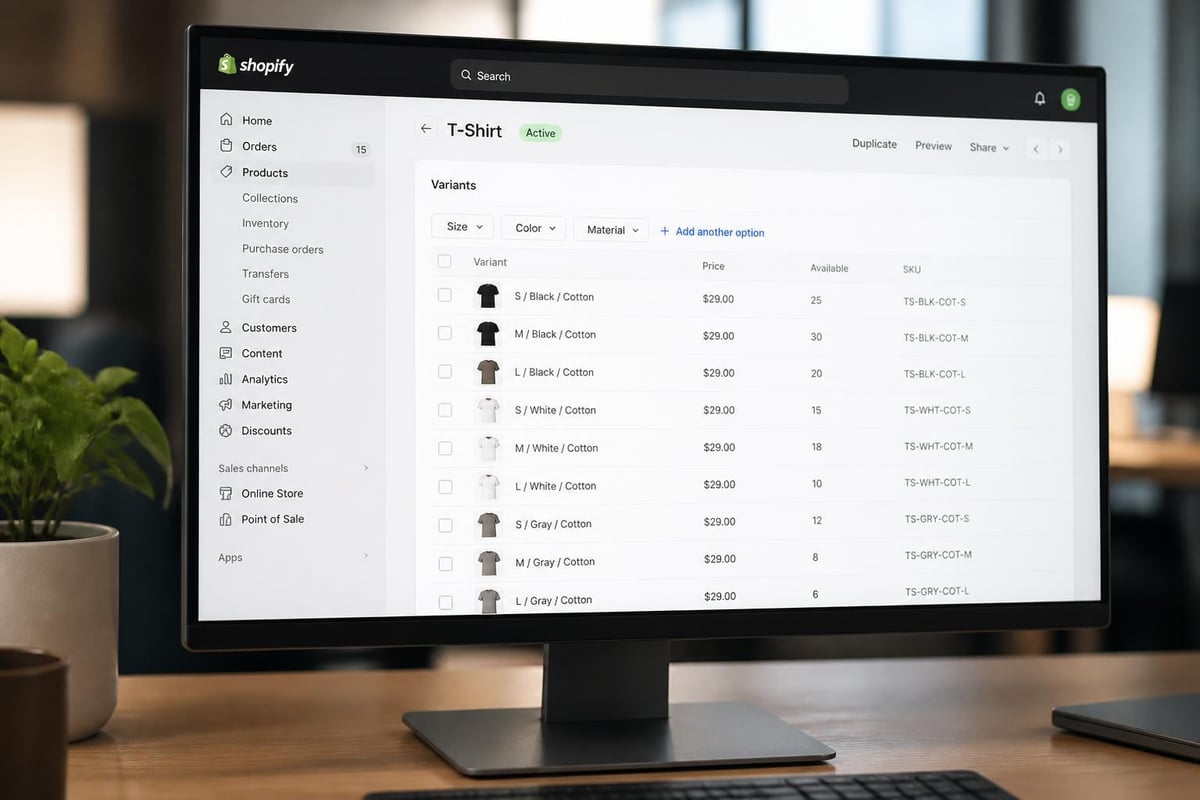
- Scroll to the Variants section
- Enter your SKU code in the SKU field for each variant
- Click Save
If your product has no variants, you'll find the SKU field in the Inventory section instead. Shopify automatically flags duplicate SKUs, preventing accidental reuse across different products.
Bulk Importing SKUs via CSV
For larger inventories, CSV imports save considerable time:
- Export your current product list from Shopify
- Open the CSV file in Excel or Google Sheets
- Add or update SKU codes in the appropriate column
- Save the file maintaining CSV format
- Import back into Shopify via Products > Import
This method is particularly valuable during Shopify migrations from other platforms, where you can map existing SKU systems directly into your new store structure.
Using Apps for Advanced SKU Management
Several Shopify apps extend SKU functionality beyond native capabilities:
- Automatic SKU generation based on product attributes
- Batch editing and bulk updates
- SKU validation to prevent duplicates or formatting errors
- Barcode creation linked to SKU codes
When building complex stores that require advanced functionality, working with experienced Shopify development teams ensures your SKU system integrates properly with inventory management, order fulfilment, and reporting systems.
Common SKU Mistakes and How to Avoid Them
Even experienced merchants make SKU-related errors that compound over time. Recognising these pitfalls helps you build more robust systems from the outset.
Duplicate SKUs Across Variants
One of the most frequent mistakes is assigning identical SKUs to different product variants. This creates inventory chaos where stock levels become impossible to track accurately. Shopify will warn you about duplicates, but the responsibility lies with you to ensure each variant receives a unique code.
Solution: Always include variant-specific information in your SKU structure. If you sell the same t-shirt in five colours and four sizes, that's 20 unique SKUs required.
Overly Complex Codes
Some merchants create SKUs that encode excessive detail: MSMT-BLKFRY-LRG-CREW-2026-SPR-001. Whilst comprehensive, such codes become difficult to remember, slow to input, and prone to transcription errors.
Solution: Focus on the 3-4 most important attributes. Anything beyond that should live in your product description or tags, not the SKU itself.
Starting SKUs With Zero
Many inventory systems and spreadsheet programmes treat leading zeros as unnecessary formatting, automatically removing them. 0123 becomes 123, breaking your SKU system.
Solution: Begin SKUs with letters or avoid leading zeros entirely. Use A123 or 1023 instead.
Inconsistent Formatting
Mixing uppercase and lowercase letters (tsh-001 vs TSH-001) or varying separator use (TSH.001 vs TSH-001) creates unnecessary confusion and potential duplicate entries.
Solution: Establish clear formatting rules and enforce them consistently. Most merchants find all uppercase with hyphens as separators works well.
According to common SKU mistakes, avoiding these errors from the start prevents costly reorganisation later as your catalogue grows.
SKU Strategies for Different Product Types
Different business models and product categories benefit from tailored SKU approaches. What works brilliantly for fashion may prove impractical for electronics or consumables.
Fashion and Apparel
Clothing retailers typically prioritise:
- Style or product type (dresses, shirts, trousers)
- Colour (essential for visual products)
- Size (standard sizing or measurements)
- Season or collection (for time-based inventory)
Example structure: STYLE-COLOUR-SIZE-SEASON
DRS-RED-M-SS26= Dress, Red, Medium, Spring/Summer 2026
Electronics and Technology
Tech products often focus on:
- Brand (particularly in multi-brand operations)
- Product line (model series)
- Specifications (storage, colour, connectivity)
- Generation (version numbers)
Example structure: BRAND-LINE-SPEC-GEN
APP-IPH-256-15= Apple, iPhone, 256GB, Generation 15
Food and Consumables
Products with expiry dates or batch tracking need:
- Product category
- Flavour or variety
- Size or weight
- Pack quantity
Example structure: CAT-VARIETY-SIZE-QTY
COF-VAN-500-1= Coffee, Vanilla, 500g, Single Pack
The comprehensive Shopify SKU guide provides extensive examples across various industries, demonstrating how different sectors approach SKU creation based on their unique operational requirements.
Integrating SKUs With Inventory Management
Properly implemented sku codes in shopify become even more powerful when integrated with broader inventory management systems. This connection enables real-time tracking, automated reordering, and accurate forecasting.
Connecting SKUs to Stock Levels
Shopify tracks inventory at the SKU level, meaning each unique code maintains its own stock count. This granularity is essential for:
- Multi-location inventory: Different warehouses can hold varying quantities of the same SKU
- Variant-specific tracking: Know exactly which sizes or colours need reordering
- Sales velocity analysis: Identify your fastest and slowest-moving products
When you enable inventory tracking for a product, Shopify automatically decrements stock when orders are placed and increments when you receive new inventory. Your SKU system is the foundation that makes this automation reliable.
SKUs in Third-Party Integrations
Most warehouse management systems (WMS), enterprise resource planning (ERP) platforms, and accounting software rely on SKUs as the primary product identifier. Consistent SKU usage ensures:
- Seamless data synchronisation between Shopify and external systems
- Accurate order fulfilment when using third-party logistics (3PL) providers
- Reliable reporting across multiple platforms
- Simplified reconciliation during audits and stocktakes
When your store requires complex integrations or custom functionality, partnering with specialists in Shopify development ensures your SKU system works harmoniously across all connected platforms.
Using SKUs for Reporting and Analysis
Beyond basic inventory tracking, SKUs unlock valuable business intelligence:
| Report Type | SKU Application | Business Value |
|---|---|---|
| Sales by product | Compare performance across SKUs | Identify bestsellers and slow movers |
| Inventory turnover | Calculate days to sell per SKU | Optimise purchasing and warehousing |
| Profit margins | Link SKUs to costs and pricing | Highlight most and least profitable items |
| Seasonal trends | Track SKU performance over time | Plan inventory for peak periods |

Advanced SKU Techniques for Growing Stores
As your Shopify store scales, more sophisticated SKU strategies become valuable. These techniques support larger catalogues, multiple locations, and complex operational requirements.
Hierarchical SKU Systems
Large retailers often implement hierarchical structures where SKUs reflect product relationships:
- Parent category (2 digits)
- Subcategory (2 digits)
- Product line (3 digits)
- Specific variant (3 digits)
For example: 01-05-127-BLK-L
This system allows filtering and reporting at any level. You can analyse performance for category 01, subcategory 05, or drill down to specific products and variants.
Dynamic SKU Generation
Some businesses automate SKU creation based on product attributes. When you add a new product and specify its category, brand, colour, and size, a script automatically generates the SKU following your established convention.
This approach requires initial development investment but eliminates manual errors and ensures absolute consistency across thousands of products. It's particularly valuable for stores with frequent new product launches or extensive catalogues.
Multi-Channel SKU Mapping
If you sell across multiple platforms (Shopify, Amazon, eBay, wholesale), maintaining consistent SKUs simplifies inventory management. However, some channels have specific requirements or character limitations.
Strategies include:
- Using your standard SKU as the master reference
- Creating channel-specific variants that map to your master SKU
- Implementing middleware that translates between different SKU formats
Understanding what SKUs mean in Shopify contexts versus other platforms helps you design mapping strategies that maintain consistency whilst accommodating platform-specific requirements.
SKU Management During Store Migrations
Moving to Shopify from platforms like WooCommerce or Magento presents an opportunity to review and potentially restructure your SKU system. However, changes must be managed carefully to avoid disrupting operations.
Evaluating Your Current SKU System
Before migrating, assess whether your existing SKUs are fit for purpose:
- Are they consistent and logical?
- Do they scale to accommodate growth?
- Are there duplicates or gaps?
- Do they integrate well with your planned Shopify setup?
If your current system is sound, maintaining it during migration ensures continuity with suppliers, warehouse staff, and historical data. If it's problematic, migration is the ideal time to implement improvements.
Mapping Old SKUs to New Systems
When restructuring SKUs during migration:
- Create a comprehensive mapping document linking old codes to new ones
- Update all connected systems (accounting, WMS, supplier databases) simultaneously
- Maintain legacy SKU references in product descriptions or meta fields for transition periods
- Communicate changes to all stakeholders well in advance
Professional Shopify migration services handle these complexities, ensuring your SKU system transfers cleanly whilst maintaining operational continuity throughout the process.
Testing SKU Systems Before Launch
After migration, thorough testing prevents issues:
- Process test orders for products across different categories
- Verify inventory updates correctly for each SKU
- Check third-party integrations receive accurate SKU data
- Run reports to ensure analytics capture SKU-level information properly
Maintaining SKU Systems Over Time
Your SKU system isn't a set-and-forget element. As your business evolves, ongoing maintenance ensures it continues serving your needs effectively.
Regular Audits and Clean-Up
Schedule quarterly reviews to:
- Identify and merge duplicate SKUs
- Remove discontinued products and their associated codes
- Update products that have changed categories or attributes
- Verify that new products follow established conventions
Audit checklist:
- Export complete product catalogue with SKUs
- Sort by SKU to identify duplicates
- Check for formatting inconsistencies
- Verify all active products have SKUs assigned
- Confirm discontinued products are properly archived
- Update documentation with any new abbreviations or codes
Training Staff on SKU Best Practices
Every team member who touches inventory should understand your SKU system:
- Warehouse staff need to recognise codes for picking and packing
- Customer service teams use SKUs when investigating order issues
- Buyers reference SKUs when placing purchase orders
- Marketing teams may use SKUs for promotional campaigns
Comprehensive training reduces errors and ensures consistent application across your organisation. Documentation should be readily accessible and updated whenever changes occur.
Adapting SKUs for New Product Lines
When expanding into new categories or brands, apply your existing convention consistently. If your structure doesn't accommodate the new products, consider whether minor adjustments can incorporate them without disrupting existing codes.
Questions to ask:
- Can this product fit within existing category codes?
- Do we need to add a new attribute to our SKU structure?
- Will this change affect our ability to analyse historical data?
- How will this impact integrations and external systems?
Tools and Resources for SKU Management
Numerous tools and resources support effective SKU implementation and management in Shopify.
Native Shopify Features
Shopify provides built-in SKU functionality that covers most basic needs:
- SKU fields for all product variants
- Duplicate detection during manual entry
- CSV import/export for bulk management
- Inventory tracking tied to SKU codes
- Basic reporting and filtering by SKU
Third-Party Apps
When you need advanced capabilities, Shopify's app store offers solutions:
- Matrixify for complex bulk editing and imports
- Stocky for inventory management and purchase orders
- TradeGecko/QuickBooks Commerce for multi-channel inventory
- SKU IQ for automated SKU generation
External Resources
Several online resources provide additional guidance:
- Video tutorials on creating SKU numbers walk through practical implementation
- SKU setup tips and definitions clarify concepts for new merchants
- Comprehensive SKU guides differentiate SKUs from other identifiers
These resources complement your internal knowledge, providing fresh perspectives and solutions to common challenges.
SKU Codes and Conversion Rate Optimisation
Whilst SKUs are primarily operational tools, they indirectly impact your conversion rates through improved customer experience and operational efficiency.
Faster Order Fulfilment
Accurate SKU systems reduce picking errors and speed up warehouse operations. This translates to faster dispatch times and more reliable delivery estimates, both of which improve customer satisfaction and repeat purchase rates.
Accurate Stock Visibility
When inventory tracking is SKU-based and reliable, your website can display accurate stock levels. Customers appreciate knowing whether items are in stock, low stock, or available for pre-order. This transparency builds trust and reduces abandoned carts from items that unexpectedly become unavailable.
Better Product Recommendations
SKU-level sales data enables more sophisticated product recommendation algorithms. Understanding which SKUs frequently sell together or which variants customers prefer allows you to present more relevant suggestions, increasing average order values.
If you're focused on improving your store's performance through data-driven decisions, professional Shopify CRO services leverage SKU-level insights alongside behavioural data to identify and implement meaningful improvements.
Simplified Returns Processing
Clear SKU identification speeds up returns processing. When customers reference the SKU from their order confirmation, your team can quickly locate the correct product, verify eligibility, and process the return efficiently. This reduces frustration and maintains positive customer relationships even when purchases don't work out.
Future-Proofing Your SKU System
Planning your sku codes in shopify system with future growth in mind prevents costly restructuring as your business scales.
Anticipating Catalogue Expansion
If you currently sell 200 products but plan to reach 2,000, ensure your SKU structure accommodates that growth. Reserving code spaces, using longer sequential numbers, or implementing hierarchical systems prevents running out of viable SKU combinations.
Preparing for International Expansion
Selling to international markets may require additional SKU considerations:
- Country-specific variants (different plug types, packaging languages)
- Currency or pricing tiers (if you maintain separate stock for different markets)
- Compliance variations (products modified to meet local regulations)
Some merchants use location codes within SKUs, whilst others maintain separate product listings with distinct SKUs for each market.
Adapting to New Fulfilment Methods
As you expand fulfilment options (dropshipping, print-on-demand, subscription boxes), your SKU system needs to identify which products use which fulfilment method. This might involve:
- Dedicated SKU prefixes for each fulfilment type
- Separate inventory locations in Shopify tied to specific SKUs
- Integration with multiple suppliers using your SKU as the common reference
Building flexibility into your initial SKU design makes these adaptations simpler when they become necessary.
Implementing robust sku codes in shopify creates a foundation for efficient operations, accurate reporting, and sustainable growth as your eCommerce business scales. By establishing clear conventions, maintaining consistency, and integrating SKUs throughout your operations, you'll reduce errors, speed up fulfilment, and gain valuable insights into product performance. Whether you're launching a new store or refining an existing one, Futur Media helps ambitious UK brands build high-performing Shopify stores with smart systems and strategic thinking that drive measurable results.



.svg)

