
.svg)






%201.avif)
Choosing the right platform for your eCommerce store is one of the most important decisions you'll make as a business owner. The shopify vs wordpress debate has been ongoing for years, and in 2026, both platforms continue to dominate the market with distinct approaches to online retail. Shopify offers a dedicated, all-in-one eCommerce solution designed specifically for selling products online, whilst WordPress with WooCommerce provides a flexible, open-source content management system that can be adapted for retail purposes. Understanding the fundamental differences between these platforms will help you make an informed choice that aligns with your business goals, technical capabilities, and long-term growth strategy.
Platform Foundations and Core Purpose
Shopify was built from the ground up as an eCommerce platform. Every feature, integration, and update is designed with online retailers in mind. This focused approach means you get a system optimised for product catalogues, inventory management, checkout processes, and order fulfilment without needing extensive configuration.
WordPress, conversely, started as a blogging platform and evolved into a comprehensive content management system. When you add WooCommerce (the most popular WordPress eCommerce plugin), you're essentially retrofitting a content platform to handle online sales. This approach offers tremendous flexibility but requires more setup and ongoing maintenance.
Hosted vs Self-Hosted Architecture
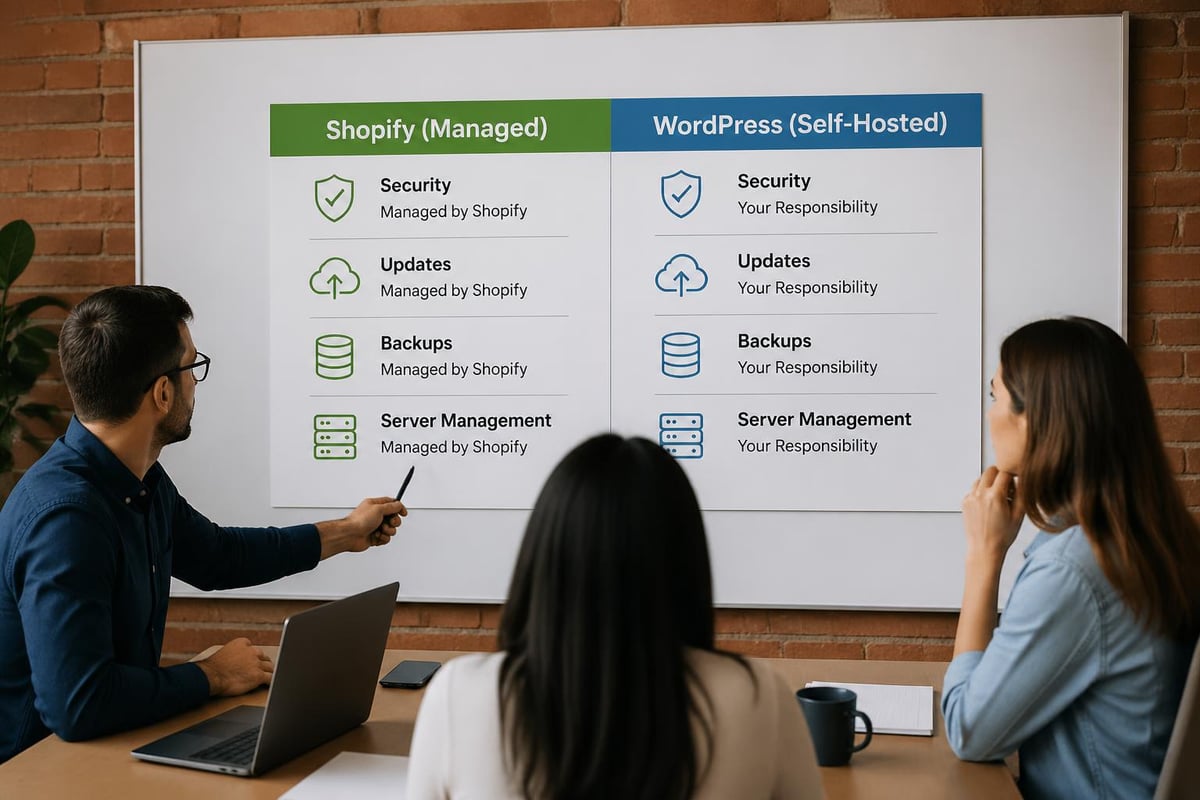
The shopify vs wordpress comparison becomes clearer when you examine their hosting models:
- Shopify: Fully hosted solution with servers, security, and updates managed by Shopify
- WordPress: Self-hosted requiring you to choose and manage your own hosting provider
- Maintenance responsibility: Shopify handles technical infrastructure; WordPress requires your oversight
- Control level: WordPress offers complete server access; Shopify provides a managed environment
| Aspect | Shopify | WordPress + WooCommerce |
|---|---|---|
| Hosting | Included | Separate purchase required |
| SSL Certificate | Free, automatic | Varies by host |
| Updates | Automatic | Manual (core, plugins, themes) |
| Server Management | Fully managed | Your responsibility |
| Backup Systems | Built-in | Requires plugins or host service |
This architectural difference influences everything from monthly costs to the technical expertise needed to maintain your store effectively.
Setup Process and Technical Requirements
Getting started with either platform requires different skill sets and time investments. Shopify's onboarding process is streamlined for business owners who want to launch quickly without technical knowledge. You can have a basic store operational within hours by following their guided setup wizard, choosing a theme, and adding products.
WordPress with WooCommerce demands more initial configuration. You'll need to select hosting, install WordPress, add the WooCommerce plugin, configure payment gateways, set up shipping zones, and customise your theme. For businesses considering this route, understanding how to set up a Shopify store versus a WordPress installation highlights the complexity difference.
Time to Launch Comparison
- Shopify: Sign up, select plan, choose theme, add products, configure payment and shipping (1-3 days for basic store)
- WordPress: Purchase hosting, install WordPress, install WooCommerce, select theme, configure plugins, set up payment gateways, optimise performance (3-7 days minimum)
The technical barrier to entry remains significantly lower with Shopify, making it ideal for entrepreneurs without development resources.
Design Flexibility and Customisation
When examining the shopify vs wordpress debate from a design perspective, both platforms offer extensive customisation options but through different mechanisms. Shopify provides a curated theme store with both free and premium options, all designed specifically for eCommerce and optimised for conversion. These themes are mobile-responsive by default and built to Shopify's performance standards.
WordPress offers virtually unlimited design possibilities through thousands of themes and the ability to build completely custom solutions. However, not all WordPress themes are created equal, particularly regarding eCommerce functionality and performance. Quality varies dramatically, and you'll need to evaluate themes carefully for speed, mobile responsiveness, and WooCommerce compatibility.
Customisation capabilities include:
- Shopify's theme editor with Liquid templating language
- WordPress's full PHP access and complete code control
- Shopify's app ecosystem for added functionality
- WordPress's plugin architecture with over 60,000 options
- Visual page builders available for both platforms
For brands requiring Shopify web design that balances aesthetics with performance, Shopify's constrained ecosystem often produces faster results with fewer compatibility issues. WordPress offers more freedom but requires greater expertise to achieve comparable performance standards.
eCommerce Features and Functionality
Out of the box, Shopify delivers comprehensive eCommerce functionality that covers most retail scenarios. Product variants, inventory tracking, abandoned cart recovery, discount codes, gift cards, and multi-currency support are all native features. TechRadar's 2026 Shopify review highlights the platform's AI-driven design tools and enhanced automation features that strengthen its position as an eCommerce leader.
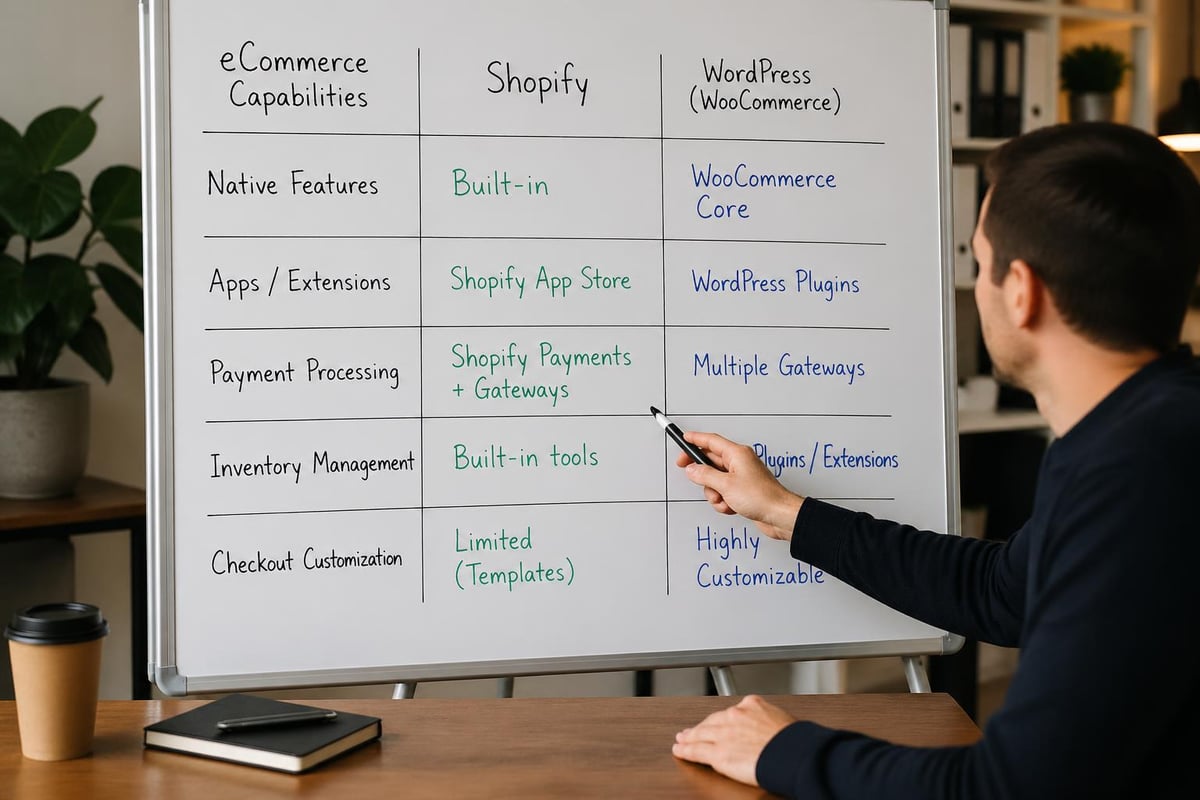
WordPress with WooCommerce provides basic eCommerce functionality through the core plugin, but advanced features often require additional extensions. Want subscription products? That's a separate plugin. Advanced shipping rules? Another extension. This modular approach offers flexibility but increases complexity and cost.
| Feature Category | Shopify | WordPress + WooCommerce |
|---|---|---|
| Product Variants | Unlimited | Unlimited |
| Abandoned Cart Recovery | Built-in (Plus plans) | Requires extension |
| Multi-Currency | Native support | Requires plugin |
| Gift Cards | Built-in | Requires extension |
| Subscriptions | Via apps | Via extensions |
| Point of Sale | Native POS system | Third-party integrations |
Payment Processing Differences
Shopify Payments offers integrated payment processing with competitive rates and no transaction fees when used exclusively. If you choose third-party gateways, Shopify charges additional transaction fees (0.5-2% depending on plan).
WordPress with WooCommerce doesn't charge transaction fees regardless of your payment processor choice. You'll pay only the gateway's standard fees, which can result in lower overall payment processing costs for high-volume stores.
Performance, Security, and Reliability
Performance directly impacts conversion rates, with research consistently showing that even one-second delays reduce customer satisfaction and sales. The shopify vs wordpress comparison reveals significant differences in how each platform handles speed and reliability.
Shopify's managed infrastructure delivers consistent performance with Content Delivery Network (CDN) distribution included, automatic image optimisation, and server resources scaled to handle traffic spikes. During peak shopping periods like Black Friday, Shopify's infrastructure has proven capable of processing millions of transactions without degradation.
WordPress performance depends entirely on your hosting quality, theme efficiency, plugin selection, and optimisation efforts. A well-configured WordPress site with quality hosting can match or exceed Shopify's speed, but achieving this requires technical knowledge and ongoing maintenance. Poor hosting or bloated plugins can create slow, unreliable experiences that damage conversion rates.
Security Considerations
- Shopify: PCI DSS compliant hosting, automatic security updates, DDoS protection included
- WordPress: Security is your responsibility; requires SSL certificate, security plugins, regular updates
- Vulnerability exposure: WordPress's popularity makes it a common target for attacks
- Update frequency: Shopify handles all security patches; WordPress requires vigilant maintenance
Scalability and Growth Potential
As your business expands, your platform must accommodate increased traffic, larger product catalogues, and more complex operations. Both platforms scale differently, with distinct advantages at various growth stages.
Shopify's tiered pricing structure (Basic, Shopify, Advanced, and Plus) provides clear upgrade paths as your business grows. Shopify Plus serves enterprise clients with advanced features, dedicated support, and enhanced customisation options. According to recent eCommerce migration data, Shopify powers over 4.6 million stores globally, demonstrating its viability across business sizes.
WordPress scales through hosting upgrades and infrastructure improvements. You can start with shared hosting and migrate to VPS, dedicated servers, or managed WordPress hosting as traffic grows. This flexibility allows precise resource allocation but requires more technical oversight.
Growth-stage considerations:
- Initial launch (0-1,000 orders/month): Both platforms suitable
- Growth phase (1,000-10,000 orders/month): Shopify simplifies operations; WordPress requires optimisation
- Established business (10,000+ orders/month): Shopify Plus or enterprise WordPress hosting needed
- Multi-channel expansion: Shopify's native integrations streamline marketplace connections
Cost Analysis and Total Ownership
Understanding the true cost of each platform extends beyond monthly subscription fees. The shopify vs wordpress financial comparison must account for hosting, apps, themes, development, maintenance, and payment processing.
Shopify Cost Breakdown
- Monthly plans: £23-£265 (Basic to Advanced)
- Shopify Plus: Starting at £1,600/month
- Transaction fees: 0.5-2% if not using Shopify Payments
- Payment processing: 1.5-2.2% + 20p per transaction
- Apps: £0-500+/month depending on requirements
- Theme: £0-300 one-time (or custom development)
WordPress Cost Breakdown
- Hosting: £5-200+/month depending on quality and scale
- Domain: £10-15/year
- SSL certificate: Often included with hosting
- WooCommerce: Free (core plugin)
- Extensions: £50-500+/year for advanced features
- Theme: £0-200 one-time (or custom development)
- Security plugins: £50-200/year
- Backup solutions: £50-150/year
- Development/maintenance: Variable based on requirements
| Cost Component | Shopify (Annual) | WordPress (Annual) |
|---|---|---|
| Basic Infrastructure | £276-£3,180 | £60-£2,400 |
| Payment Processing | Variable by volume | Variable by volume |
| Essential Features | Included | £200-£800 (extensions) |
| Maintenance | Included | £500-£2,000+ (DIY or agency) |
For detailed comparisons, NerdWallet's analysis provides additional perspective on how costs accumulate across different business scenarios.
SEO Capabilities and Digital Marketing
Both platforms can achieve excellent search engine visibility when properly optimised, though they approach SEO differently. WordPress has historically been praised for SEO flexibility thanks to plugins like Yoast and Rank Math that provide granular control over meta tags, schema markup, and technical optimisation.
Shopify has significantly improved its SEO capabilities over recent years, with better URL structures, automatic sitemap generation, and improved page speed. However, some SEO professionals note limitations around URL customisation and redirect management compared to WordPress's complete control.
SEO considerations include:
- Content marketing: WordPress excels with blogging and content hierarchy
- Technical SEO: Both platforms support essential elements; WordPress offers deeper control
- Page speed: Shopify's managed hosting typically delivers faster baseline performance
- Schema markup: Shopify includes product schema automatically; WordPress requires configuration
- Mobile optimisation: Both platforms support responsive design; execution depends on theme quality
For stores prioritising organic visibility, investing in professional Shopify SEO can deliver search-driven growth without platform limitations becoming obstacles. Many successful eCommerce brands achieve excellent rankings on Shopify despite WordPress's theoretical advantages.

Migration Considerations and Platform Switching
The decision between shopify vs wordpress isn't always permanent. Many businesses start on one platform and migrate as their needs evolve. Understanding migration complexity helps inform your initial choice and long-term strategy.
Moving from WordPress to Shopify has become increasingly streamlined, with dedicated tools and services available to transfer products, customer data, and order history whilst preserving SEO value. The process typically involves exporting WordPress data, mapping fields to Shopify's structure, implementing 301 redirects, and rebuilding theme functionality. Professional Shopify migrations ensure data integrity and minimise downtime during transitions.
Migrating from Shopify to WordPress is technically possible but less common, as businesses typically move to Shopify rather than away from it. When migrations do occur, they're usually driven by specific requirements around content management or complete customisation control that justify the increased technical overhead.
Migration Decision Factors
- Current platform limitations: Are you experiencing specific constraints?
- Technical resources: Do you have development support for WordPress maintenance?
- Growth trajectory: Which platform better supports your three-year plan?
- Budget considerations: Can you absorb migration costs and potential revenue disruption?
Support Systems and Community Resources
When problems arise or you need guidance, support quality becomes crucial. The shopify vs wordpress comparison reveals different support philosophies that match each platform's operational model.
Shopify provides direct customer support through email, live chat, and phone across all plans, with 24/7 availability for most channels. This centralised support model means you have a single point of contact for platform issues, though app-related problems may require separate vendor support.
WordPress support is decentralised by nature. The core WordPress software is maintained by volunteers, whilst WooCommerce offers support for premium extensions. Hosting providers typically offer server-level support but won't help with theme or plugin issues. This fragmented ecosystem means you often need to troubleshoot across multiple vendors.
Community resources comparison:
- Shopify: Official documentation, community forums, partner ecosystem, annual conferences
- WordPress: Extensive documentation, massive global community, WordCamps, countless tutorials
- Third-party resources: Both platforms have abundant blogs, YouTube channels, and courses
- Agency support: Specialist agencies exist for both platforms with varying expertise levels
Platform Ecosystem and Third-Party Integrations
Modern eCommerce requires integration with email marketing, accounting software, inventory management, CRM systems, and marketplace platforms. How each platform handles these connections significantly impacts operational efficiency.
Shopify's App Store offers over 8,000 applications covering virtually every business need, from marketing automation to dropshipping integration. Apps install with minimal configuration, though costs accumulate quickly when using multiple premium applications. The curated marketplace ensures basic compatibility and security standards.
WordPress's plugin repository contains over 60,000 plugins, providing unmatched breadth but variable quality. Plugins may conflict with each other or become abandoned by developers, creating maintenance challenges. The open ecosystem allows for bespoke integrations but requires more technical oversight to maintain stability.
| Integration Type | Shopify Approach | WordPress Approach |
|---|---|---|
| Email Marketing | Native apps (Klaviyo, Mailchimp, etc.) | Plugins with varying quality |
| Accounting | Apps with sync features | Plugins or API connections |
| Marketplaces | Built-in channels (Amazon, eBay, etc.) | Plugins or manual integration |
| Inventory Management | App ecosystem | Plugins or custom solutions |
| Analytics | Shopify Analytics + integrations | Google Analytics + plugins |
Maintenance Requirements and Long-Term Management
The ongoing time investment required to maintain each platform differs substantially and should influence your decision based on available resources.
Shopify's managed approach means you'll never update the core platform, worry about server security, or troubleshoot compatibility between system components. Your maintenance focuses on content updates, app management, and store optimisation rather than technical infrastructure. This allows business owners to concentrate on growth rather than platform administration.
WordPress requires regular maintenance across multiple layers: core WordPress updates, plugin updates, theme updates, security monitoring, backup verification, and performance optimisation. Neglecting these tasks creates security vulnerabilities and performance degradation. Many WordPress store owners either develop technical skills themselves or hire agencies for ongoing Shopify support equivalent services.
Monthly maintenance tasks:
- Shopify: Review app usage, check for app updates, monitor performance metrics, update content
- WordPress: Update core/plugins/themes, verify backups, security scans, performance testing, troubleshoot conflicts
Content Management and Blogging Capabilities
If content marketing forms a significant part of your strategy, platform choice impacts your ability to publish, organise, and promote content effectively. WordPress originated as a blogging platform and maintains superior content management features including custom post types, advanced taxonomies, and flexible content hierarchies.
Shopify includes blogging functionality that covers basic content marketing needs with post scheduling, categories, tags, and featured images. However, advanced content strategies requiring complex taxonomies, custom fields, or sophisticated content relationships may find WordPress more capable. Omnisend's detailed platform comparison examines these content management differences comprehensively.
For eCommerce businesses where products are primary and content supports sales, Shopify's blogging features typically suffice. Media companies selling products or businesses with extensive editorial requirements may benefit from WordPress's content strengths.
Making Your Platform Decision
The shopify vs wordpress choice ultimately depends on your specific circumstances, priorities, and resources. Neither platform is universally superior; each excels in different scenarios.
Choose Shopify when you:
- Want to launch quickly with minimal technical knowledge
- Prefer all-in-one solutions with centralised support
- Value reliability and performance without ongoing maintenance
- Plan to sell primarily through an online store
- Need point-of-sale integration for physical retail
- Lack in-house development resources
Choose WordPress when you:
- Require complete design and functionality control
- Have technical resources or budget for development support
- Prioritise content marketing alongside eCommerce
- Want to avoid platform transaction fees
- Need highly specific customisation unavailable through apps
- Prefer open-source software with maximum flexibility
For UK eCommerce brands seeking conversion-focused stores that balance aesthetics with performance, working with specialists in Shopify development often delivers faster results than navigating WordPress complexity independently.
Industry Trends and Future Considerations
Looking at the broader eCommerce landscape in 2026, several trends influence the shopify vs wordpress evaluation. Headless commerce architectures, AI-powered personalisation, and progressive web applications are reshaping how online stores operate.
Shopify has invested heavily in headless commerce capabilities, allowing developers to use Shopify's backend whilst building custom frontends with frameworks like React or Vue.js. This approach combines Shopify's robust eCommerce functionality with complete design freedom, though it requires significant development expertise.
WordPress with WooCommerce can also operate headlessly, with the WooCommerce REST API enabling frontend flexibility. However, the ecosystem around headless WordPress eCommerce remains less mature than Shopify's Hydrogen framework and development tools.
Emerging considerations:
- AI integration: Both platforms adding AI features for personalisation and automation
- Mobile commerce: Native mobile shopping apps increasingly important
- Sustainability: Platform carbon footprint and eco-friendly hosting options
- Voice commerce: Integration with voice assistants and conversational commerce
- Social commerce: Direct selling through Instagram, TikTok, and Facebook
For additional platform context, OuterBox Design's comparison explores setup ease, flexibility, and customer support considerations across different business types.
Technical Performance Benchmarks
Real-world performance data provides valuable insight beyond theoretical comparisons. Shopify stores typically achieve Core Web Vitals scores of 70-90 out of 100 with minimal optimisation, thanks to managed infrastructure and CDN delivery. WordPress performance varies dramatically, with scores ranging from 20-95 depending on hosting quality, theme efficiency, and plugin selection.
Page load times directly impact conversion rates, with industry research showing that three-second load times reduce conversions by approximately 40%. Achieving fast WordPress performance requires technical knowledge around caching strategies, image optimisation, database management, and server configuration. Shopify handles these optimisations automatically in most cases.
Performance factors to evaluate:
- Time to First Byte (TTFB): Server response speed
- Largest Contentful Paint (LCP): Main content loading time
- First Input Delay (FID): Interactivity responsiveness
- Cumulative Layout Shift (CLS): Visual stability during loading
Testing both platforms with your specific requirements through trial periods provides the most accurate performance assessment for your use case.
Choosing between Shopify and WordPress for your eCommerce store depends on balancing ease of use, customisation needs, budget considerations, and long-term growth plans. Both platforms can power successful online retail businesses when properly implemented and maintained. If you're an ambitious UK brand looking to launch, redesign, or migrate your eCommerce store with a platform built for performance and conversion, Futur Media specialises in creating high-performing Shopify stores that drive measurable results. Our Cardiff-based team combines strategic thinking with technical expertise to build online stores that grow with your business.



.svg)

