
.svg)





%201.avif)
Adding a stockists page to your Shopify store is essential if you sell through retail partners or wholesale channels. Whether you're a growing brand expanding into physical shops or an established business managing dozens of stockist relationships, a well-designed stockists page helps customers find where they can purchase your products locally. This guide walks through exactly how to add a stockists page to Shopify, covering manual methods, app-based solutions, and best practices for creating a functional, professional page that serves both your customers and your retail partners.
Why Your Shopify Store Needs a Stockists Page
A stockists page serves multiple strategic purposes for wholesale and hybrid retail brands. It bridges the gap between your direct-to-consumer online presence and your wholesale distribution network.
Building Trust and Credibility
Displaying established retail partners demonstrates social proof. When potential customers see your products stocked in respected shops, it validates your brand's credibility and quality. This is particularly valuable for emerging brands seeking to establish authority in competitive markets.
Key benefits include:
- Increased customer confidence through third-party validation
- Enhanced brand perception through association with premium retailers
- Reduced purchase hesitation for high-value products
- Support for local shopping preferences and sustainability values
Supporting Your Wholesale Partners
Your stockists page directly supports your B2B relationships. Retailers who stock your products deserve the referral traffic a well-maintained stockists page provides. This reciprocal relationship strengthens partnerships and encourages continued wholesale orders.
Creating a Basic Stockists Page in Shopify
The simplest approach to how to add a stockists page to Shopify involves creating a standard page within your Shopify admin and manually adding stockist information. This method requires no additional apps or coding knowledge.
Step-by-Step Manual Setup
Navigate to your Shopify admin dashboard and select "Online Store" from the left sidebar, then click "Pages". Select "Add page" to create a new page in your store.
- Enter "Stockists" or "Where to Buy" as your page title
- Use the rich text editor to add your stockist information
- Organise content by region, country, or category
- Include retailer names, addresses, and website links
- Add contact information where appropriate
For more complex layouts, you can use the HTML editor within the content section. This allows you to create tables, columns, or custom formatting that presents stockist information more professionally. The page creation process in Shopify provides flexibility for various content structures.

Formatting Stockist Information
Present your stockist data in a scannable, user-friendly format. Consider using tables to create structured layouts that customers can quickly parse.
| Retailer Name | Location | Type | Website |
|---|---|---|---|
| Example Shop | London, UK | Physical | example.com |
| Online Partner | Nationwide | Online | partner.com |
| Regional Store | Manchester, UK | Physical | regional.com |
This tabular approach works particularly well for brands with a manageable number of stockists. As your list grows, you may need more sophisticated solutions.
Using Shopify Apps for Advanced Stockist Pages
When manual management becomes impractical or when you need interactive features like searchable maps, dedicated apps provide enhanced functionality for creating stockist pages.
Stockist Store Locator
The Stockist Store Locator app is one of the most popular solutions for brands needing interactive store finder functionality. It provides a searchable map interface that customers can use to find nearby retailers.
Core features include:
- Interactive Google Maps integration
- Postcode and address search functionality
- Mobile-responsive design
- Bulk import capabilities for large stockist lists
- Customisable styling to match your brand
Installing Stockist involves adding the app from the Shopify App Store, then embedding it into a Shopify page or theme template. The app generates embed code that you paste into your page content or theme files, depending on your preferred implementation method.
Alternative Store Locator Solutions
Storepoint offers another robust option for brands seeking store locator functionality. The platform provides straightforward embedding options for Shopify without requiring extensive technical knowledge.
For product-specific stockist needs, consider implementing a "Find in Store" feature on individual product pages. This product-level store locator helps customers locate specific items at nearby retailers, which is particularly valuable for brands with selective distribution of certain product lines.
Implementing a Stockist Page in Shopify 2.0 Themes
Shopify 2.0 themes offer enhanced flexibility through sections and blocks, allowing for more sophisticated stockist page implementations without custom coding.
Using Theme Sections
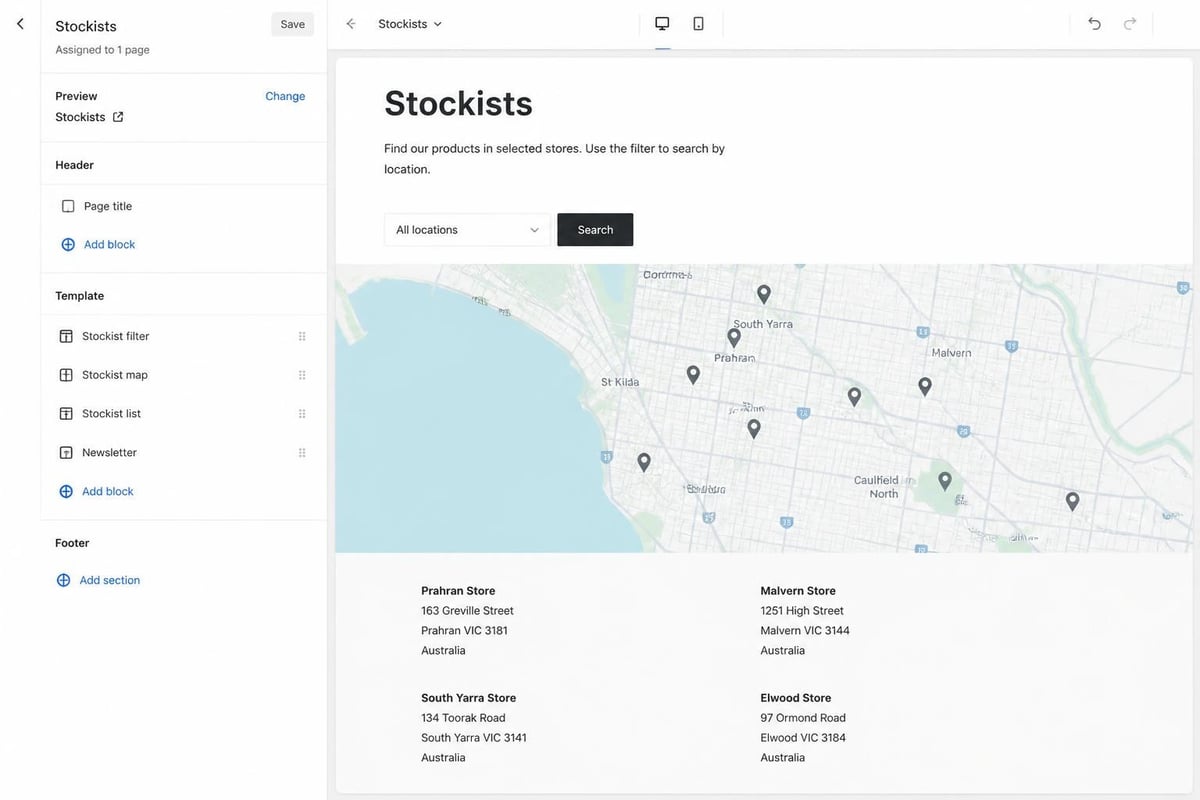
Modern Shopify themes built on the Online Store 2.0 architecture allow you to add apps and custom content as sections within pages. This approach provides greater design control compared to simply pasting embed codes into the page content area.
When installing Stockist on Shopify 2.0 themes, you can choose between adding it to a specific page or embedding it directly into your theme template. The template approach offers more styling options and better integration with your overall design system.
Custom Sections for Stockist Management
If you're working with a development team or have access to Shopify Development resources, creating a custom section specifically for stockists provides maximum control. This allows you to build exactly the functionality your brand needs, from filtering options to custom map styles.
Setting Up Wholesale Stockist Applications
Many brands use their stockists page not just to display existing retail partners, but also to recruit new ones. Adding a "Become a Stockist" application process creates a structured pathway for retailers interested in carrying your products.
Creating a Stockist Application Page
Beyond your main stockists directory, consider creating a separate page for wholesale inquiries. This page should explain your wholesale programme, terms, minimum order quantities, and application process.
The process of creating a "Become a Stockist" page typically involves:
- Setting up a dedicated page for wholesale applications
- Installing a form app or using Shopify's contact form
- Configuring fields to collect relevant business information
- Creating an approval workflow for reviewing applications
- Setting up wholesale customer accounts with special pricing
This structured approach helps you scale your wholesale channel whilst maintaining quality control over which retailers represent your brand.
Wholesale Customer Accounts
Once you approve stockist applications, you'll need to set up customer accounts with wholesale pricing. Shopify's native customer tags and discount features work for basic needs, whilst apps like Wholesale Pricing Discount provide more sophisticated pricing tiers and minimum order requirements.
Optimising Your Stockists Page for Search and Conversion
A stockists page represents valuable content for both users and search engines. Proper optimisation ensures customers can find the page and quickly locate retailers near them.
SEO Considerations
Include location-specific keywords throughout your stockists page to capture search traffic from customers looking for local retailers. Terms like "where to buy [brand] in London" or "[brand] stockists Manchester" represent commercial search intent.
SEO best practices include:
- Using descriptive page titles and meta descriptions
- Including location names in headings and content
- Adding schema markup for local businesses
- Creating separate pages for major cities or regions
- Linking to your stockists page from relevant product pages
Strategic Shopify SEO extends beyond product pages to support pages like stockists directories, creating additional entry points for organic traffic.
User Experience Design
The most comprehensive stockist database becomes useless if customers can't navigate it effectively. Prioritise clear organisation, search functionality, and mobile optimisation.
Consider implementing:
| Feature | Benefit | Implementation |
|---|---|---|
| Search filter | Quick location finding | App or custom code |
| Regional grouping | Easier browsing | Manual organisation |
| Map view | Visual location reference | Stockist app |
| Online/physical toggle | Channel preference | Custom filtering |
Mobile users particularly benefit from map-based interfaces and postcode search, as they're often searching for nearby stockists whilst out shopping.
Maintaining and Updating Your Stockists Page
Creating your stockists page is just the beginning. Regular maintenance ensures accuracy and continued value for both customers and retail partners.
Regular Audit Schedule
Establish a quarterly review process to verify stockist information remains current. Retailers close, relocate, or discontinue product lines, and outdated information frustrates customers whilst potentially damaging relationships with current stockists.
Your audit should verify:
- All listed retailers still stock your products
- Contact information and addresses remain correct
- Website links function properly
- New stockists are added promptly
- Closed retailers are removed
Communication with Retail Partners
Maintain open communication channels with your stockists to receive updates about changes. Some brands include stockist page updates as part of their regular wholesale communications, ensuring partners notify you of any relevant changes.

Advanced Features and Integrations
As your wholesale channel grows, you may need more sophisticated functionality beyond basic store locators.
Product-Specific Availability
Not all stockists carry your entire range. Advanced implementations allow customers to search for specific products, showing only retailers that stock particular items. This requires integration between your inventory management system and your stockist database.
Real-Time Stock Availability
The most advanced stockist pages integrate real-time inventory data, showing whether specific retailers currently have products in stock. This requires technical integration between retailer point-of-sale systems and your stockist page, typically feasible only for larger brands with significant resources.
Click-and-Collect Integration
Some brands offer click-and-collect services through stockists, allowing customers to order online and collect from nearby retailers. This hybrid approach combines the convenience of ecommerce with the immediacy of local retail.
Common Mistakes to Avoid
Understanding how to add a stockists page to Shopify includes recognising common pitfalls that undermine effectiveness.
Outdated Information
Nothing damages credibility faster than customers visiting retailers based on your stockists page only to find the shop closed or your products unavailable. Establish processes to keep information current.
Poor Mobile Experience
Over 70% of Shopify traffic comes from mobile devices in 2026. Stockists pages that don't function well on smartphones fail the majority of users. Test thoroughly on various devices and screen sizes.
Overwhelming Lists
Presenting hundreds of stockists as an unsorted list creates poor user experience. Implement search, filtering, or regional organisation to make information accessible.
Missing Online Retailers
Don't forget to include online stockists alongside physical retailers. Many customers prefer online shopping even when seeking third-party retailers rather than buying direct from your brand.
Choosing the Right Approach for Your Brand
The optimal method for how to add a stockists page to Shopify depends on your specific circumstances, including the number of stockists, budget, technical capabilities, and customer needs.
Decision Framework
Consider these factors when selecting your approach:
For brands with fewer than 20 stockists: Manual page creation with formatted lists or tables provides sufficient functionality without ongoing app costs.
For brands with 20-100 stockists: A basic store locator app offers searchable, map-based functionality that significantly improves user experience compared to manual lists.
For brands with 100+ stockists or complex needs: Custom development or premium store locator solutions with advanced filtering, product-specific availability, and integration capabilities justify the investment.
Budget Considerations
Manual implementation costs nothing beyond the time required to create and maintain the page. Store locator apps typically range from £10-50 monthly depending on features and stockist count. Custom development requires upfront investment but provides maximum flexibility and no ongoing app fees.
Testing and Launching Your Stockists Page
Before making your stockists page public, thorough testing ensures functionality and user experience meet standards.
Pre-Launch Checklist
- Test all retailer links to verify they open correctly
- Verify map functionality on desktop and mobile devices
- Check search and filtering features work as expected
- Confirm page loads quickly with all images optimised
- Test on multiple browsers and devices
- Review content for spelling and accuracy
- Verify navigation to and from the stockists page works properly
Promotion and Integration
Once live, promote your stockists page to maximise its value. Add links from your homepage footer, main navigation, and product pages. Include "Find a Retailer" calls-to-action within your marketing emails and social media content.
Consider adding the stockists page to your Shopify category pages and product detail pages, offering customers the option to buy locally rather than online for immediate availability.
Creating an effective stockists page strengthens both your customer experience and wholesale relationships whilst opening additional channels for brand discovery and sales. Whether you choose a simple manual approach or implement sophisticated store locator functionality, the key lies in maintaining accurate, accessible information that serves both customers and retail partners. If you're looking to build a stockists page as part of a broader Shopify project or need expert guidance on the best implementation approach for your brand, Futur Media specialises in creating high-performing Shopify stores with custom functionality tailored to your business needs.



.svg)

